Create and switch workspaces
Set up a shared workspace for your shop and switch between it and your personal space.
Available onTeam
Updated September 27, 2026Browse all help topics
Create a workspace
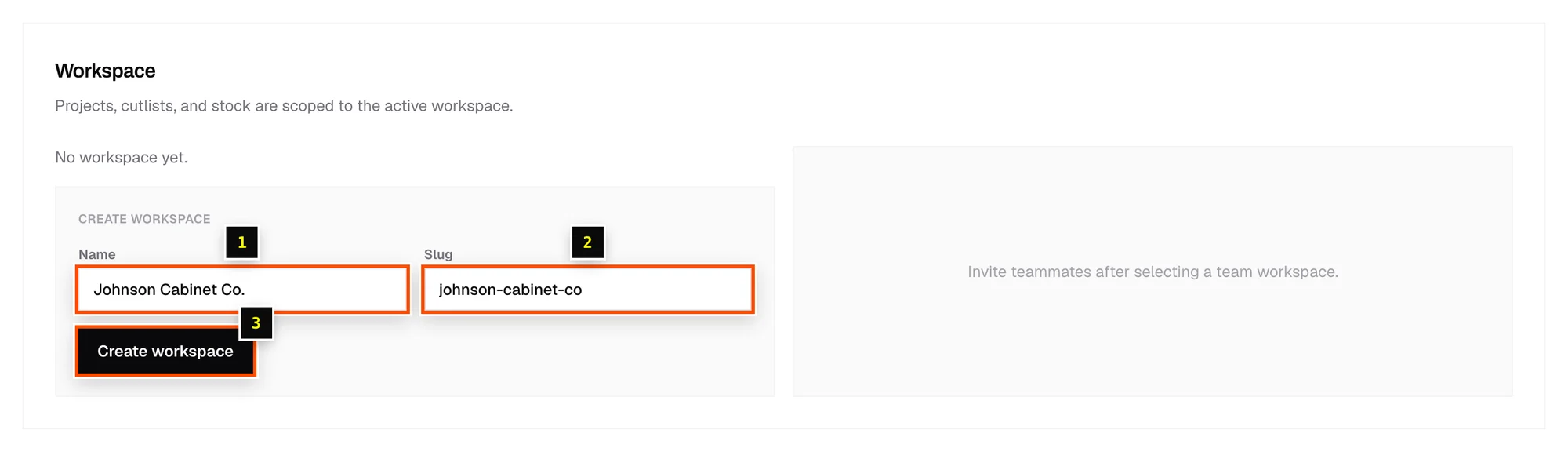
- Step 1: Account menu → Settings → Workspace.
- Step 2: Under Create workspace, enter a Name (your shop name) and a Slug (a short ID, such as
johnson-cabinets). - Step 3: Click Create workspace.
- Step 4: Choose it under Active workspace.
Switch workspaces
Pick a workspace under Settings → Workspace → Active workspace. Personal (no team) is your own private space.
Related articles
Didn't find what you need?
Email us and tell us which article you were reading.