
Article
How to Use a Cut List Optimizer: 7 Steps to a Cut Plan (2026)
Cutlistor Team4 min read
5-minute overview
Open the free cut list optimizer, enter your sheet or bar stock sizes, add parts with quantities, set kerf, review the nested layout, and export a PDF. For lumber, pipe, or trim, use the free linear cut list optimizer instead.
Introduction to Cut Lists
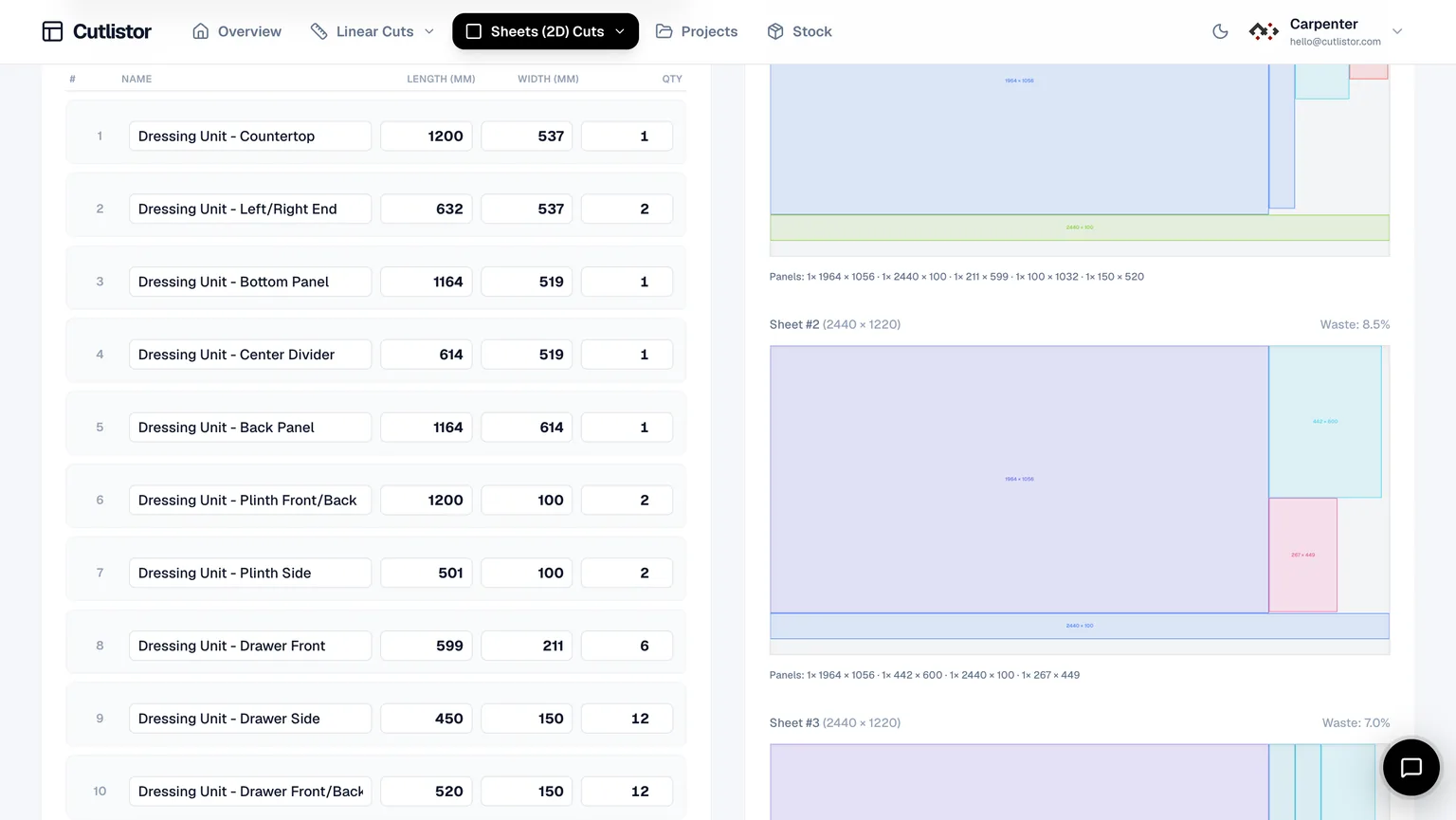
A cut list is a structured list of all the parts required for a project, including their dimensions, quantities, and materials. It acts as a blueprint for cutting materials before assembly begins.
Instead of estimating or cutting on the fly, a cut list ensures every piece is accounted for in advance. This is especially important for projects involving plywood, MDF, or lumber, where mistakes can quickly become expensive.
Cut lists are widely used in woodworking, cabinetry, furniture making, and construction projects.
- Length, width, and thickness
- Quantity of each part
- Material type
- Optional notes such as labels or grain direction
Benefits of Using a Cut List Optimizer
Creating a cut list manually is possible, but optimizing it is where the real value comes in.
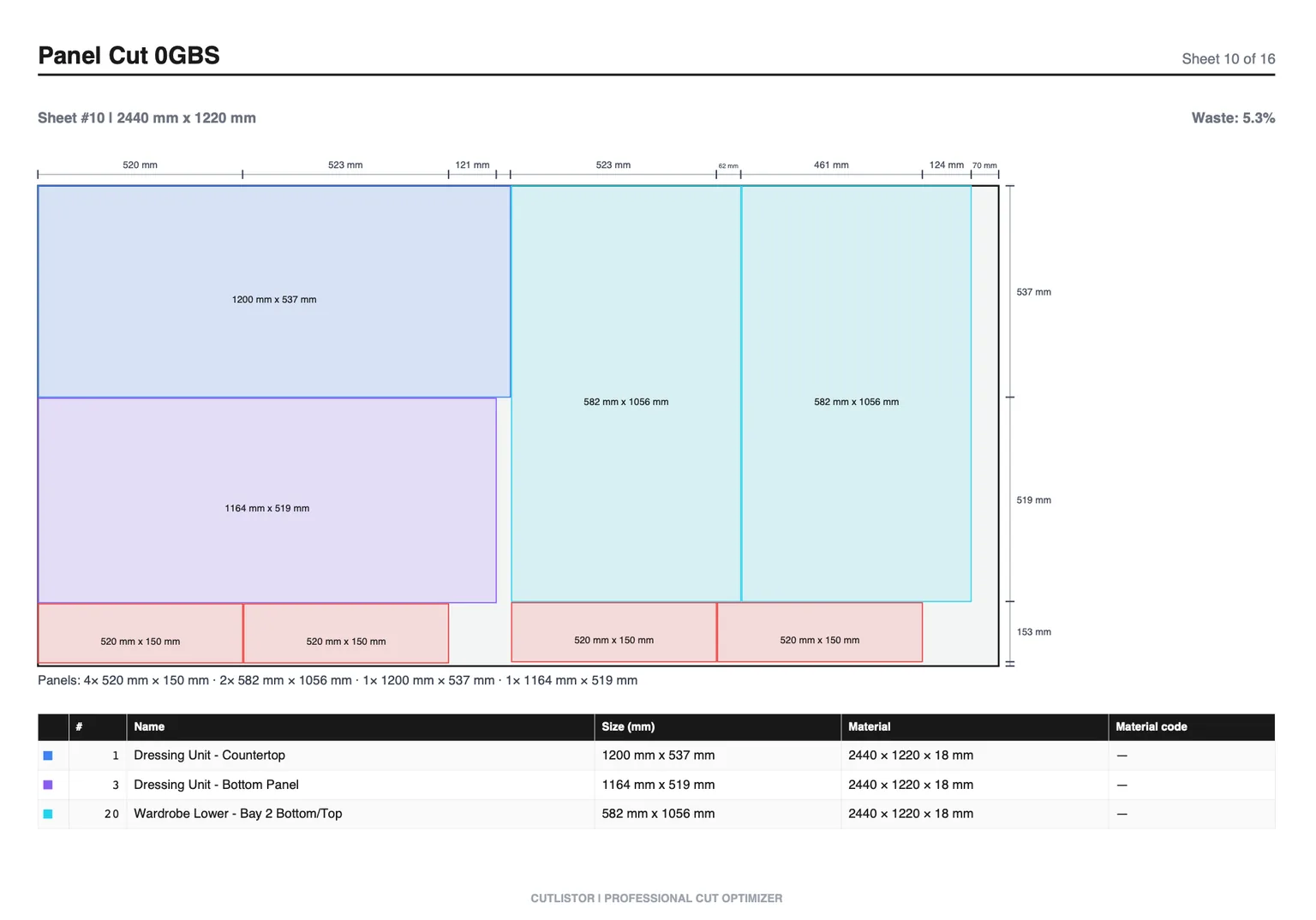
A cut list optimizer automatically arranges your parts to minimize waste and improve efficiency.
1. Reduce Material Waste
Without optimization, materials are often cut inefficiently, leaving large unusable offcuts.
Using a cut list optimizer helps ensure that every sheet or board is used as efficiently as possible.
2. Save Money
Less waste means fewer materials to purchase. This is especially important when working with expensive plywood or large quantities of lumber.
Even small improvements in layout can significantly reduce total project cost.
3. Improve Accuracy
Manual planning increases the risk of errors such as:
- Incorrect dimensions
- Missing parts
- Poor cut sequencing
A free cut list optimizer calculates everything based on your inputs, reducing the chance of mistakes.
4. Save Time
Instead of spending time planning layouts manually, an optimizer generates results instantly. This allows you to focus more on building and less on calculations.
How to Use a Cut List Optimizer
Using a cut list optimizer is straightforward and requires only a few inputs.
Step 1: Define Your Material
Start by entering the size of your raw material.
For sheet materials like plywood, enter sheet width and height (for example, 2440 × 1220 mm). For linear materials like lumber, enter stock length (for example, 2400 mm or 8 ft).
If you are working with sheet materials, use the main optimizer here:
For length-based cuts, use:
Step 2: Add Your Parts
Input all required pieces. Make sure your measurements are accurate before proceeding.
- Dimensions (length and width for sheets, length only for linear)
- Quantity for each part
Step 3: Set Kerf (Blade Thickness)
Kerf is the material removed by the cutting blade. Including kerf ensures your final pieces are cut to the correct size.
- 3 mm for circular saws
- 2–3 mm for table saws
Step 4: Generate the Optimized Layout
Once all inputs are added, run the optimizer and review the generated cutting layout. Check how parts are distributed across materials.
The tool will automatically minimize waste and organize cuts efficiently.
- Run the optimizer
- Review the generated cutting layout
- Check how parts are distributed across materials
Step 5: Export or Use the Plan
Depending on your workflow, you can:
- Follow the layout directly on-site
- Print or export the plan (if available)
- Share with your team or contractor
Implementation Tips for Better Results
Group Similar Parts
If multiple parts share the same dimensions, group them together. This helps the optimizer produce cleaner layouts.
Use Standard Material Sizes
Always use standard sheet or stock sizes available in your region. This ensures the plan is practical and usable.
Double-Check Measurements
Optimization is only as accurate as the data you input. Always verify dimensions before generating the layout.
Consider Grain Direction (for Wood)
If your material has a visible grain, ensure parts are oriented correctly. Some optimizers allow you to lock rotation for this purpose.
Use the Right Tool for the Job
For plywood and panels, use the Cut List Optimizer
For lumber and long cuts, use the Linear Cut List Optimizer
Using the correct optimizer ensures accurate and efficient results.
Conclusion
A cut list is essential for any woodworking or construction project, but optimization is what makes it truly effective.
By using a cut list optimizer, you can:
- Reduce waste
- Save money
- Improve accuracy
- Speed up your workflow
Instead of relying on manual planning or spreadsheets, using a dedicated tool gives you instant, reliable results.
Start with a free cut list optimizer and generate your cutting plan in seconds.
For deeper reading, see our plywood sheet guide and Excel comparison below.