
Article
Plywood Cut List Calculator: Free 4×8 Sheet Layouts in 2026
Cutlistor Team4 min read
Introduction
If you're looking for a plywood cut list calculator, here's a free one you can use right now - no download. Cutlistor nests your parts on real sheet sizes (4×8, 5×5, or metric 2440×1220), subtracts kerf, and exports a PDF cut plan for the shop.
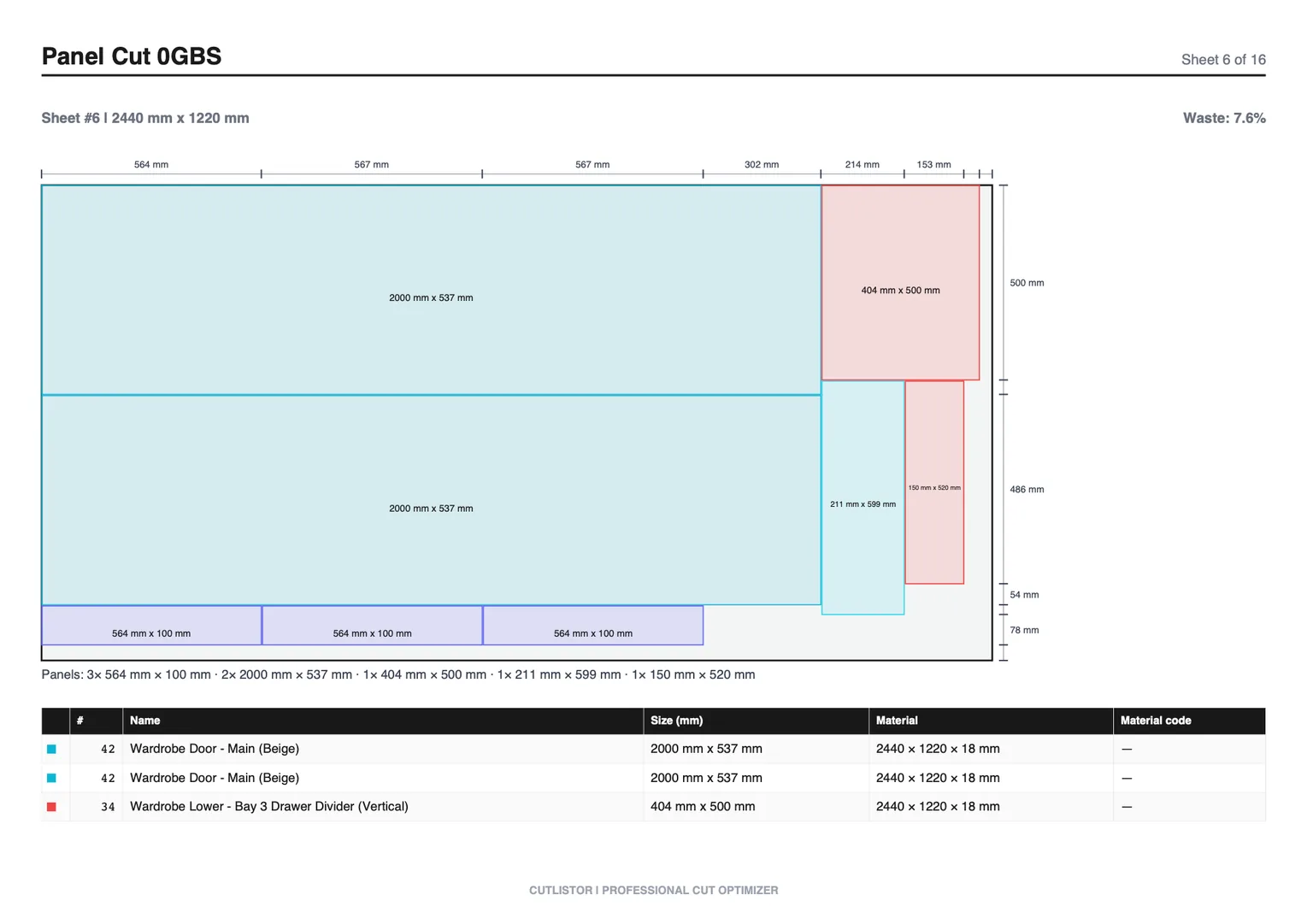
Cutting plywood without a proper plan often leads to wasted material, incorrect cuts, and unnecessary costs. Whether you're building cabinets, furniture, or interior panels, having an optimized cut list is essential.
New to optimizers? Our step-by-step cut list guide walks through sheet and linear workflows, and we compare spreadsheets to dedicated tools in the Excel vs optimizer article.
What is a Plywood Cut List?
A plywood cut list is a detailed list of all the rectangular parts you need to cut from sheet materials like plywood, MDF, or laminates.
Unlike linear cut lists, plywood cut lists require 2D optimization, meaning parts must be arranged across the surface of a sheet (such as 2440 × 1220 mm).
- Width and height of the piece
- Quantity required
- Material type
- Optional notes (labels, grain direction)
Why You Need a Plywood Cut List Calculator
Reduce Material Waste
Without proper planning, large portions of plywood sheets often go unused. A calculator arranges parts efficiently to minimize leftover scraps.
Save Money
Plywood can be expensive, especially for large projects. Optimizing your cuts means buying fewer sheets overall.
Improve Accuracy
Manual layouts increase the chances of:
- Overlapping cuts
- Incorrect dimensions
- Missing parts
Using a Free Cut List Optimizer ensures your layout is calculated correctly based on your inputs.
Save Time
Instead of manually planning each cut, a calculator generates a layout instantly, allowing you to focus on execution.
How a Sheet Cut List Optimizer Works
A sheet cut list optimizer uses algorithms to determine the most efficient way to fit all required parts into a given sheet size.
The result is a visual cutting plan that shows exactly how to cut each sheet.
- Input sheet dimensions
- Add all required parts
- Apply kerf (blade thickness)
- Generate optimized layout
Step-by-Step: How to Create a Plywood Cut List
Step 1: Define Sheet Size
Enter the size of your plywood sheet. Common sizes include:
- 2440 × 1220 mm
- 8 ft × 4 ft
Step 2: Add Your Parts
Input all required pieces. Group identical parts to simplify the process.
- Width and height
- Quantity
Step 3: Set Kerf
Kerf is the thickness of the blade used for cutting. Typical values range from 2–3 mm.
Including kerf ensures accurate final dimensions.
Step 4: Generate Layout
Run the optimizer to automatically arrange parts across the sheet.
- Optimized sheet layouts
- Number of sheets required
- Material usage efficiency
Step 5: Review and Cut
Follow the generated layout when cutting your sheets to ensure accuracy and minimal waste.
Common Mistakes When Cutting Plywood
Ignoring Kerf
Not accounting for blade thickness can lead to pieces being slightly too small.
Poor Layout Planning
Manual layouts often leave unusable gaps between parts.
Using Incorrect Sheet Sizes
Always match your input sheet size with the actual material you're using.
Not Grouping Similar Parts
Failing to group identical parts can result in inefficient layouts.
Best Way to Optimize Plywood Cuts
The most efficient way to optimize plywood cuts is by using a dedicated tool.
A Cut List Optimizer allows you to:
- Automatically generate layouts
- Minimize waste
- Adjust kerf settings
- Plan cuts instantly
For projects involving long materials like lumber or pipes, use the Linear Cut List Optimizer instead.
Plywood Cut List Use Cases
Cabinets
Plan precise cuts for kitchen cabinets, wardrobes, and storage units.
Furniture
Optimize panels for tables, desks, and shelving units.
Interior Panels
Efficiently cut wall cladding, partitions, and decorative panels.
FAQs
What size is standard plywood?
Common plywood sheet sizes include 2440 × 1220 mm (8 ft × 4 ft), though sizes may vary by region.
What is kerf in plywood cutting?
Kerf is the width of material removed by the cutting blade. It must be included in calculations for accurate results.
How do you reduce waste in plywood?
- Use a cut list optimizer
- Plan layouts before cutting
- Group similar parts
- Use correct sheet sizes
Can I use Excel for plywood cut lists?
Excel can help organize data, but it does not automatically optimize layouts. For best results, use a dedicated cut list optimizer.
What is the best free plywood cut list calculator?
A good calculator should be fast, accurate, and easy to use. You can try a Free Cut List Optimizer to generate optimized layouts instantly.