Guide · 5 min read
Cut list optimizer: free online sheet & linear calculator
A cut list optimizer turns your parts and purchased stock into efficient cut plans with less waste - whether you nest rectangles on plywood and MDF or slice lengths from lumber, trim, pipe, and bar stock. Cutlistor runs both workflows in the browser: a sheet cut list optimizer for 2D nesting and a linear cut list optimizer for 1D stock, with kerf-aware PDF export, DXF export for CNC/CAM, and optional AI plan scanning on paid plans.
Watch the product demo
See how to enter stock and parts, run layouts, and export a cut plan in Cutlistor.
Cut list optimizer vs cut list calculator
Many searches use “cut list calculator” and “cut list optimizer” interchangeably. A calculator often stops at quantities and sizes. A true optimizer arranges parts on stock, removes kerf from each cut, and helps you visualize the cut layout before you touch the saw.
Cutlistor targets both intents: you get immediate diagram-style layouts and documents you can take to the shop floor.
Why speed matters in the shop
When dimensions change, manually redrawing layouts breaks momentum. Free cut list optimizer tools should update quickly, keep kerf honest, and keep stock lists consistent so you can iterate without spreadsheet fatigue.
Best cut list optimizer for your next job
If you are nesting rectangles on panels, start with the sheet optimizer. If you are cutting fixed lengths from bars, sticks, or pipe, use the linear optimizer. Both are free to try in the browser with optional accounts for saved projects and higher limits.
Cutlistor vs Excel vs traditional desktop software
Spreadsheets excel at tracking quantities and pricing, but they do not auto-nest parts on sheets or bars. Traditional desktop optimizers often require installation and batch recalculation when dimensions change. Cutlistor updates layouts in real time in the browser, exports kerf-aware PDFs and DXF for CNC handoff, and supports CSV/XLSX import plus AI plan scanning and 3D CAD import on paid plans.
| Capability | Cutlistor | Excel / Sheets | Traditional desktop |
|---|---|---|---|
| Auto-nest sheet layouts | Yes - multiple methods | Manual only | Often yes |
| 1D linear optimization | Yes - dedicated tool | Manual only | Often yes |
| Real-time layout refresh | Yes | No | Varies |
| PDF cut plans | Yes | Manual export | Often yes |
| DXF export for CNC/CAM | Yes | No | Varies |
| Browser - no download | Yes | Yes | Usually no |
| AI plan / sketch import | Yes (paid quotas) | No | Rare |
| 3D CAD import (glTF / Collada) | Yes | No | Rare |
Worked example: sheet job from parts to PDF
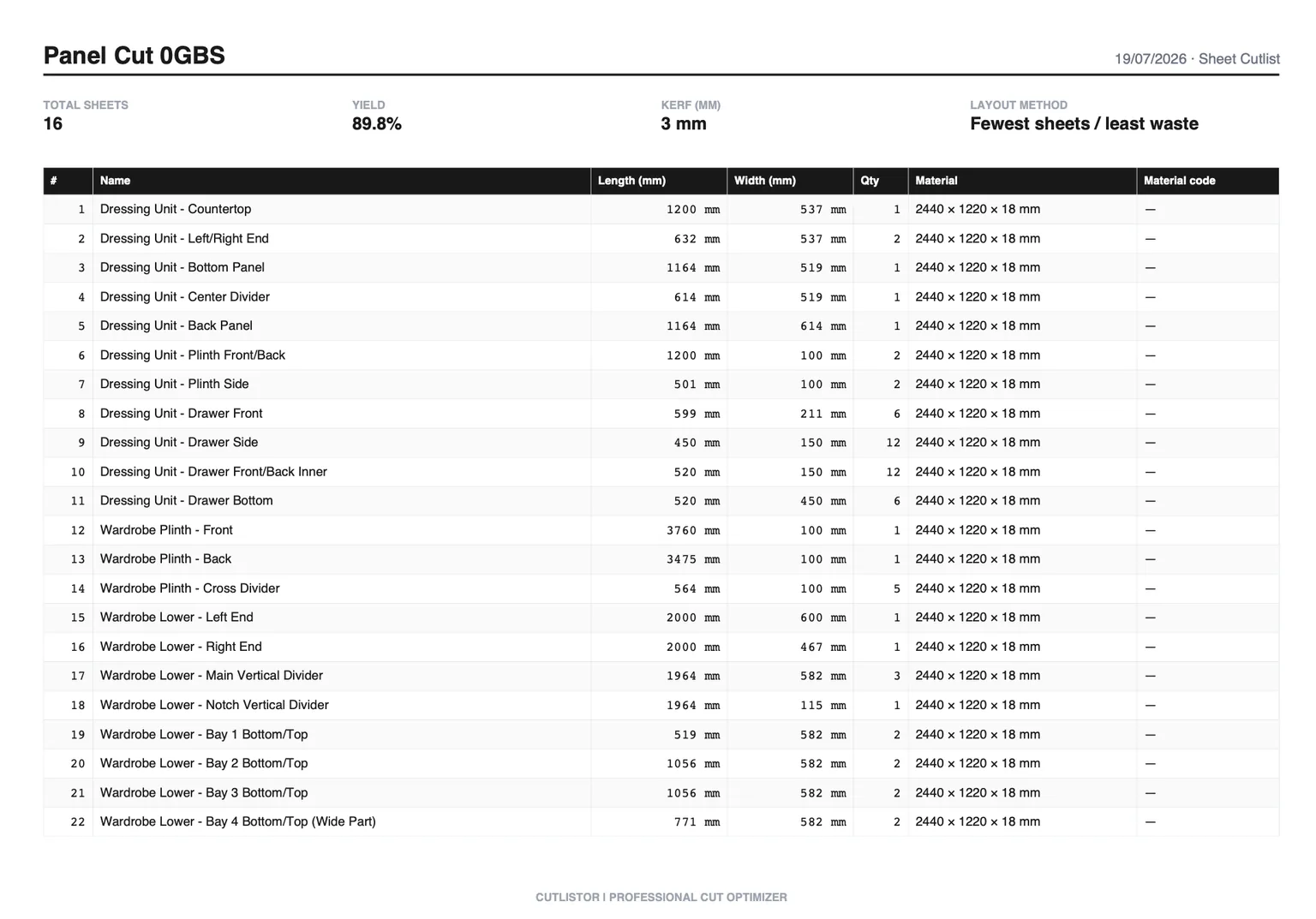
Start with a real panel list. For a single 610 mm wide base unit in 18 mm birch ply on 2440×1220 mm stock, you might enter: sides 1829×610 qty 2, bottom 568×610 qty 1, shelf 568×610 qty 3, drawer front 356×140 qty 1.
Open the free sheet cut list optimizer, add stock 2440×1220 mm, set kerf to your measured blade loss (often near 3.2 mm on a thin-kerf rip setup), and run the layout. Read sheet count and yield before buying.
Switch layout methods to match production. Rips & rows if the panel saw crew wants straight bands; Fewest sheets / least waste if material cost dominates; Router / CNC layout if you need denser packs with spoilboard spacing. Export the PDF when the diagram matches shop habits, or export DXF when CNC needs solver-native geometry.
If the designer changes shelf depth from 568 mm to 584 mm, edit the row and recalculate. The optimizer refreshes nesting immediately instead of rebuilding a spreadsheet sketch by hand.
Free tier limits and when accounts help
Cutlistor's free tier meters something different: editing parts and re-optimizing the layout are unlimited, and only PDF export and starting a new project count against a daily allowance of 3. Cut lists are capped at 20 rows, CSV and XLSX import is limited to 5 rows per file, and nothing is saved between sessions.
Create an account when the same stock sizes, customers, and part libraries return every week. Pro adds saved projects (up to 50), stock inventory, DXF export for CNC, and monthly AI plan import plus 3D CAD import quotas. Business raises caps further, including unlimited AI plan scans per month.
Split mixed jobs logically: panels in the sheet optimizer, sticks in the linear optimizer. Paid saved projects keep both under one customer record even though each material form uses its own calculator.
Import CSV or XLSX from the samples at /samples/cutlist-import/ when Excel already holds your quantities. Paid AI scanning can draft rows from PDF plans or sketches, but always verify dimensions against the contract set before cutting.
Related calculators and guides
Explore material-specific landing pages when one stock type dominates the job, or dig into the underlying nesting concepts below.
FAQ
- Is Cutlistor a cut list optimizer free option?
- Yes. The sheet and linear tools run in your browser with daily limits on certain actions; accounts unlock persistence and higher limits.
- Do I need to download software?
- No download is required. Cutlistor runs as a web application on Windows, Mac, tablet, and phone.
- What is the difference between a cut list calculator and a cut list optimizer?
- A calculator often totals quantities and sizes. An optimizer also arranges parts on stock, subtracts kerf, and produces visual cut layouts you can export as PDF.
- Can I optimize both plywood and lumber in one workflow?
- Use the sheet optimizer for panels and the linear optimizer for sticks, trim, and pipe. Saved projects on paid plans keep both in one dashboard.
Related guides
- Cutting list optimization that works in real shopsGuide to cutting list optimization: improve yield, apply kerf, compare sheet vs linear workflows, and use Cutlistor’s free optimizers for instant cut layouts.
- How to build a cabinet cut listHow to build a cabinet cut list and nest it on sheet stock: what to include, kerf-aware panel nesting, MDF/melamine/plywood sizing, and yield.
- Linear cut list calculator for 1D stockLinear cut list calculator guide: 1D cutting, kerf, stock lengths, use cases for lumber and pipe, and Cutlistor’s free linear cut list optimizer.
- The cutting stock problem in workshopsPlain-language guide to the cutting stock problem in woodworking: 1D bar cutting vs 2D sheet nesting, heuristics, and practical tools including Cutlistor.