
Article
Material Optimization: What It Is and 9 Ways to Cut Waste
Cutlistor Team7 min read
Introduction
Material optimization is the practice of turning purchased stock into finished parts with as little scrap and rework as possible. It is not a single button press: it is accurate part data, realistic stock sizes, correct kerf, and a layout method your machines can actually execute.
Shops that treat optimization as only software often still bleed money, because garbage inputs produce pretty layouts that do not fit the saw. This guide focuses on workshop discipline first, then how Cutlistor sheet and linear optimizers fit into a repeatable process.
What is material optimization?
At its core, material optimization answers three questions before you cut: how many sheets or sticks do I need, where does each part go, and how much waste is left? For sheet goods, algorithms pack rectangles in two dimensions. For lumber, pipe, or extrusion, they sequence cuts along one dimension with kerf between each piece.
Optimization does not replace craftsmanship. It reduces the number of judgment calls you make while tired, and it surfaces yield so you can quote jobs with eyes open. A 5% yield improvement on a twelve-sheet kitchen is often one fewer full sheet at prefinished prices.
Yield vs waste
Yield is the percentage of stock area or length that becomes paid parts. Waste is everything else, including kerf, trim strips, and damaged offcuts you will not reuse. Track both per job so you know whether a layout problem or a data problem caused the loss.
Accurate material cutting starts with inputs
| Input | Why it matters | Typical failure |
|---|---|---|
| Stock size | Defines the canvas for nesting | Using 4×8 when supplier ships 49×97 |
| Part dimensions | Drives fit and count | Rough sizes without edge band allowance |
| Quantity | Drives sheet count | Forgetting duplicate hardware rails |
| Material group | Keeps unlike thickness apart | Mixing 6 mm backs with 18 mm boxes |
| Kerf | Prevents undersized parts | Zero kerf on a 3 mm blade |
| Grain | Locks appearance faces | Horizontal grain on a vertical door |
Kerf, grain, and machine reality
Kerf is the material removed by the blade or bit. Every rip and crosscut consumes kerf; nested layouts must account for it or finished parts shrink. Set kerf to the blade actually on the saw for that job, not a generic default from last year.
Kerf by process
- Table saw with full kerf blade: often near 3 mm (about 1/8 in)
- Thin-kerf blade: check manufacturer spec, still non-zero
- CNC router: use programmed tool diameter per pass strategy
- Beam saw or panel saw: match factory setup card
Grain direction on sheet goods
When faces are visible, grain is a quality constraint, not decoration. Cutlistor lets you lock grain so the optimizer does not rotate a door skin for yield in a way the client will reject. Sometimes accepting slightly lower yield keeps you out of a remake.
Sheet material optimization (2D)
Panel jobs (plywood, MDF, melamine, HPL) need two-dimensional nesting. You are packing rectangles on a sheet with kerf between them. Cutlistor offers multi-method sheet layouts so you can compare algorithms when one leaves an awkward strip along the long edge.
When 2D optimization is required
- Cabinet boxes, closets, and shop fixtures
- Tabletops, shelves, and wide panels
- Any part with both width and height on sheet stock
Sheet workflow in Cutlistor
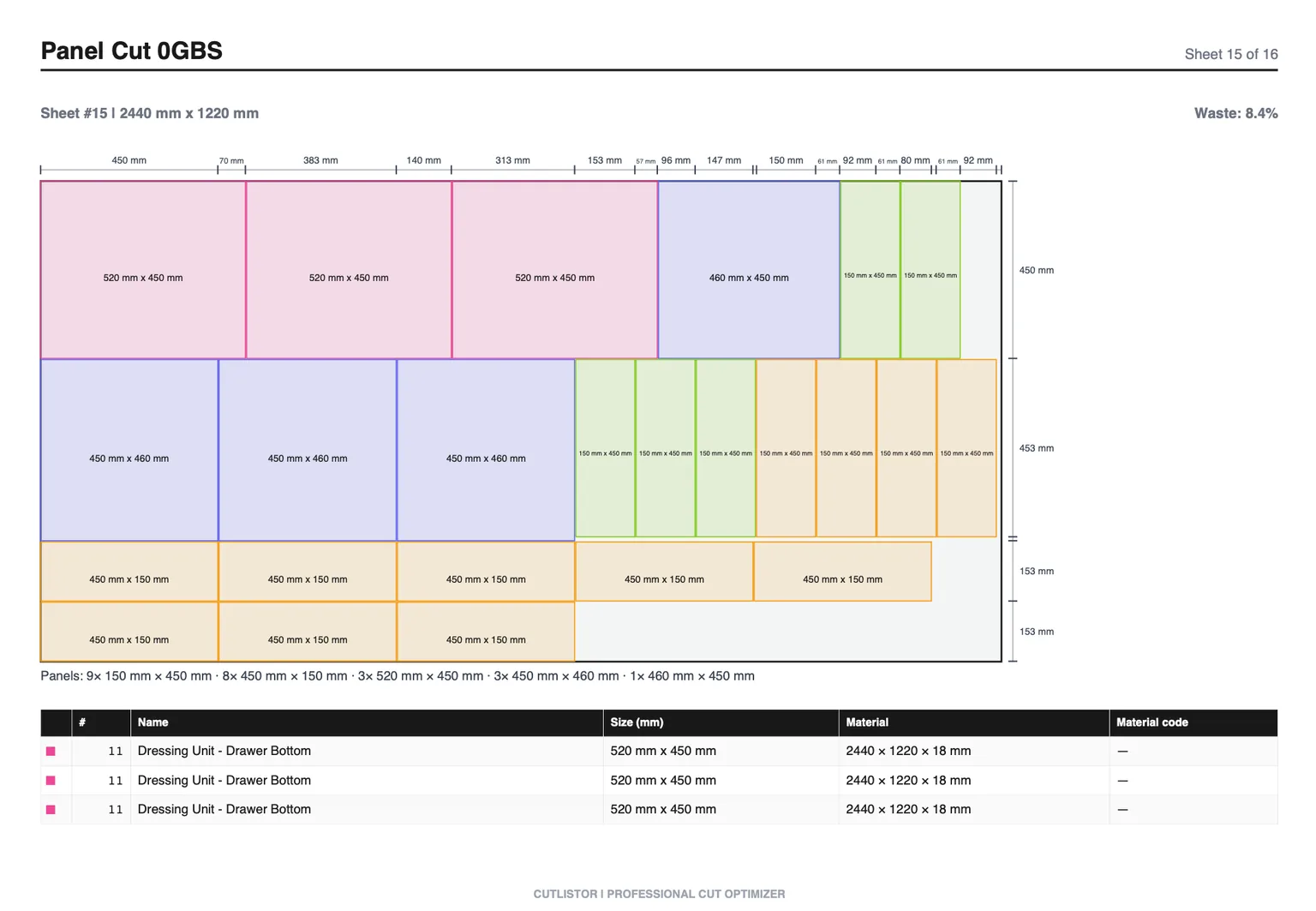
Open the free sheet cut list optimizer, define each sheet SKU and size, add parts with quantities, set kerf and grain, generate layouts, review sheet count and waste, export PDF for the floor. For metric shops, enter 2440×1220; for imperial, 48×96 in or ft as you prefer consistent units.
Remnants worth keeping
Optimization highlights waste; humans decide salvage. A 400 mm strip of prefinished maple might be worthless on paper but perfect for cleats on the next job. Note usable offcuts in job files instead of treating every skinny remainder as trash.
Linear material optimization (1D)
Sticks, bars, and trim optimize along one axis. Kerf still applies between every cut. Mixed stock lengths (8, 10, 12 ft) should all be listed so the optimizer can pick the stick that minimizes tail waste.
When 1D optimization is required
- Framing lumber and hardwood lengths
- Baseboard, casing, and crown with miters
- Pipe, tube, and metal bar with fixed stock lengths
Linear workflow in Cutlistor
Use the free linear cut list optimizer for length-only parts. Enter each available stock length and quantity, add parts, set kerf, enable mitered ends when trim needs angled cuts, export PDF stick diagrams for the chop saw station.
Cut list software in the optimization loop
Cutlistor is browser-based: no separate material optimization server to maintain for everyday jobs. Free tools cover sheet and linear nesting with PDF export. Paid plans add saved projects and stock libraries, CAD import (glTF, GLB, Collada), and AI plan scan with quotas when you want to seed parts from drawings.
Spreadsheet plus optimizer
Keep Excel or Google Sheets for pricing and client-facing BOMs. Import the same rows into Cutlistor for layout. Spreadsheets track numbers; optimizers generate geometry. Compare both approaches in our Excel vs optimizer article.
CAD import and plan scan
When parts already live in a 3D model, importing Collada or glTF avoids transcription errors. For paper architectural plans, AI plan scan can draft parts quickly, but treat output as a draft: verify dimensions on critical openings before cutting.
What PDF export is (and is not)
Exported PDFs are finished cut plans for a specific job. Cutlistor does not provide downloadable blank PDF templates to fill in by hand. If you need a paper checklist, build it in your project management tool and attach the optimizer PDF beside it.
Team habits that protect yield
Software cannot stop someone from swapping two similar part IDs at the saw. Build habits: read the label aloud once, stack parts by room or cabinet number, and keep offcut racks sorted by material SKU. When a new hire joins, walk them through one PDF line by line before they cut unsupervised.
Morning meetings worth having: which jobs release today, which layouts are revision B, and which sheets are back-ordered. Five minutes of coordination prevents an afternoon of cutting the wrong prefinished face.
Measuring success on the floor
Track a few simple metrics monthly: average sheet count per kitchen box, linear waste tail length, remakes due to wrong size, and hours spent redrawing layouts. Optimization wins show up as fewer emergency material runs and fewer partial sheets abandoned in the corner.
- Compare layouts before buying: quote with optimized sheet count, not guesswork
- Train operators to read PDF labels consistently with your part IDs
- Re-optimize when the client changes one dimension, even late in the build
FAQ and next steps
Should I run sheet or linear first?
Run separate optimizations per material family. Panel parts never belong in the linear tool unless they are strips with only length that matters on a stick. Mixed furniture jobs need both optimizers and two PDFs on the clipboard.
Why compare multi-method sheet layouts?
Different nesting methods trade waste against cut complexity. A layout with one extra sheet might be safer for a manual panel saw than a tight pack that needs fragile skinny rips. Pick the plan your team will cut accurately.
Conclusion
Material optimization is mostly good data and honest stock, then software that respects kerf and grain. Use Cutlistor free optimizers for daily nesting, import spreadsheets when you already have them, and treat every PDF as a living document until the job ships.