Guide · 6 min read
Cutting plan efficiency explained
Cutting plan efficiency measures how much purchased stock becomes usable parts versus scrap and offcuts you cannot reuse. Higher yield means fewer sheets or sticks on the purchase order and less cash tied up in the offcut rack. Efficiency is not only math. It includes how fast the crew can execute the plan without mistakes. A slightly lower yield layout that rips in straight rows may beat a tight nest that confuses the saw operator on a deadline job. Cutlistor shows yield as you edit parts so you can compare sheet layout methods or linear stock choices before blade time. The sections below explain how yield is calculated, what drags it down, and worked numbers you can sanity-check.
How yield is calculated on sheets
Sheet yield compares usable part area to the area of sheets the optimizer actually consumes. If your parts total 4.2 m² and the layout uses two 2440×1220 mm sheets (about 5.95 m²), sheet yield is roughly 4.2 ÷ 5.95 ≈ 71%.
Kerf reduces yield because every cut removes material. A 3.2 mm kerf on ten cuts between eleven parts is 32 mm of lost width or length that does not appear in finished sizes but still comes off the panel.
Cutlistor recalculates yield when you change kerf, rotate parts where grain allows, or switch layout methods. Treat yield as a comparison tool between options on the same job, not an absolute grade across different industries.
How yield is calculated on linear stock
Linear yield compares the total finished length of parts (plus kerf between cuts) to the total length of sticks purchased. If you need twelve studs at 2438 mm each on 3048 mm sticks with 3.2 mm kerf, each stud consumes about 2441 mm.
Two studs fit per 3048 mm stick with roughly 166 mm offcut per stick before the last partial stick. The optimizer’s job is to reorder lengths so offcuts become usable for shorter parts later in the list.
Buying only one stock length when the job needs two often destroys yield. Cutlistor lets you enter multiple stock lengths (8 ft and 10 ft, for example) so the algorithm can choose cheaper combinations.
What hurts cutting plan efficiency
Wrong stock size is the silent killer. Nesting on 1220×2440 mm when you buy 1250×2500 mm panels changes yield and sheet count. Always enter the SKU on the invoice.
Ignoring kerf produces pretty diagrams that fail in the real world. Match kerf to the blade or process (table saw, panel saw, plasma) for the material you are cutting today.
Mixing thicknesses or materials on one layout without separate stock rows causes rejected layouts. Split jobs by material code the way Cutlistor import templates suggest.
| Issue | Typical symptom | Fix |
|---|---|---|
| Kerf set to zero | Parts too tight, assembly gaps wrong | Enter measured blade kerf |
| Wrong sheet dimensions | Sheet count surprises at yard | Match supplier SKU size |
| One stock length only | Huge offcuts on linear jobs | Add all lengths you actually buy |
| Busy nest, slow crew | Rework and mis-cuts | Try Rips & rows or Neat grid |
| Grain ignored | Visible face wrong | Lock grain before accepting layout |
Linear cutting optimisation worked example
Suppose you need: four rails at 2438 mm, two legs at 812 mm, two stretchers at 448 mm, all from 2438 mm (8 ft) SPF 2×4 stock, kerf 3.2 mm.
Naive cutting might use one stick per long rail (four sticks) plus separate sticks for shorts. A 1D optimizer packs the 448 mm stretchers into offcuts from rail sticks and may drop total sticks from six to four on paper before you buy.
Open the free linear cut list optimizer, enter stock length 2438 mm, enter each part length and quantity, set kerf 3.2 mm, and read sticks required plus yield. Adjust if you also keep 3048 mm sticks in the yard and want the tool to choose between lengths.
Sheet efficiency and layout methods
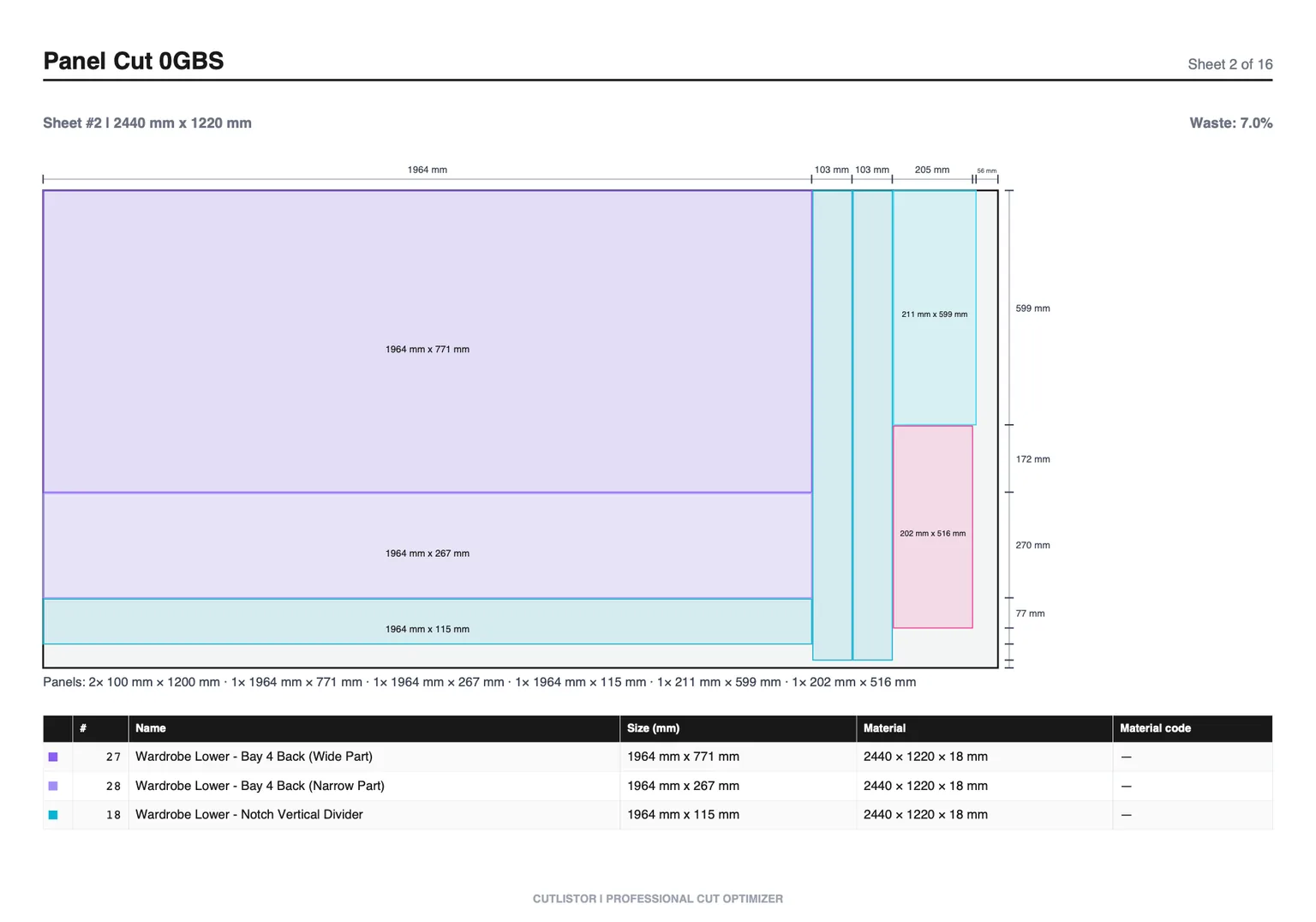
Cutlistor offers four sheet strategies: Rips & rows (fast job-site ripping), Fewest sheets / least waste (tighter 2D nesting), Neat grid (uniform row heights), and Router / CNC layout (denser packs with spoilboard spacing).
Fewest sheets / least waste often raises yield a few points on cabinet batches at the cost of busier diagrams. Rips & rows may lower theoretical yield while speeding production.
Run the same part list through two methods and compare sheet count and yield side by side before committing material. That takes seconds in the browser versus hours redrawing in a spreadsheet.
Shop habits that compound efficiency
Standardize part naming and material codes so imports stay clean week to week. Crews trust the PDF when labels match the pull list.
Save reusable stock SKUs on paid plans so 2440×1220 mm birch and 2750×1830 mm melamine do not get retyped. Fewer typos mean fewer emergency sheet runs.
Measure offcuts honestly. If you routinely reuse 600 mm melamine strips, add them as parts in a future job or track them in stock inventory rather than treating every offcut as waste.
FAQ
- What is a good yield percentage?
- It varies by job shape. Simple cabinet runs on sheets often land between 65% and 85% after kerf. Compare methods on the same part list instead of chasing a universal target.
- How much does kerf matter?
- On dense sheet nests with many cuts, kerf can shift sheet count by one full panel. On linear jobs, kerf decides whether a short part fits in an offcut.
- Should I always pick Fewest sheets / least waste?
- Not always. Pick the method that matches saw or CNC workflow. Switch methods in Cutlistor to see yield and diagram complexity tradeoffs.
- Is linear or sheet optimization harder?
- Sheet nesting is 2D and sensitive to grain and kerf. Linear is simpler math but still needs multiple stock lengths and honest kerf. Use the tool that matches your material form.
- Does the free optimizer show yield?
- Yes. Both free sheet and linear tools update yield as you edit parts, subject to daily calculation limits on the free tier.
Related guides
- Length nesting for linear stockLength nesting for lumber, pipe, and bar stock: how 1D nesting works, kerf, stock lengths, and Cutlistor’s free linear cut list optimizer.
- Cut list software that runs in your browserCut list software comparison: browser-based sheet and linear optimizers, AI plan scan, 3D CAD import, PDF and DXF export. No PC download required.
- Cut list optimiser: free online (UK spelling)Free online cut list optimiser for sheet goods and linear stock. Kerf-aware cutting list optimisation with PDF export. Browser-based, no download.
- How many sheets of plywood do I need?How many sheets of plywood do you need? Why square-footage math under-counts, how kerf changes the answer, and how to get an exact 4×8 sheet count.