Guide · 5 min read
Cut list software that runs in your browser
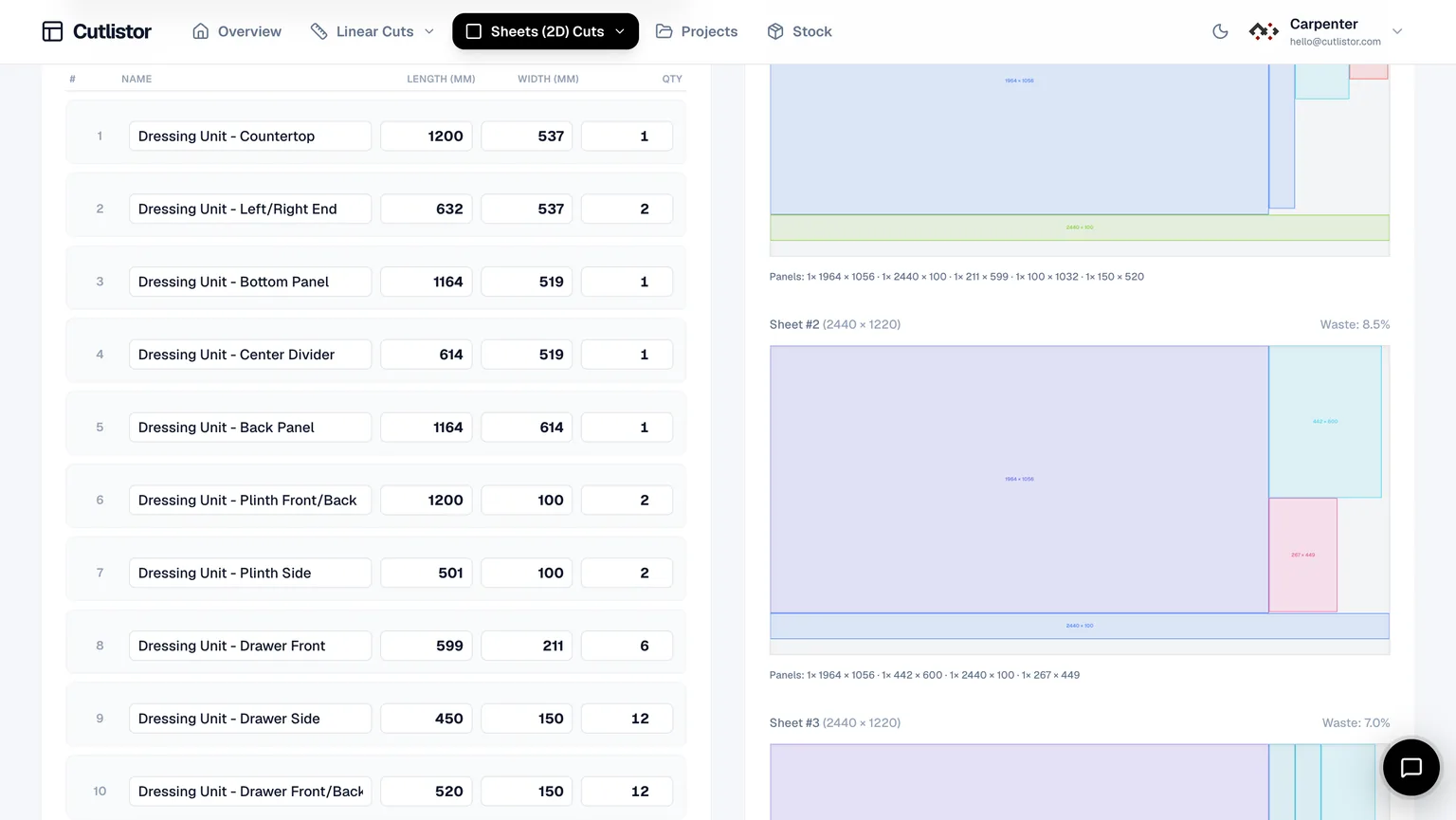
Cut list software ranges from spreadsheets to installed desktop optimizers. Cutlistor is a web application: sheet and linear cut list optimizers with real-time layouts, CSV/XLSX import, kerf-aware PDF export, DXF export for CNC/CAM handoff, and optional AI plan scanning and 3D CAD import on paid plans. There is no Windows installer to maintain. Open Chrome, Safari, Edge, or Firefox on a shop PC, laptop, or tablet, enter stock and parts, and see layouts update as dimensions change. That matters when revisions arrive mid-build and you cannot wait for IT to push a new executable. This guide explains what to expect from modern cut list software, how Cutlistor’s free tier compares to paid plans, and how sheet plus linear tools fit the same workflow.
What cut list software should actually do
At minimum it should accept parts with finished sizes and quantities, respect kerf, and show how parts lay on purchased stock. Spreadsheets alone rarely auto-nest rectangles or reorder cuts on bars.
Strong tools export shop-floor documentation: labeled diagrams, sheet or stick indices, and material names your crew already uses. CNC shops may also need DXF geometry from the nest for CAM post-processors.
Great tools stay fast when the job changes. Browser-based recalculation means you edit one dimension and see yield move immediately instead of rerunning a batch file.
Free vs paid plans on Cutlistor
The free sheet and linear optimizers let you try full nesting workflows without installing software. Each session supports up to 20 part rows, 3 calculations per day, CSV imports of up to 5 rows, plus 3 AI plan scan and 3 3D CAD import per month.
A paid trial unlocks the dashboard with saved projects. Pro adds up to 250 saved projects, stock inventory with quantity tracking, higher monthly AI plan import and 3D model import quotas, and team-friendly billing. Business removes several Pro caps, including unlimited AI plan scans per month.
Pick free when proving a tool on a single job. Pick paid when the same stock library, customer jobs, and imports repeat every week.
| Feature | Free optimizers | Pro | Business |
|---|---|---|---|
| Sheet + linear nesting | Yes | Yes | Yes |
| Max part rows (free tools) | 20 per session | Unlimited | Unlimited |
| CSV/XLSX rows per import | 5 | Unlimited | Unlimited |
| Saved projects | No | Up to 50 | Unlimited |
| Stock inventory | No | Yes (quantity cap on Pro) | Yes |
| AI plan import / month | 3 | 50 | Unlimited |
| 3D CAD import (glTF / Collada) | 3 | 50 stored / month | Unlimited |
| Team seats | No | Add-on | Included |
Limits evolve; see the subscribe page for current caps.
Browser workflow: no download required
Cutlistor runs entirely in the browser. Shops on Windows, macOS, iPadOS, and Android use the same URL. Updates ship server-side, so you never block production on a version mismatch between office and bench laptops.
Use the free sheet cut list optimizer for plywood, MDF, melamine, and plate rectangles. Use the free linear cut list optimizer for lumber, trim, pipe, tube, and bar stock.
Bookmark both tools if your jobs mix panels and sticks. Many cabinet makers start in the sheet tool mornings and move to linear for face frames or cleats the same afternoon.
Sheet features: layout methods, grain, PDF
Sheet optimization supports four layout methods: Rips & rows, Fewest sheets / least waste, Neat grid, and Router / CNC layout. Switch methods without retyping parts to compare yield and diagram style.
Set kerf per material, enable grain direction on parts that need it, and export PDF cut packs with labeled parts. Export DXF for sheet and linear layouts when your CNC or laser workflow needs solver-native geometry. Import starting rows from CSV or XLSX using the published samples.
These are the same core features whether you are on a free trial job or a saved Pro project; paid plans mainly add persistence, inventory, and import quotas.
Linear features: multiple stock lengths and yield
Linear optimization handles multiple stock lengths per material, kerf between cuts, and yield readouts before you buy sticks. Import linear CSV/XLSX or type parts manually.
Dashboard projects support mitered ends on linear parts when trim geometry requires angles. The free linear tool focuses on straight cuts so new users are not overwhelmed by angle fields on day one.
Export PDF linear diagrams for the chop saw station. Pair with sheet PDFs when a job uses both panel and stick stock.
Imports, AI plan scan, and 3D CAD on paid plans
CSV/XLSX import is available on free optimizers using the sample column layouts. Paid accounts can additionally scan PDF plans or sketches with AI to draft part rows, then edit before optimizing.
3D CAD import accepts glTF and Collada models on supported plans, useful when parts already exist in a design tool and you want to avoid manual re-entry.
Treat AI and CAD imports as accelerators, not replacements for review. Always verify thickness, material, and quantities against the contract documents before cutting.
FAQ
- Is there a cutlist optimizer free download for PC?
- Cutlistor is browser-based with no download. It runs on Windows, Mac, iPad, and Android through a modern web browser.
- Do I need an account to try nesting?
- No account is required for the free optimizers. Sign up when you want saved projects, stock inventory, or AI imports beyond free-tier quotas.
- How is this different from Excel?
- Excel tracks numbers well but does not auto-nest parts on sheets or optimize cut order on bars. Cutlistor adds layouts, kerf-aware yield, and PDF cut plans.
- Can one project mix sheet and linear parts?
- Use the sheet optimizer for panels and the linear optimizer for sticks. Saved dashboard projects organize customer jobs; run each material form in the matching tool.
- Does Cutlistor export DXF for CNC?
- Yes. Download sheet and linear cut layouts as DXF files with closed polylines for laser cutters, routers, and CAM post-processors.
- What file types can I import?
- CSV and XLSX for part tables on free tools. Paid plans add AI plan scanning and glTF/Collada 3D model import within monthly quotas.
Related guides
- Cut list optimiser: free online (UK spelling)Free online cut list optimiser for sheet goods and linear stock. Kerf-aware cutting list optimisation with PDF export. Browser-based, no download.
- How many sheets of plywood do I need?How many sheets of plywood do you need? Why square-footage math under-counts, how kerf changes the answer, and how to get an exact 4×8 sheet count.
- What is a cut sheet?A cut sheet means two different documents depending on the trade: a cutting layout in the shop, a product spec sheet on site. What each contains, with examples.
- CNC nesting optimizer explainedWhat a CNC optimizer does, how rectangular nesting differs from true-shape, why bit diameter is your kerf, and where a cut list optimizer stops and CAM begins.