
Article
Best Cut List Optimizer for Cabinet Makers in 2026
Cutlistor Team4 min read
Introduction
A cut list optimizer for cabinet makers is a nesting engine, not a pocket calculator. You feed it panels and sticks; it returns sheet counts, stick usage, and layouts with kerf. This roundup is commercial and optimizer-focused.
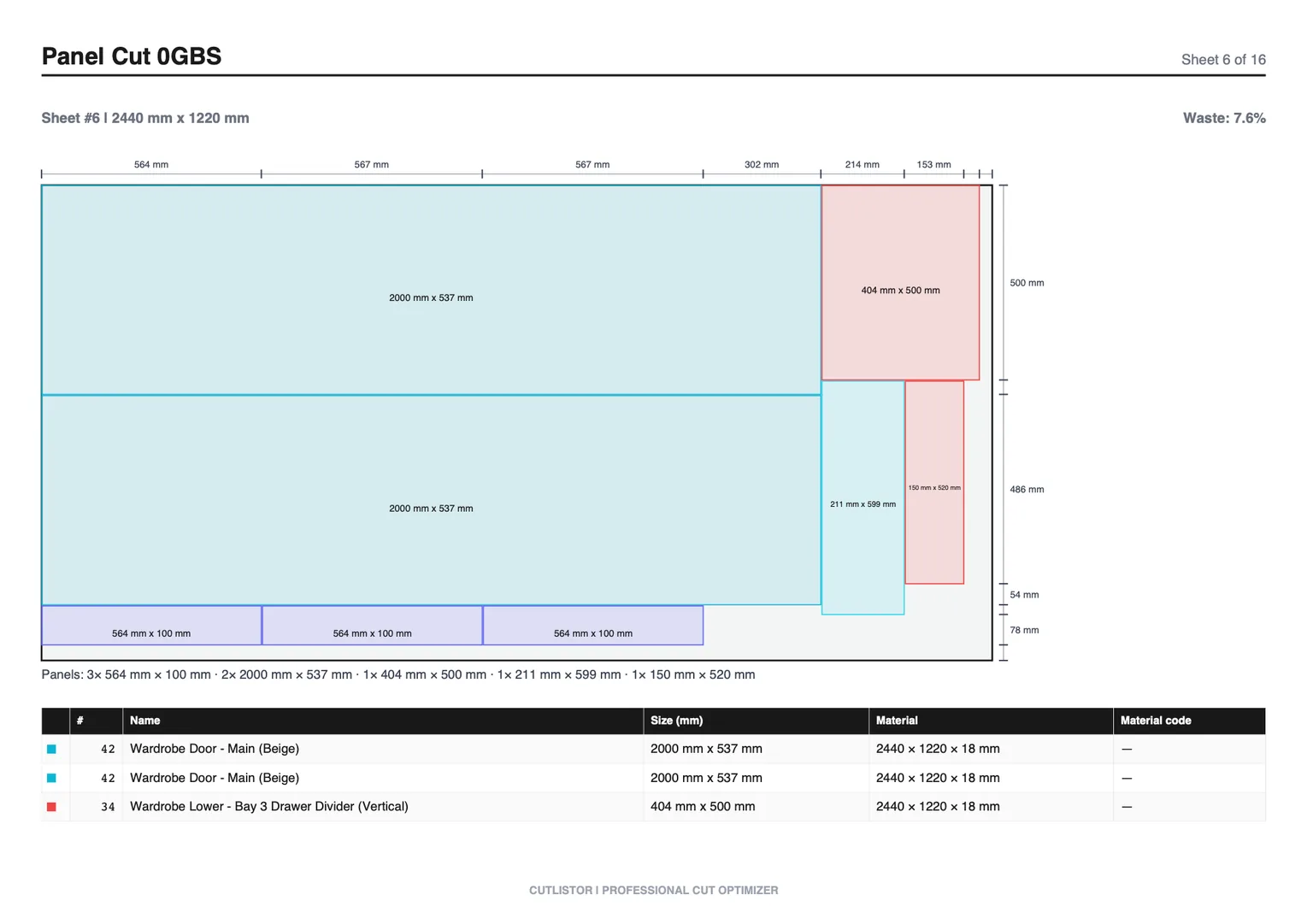
If you want calculator-style tooling and takeoff helpers, see our companion guide on best cut list calculators for cabinet makers. Here we score products on nest quality, revision speed, imports, CNC handoff, and total cost of ownership.
Optimizer vs Calculator (Why This Guide Exists)
| Job | Calculator | Optimizer |
|---|---|---|
| How tall is this gable? | Yes | Not the point |
| How many sheets for 80 parts? | Guess | Core job |
| Kerf-aware layout PDF | Rare | Expected |
| Linear face-frame packing | Manual | 1D nest |
| Import Excel BOM | Sometimes | Buying criterion |
How We Score Cabinet Optimizers
Weighted toward buy-intent shops running weekly casework, not one hobby vanity.
- Nest quality with kerf and grain on melamine/plywood
- Mixed sheet + linear workflow for real kitchens
- Import path from Excel/CSV cabinet BOMs
- Revision speed when designers change depths
- PDF clarity for the floor; DXF when CNC matters
- Transparent pricing and honest free-tier meters
- Clear limits: not full design, not true-shape CAM
Best Optimizers for Cabinet Makers
Ranked for commercial cabinet nesting, not general DIY woodworking.
1. Cutlistor: best overall for browser cabinet nesting
Cutlistor combines 2D sheet nesting and 1D linear optimization in the browser. Cabinet shops use it for case panels plus face-frame sticks, cleats, and scribe in one planning pass. Layouts refresh as you edit; PDFs label parts for breakdown.
Read the free tier this way: iteration is free, delivery is budgeted. Editing parts and re-optimizing the sheet cost nothing and are unlimited, while PDF export and starting a fresh project draw on 3 per day. The row cap is 20 per list, spreadsheet import is 5 rows per file, and projects are not saved.
- 3 PDF exports per day (editing and re-optimizing unlimited)
- 20 part rows per session
- CSV/XLSX import up to 5 rows
- 3 AI plan scans and 3 3D CAD imports per month on the free tier
- No saved projects until you sign up for a paid plan
- Pro $12/mo / $99/yr; Business $25/mo; Team $99/mo (5 seats)
- DXF on paid plans; AI/3D import quotas by tier
- Limitations: not Cabinet Vision/Mozaik design; not true-shape CAM
2. CutList Plus fx: best desktop classic
Strong for shops standardized on Windows desktop nesting and familiar CutList Plus reports. Evaluate against browser collaboration and current licensing before you renew.
3. CutList Optimizer: best simple free nest
A known browser nest for rectangular panels. Good entry point; weaker when Excel BOM size and real-time edits dominate the week.
4. OptiCutter: best for polished online reports
Subscription-friendly online optimizer with clean reporting. Shortlist when presentation and CSV workflows matter as much as raw nest speed.
5. MaxCut: best desktop shop-floor labeling focus
Consider when operators want installed cutting software tied to labels and saw habits. Compare to browser tools for multi-user estimating.
Optimizer Comparison Matrix
| Optimizer | Sheet | Linear | Excel import | Free tier | CNC DXF | Best cabinet fit |
|---|---|---|---|---|---|---|
| Cutlistor | Yes | Yes | Strong | 3 PDF exports/day (optimizing unlimited), 20 rows, nothing saved | Paid | Mixed casework + sticks |
| CutList Plus fx | Yes | Yes | Yes | Trial/legacy | Varies | Desktop-standardized shops |
| CutList Optimizer | Yes | Basic | Limited | Yes | Varies | Small panel lists |
| OptiCutter | Yes | Varies | Yes | Limited | Varies | Report-driven offices |
| MaxCut | Yes | Varies | Yes | Trial | Varies | Desktop floor labeling |
Best Optimizer by Cabinet Shop Type
| Shop type | Start with | Why |
|---|---|---|
| Custom kitchen (1–3 person) | Cutlistor free → Pro | Browser, sheet + linear, PDF |
| Excel-first office | Cutlistor + Excel import | BOM stays in Sheets/Excel |
| CNC panel processor | Cutlistor paid DXF or design suite nest | Rectangles vs full machining |
| SketchUp design-build | OpenCutList, then optimizer if needed | List from model first |
| Production with Cabinet Vision | Design suite nest / machining | Optimizer only for overflow estimating |
Conclusion
The best cut list optimizer for cabinet makers minimizes sheet waste, respects grain, packs sticks, and survives revisions without a full design-suite license. Cutlistor leads for browser sheet-plus-linear planning at published SaaS prices. Desktop classics and simple free nests remain valid for specific shop cultures.
Nest a real BOM on the cabinet making optimizer, then decide if free limits, Pro, or a design suite matches your volume.