Article
Cut List Software for Frameless Cabinets: Melamine Nesting That Respects Grain
Cutlistor Team4 min read
Introduction
Frameless (European-style) cabinets are a sheet-goods business. Gables, bottoms, tops, shelves, and backs dominate the BOM. Cut list software must nest those rectangles with kerf and grain, not pretend face-frame hardwood is the main problem.
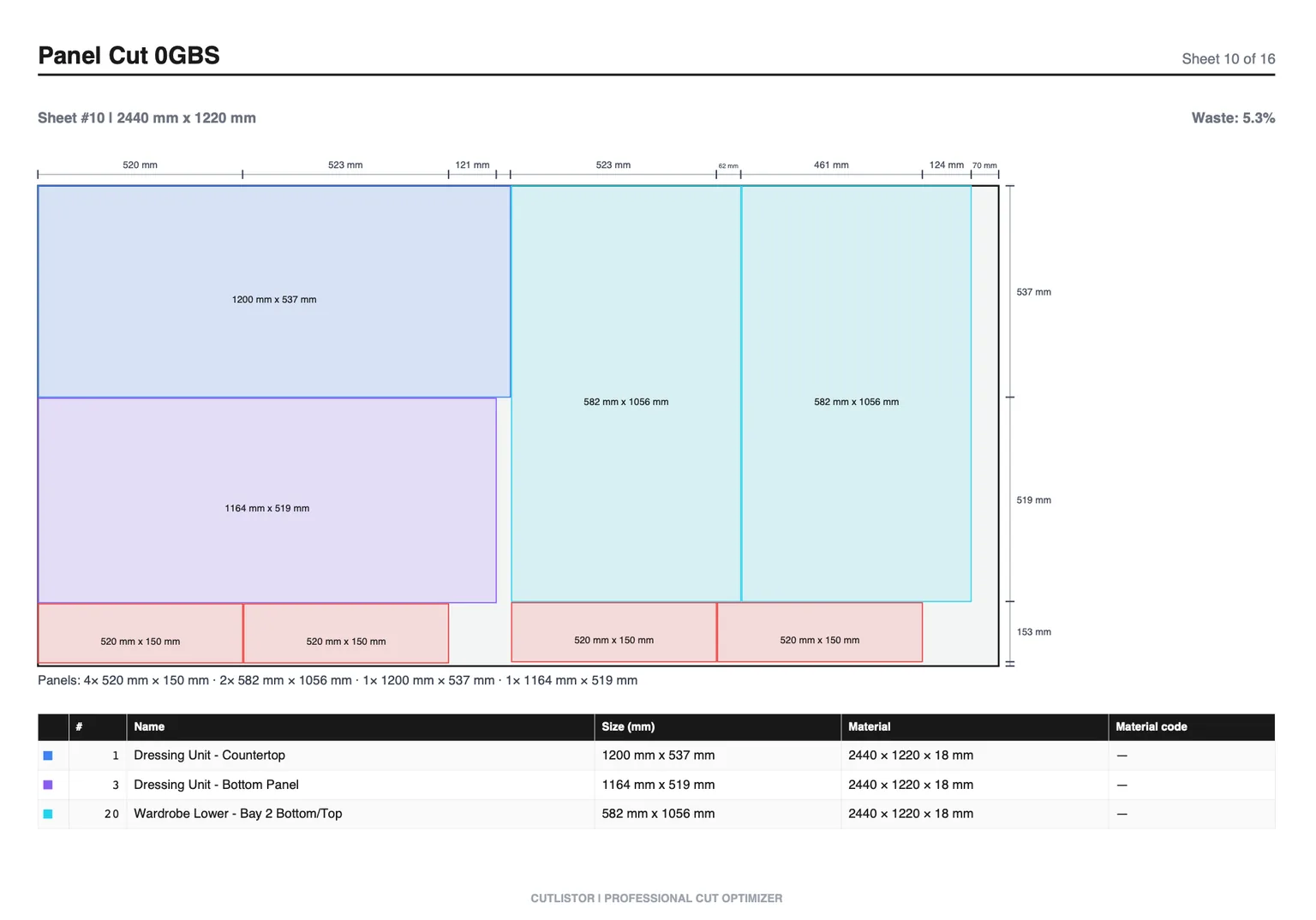
This guide covers frameless-specific nesting needs and where Cutlistor fits. For face-frame shops, see the companion article on face-frame cut list software.
What Frameless Shops Need From Software
| Frameless task | Software requirement |
|---|---|
| Carcass panels on melamine | 2D nest with material groups |
| Visible end panels / doors | Grain lock |
| Backs on thinner stock | Separate sheet library |
| Edge banding lists | Accurate finished sizes in BOM |
| CNC boring after nest | Design suite machining or DXF rectangles |
| Fillers and scribe | Small sheet parts + occasional linear |
Frameless Workflow With a Cut List Optimizer
- Design in Mozaik, Cabinet Vision, SketchUp, or elevations + Excel
- Export finished panel sizes (banding strategy reflected in sizes)
- Group by thickness and décor/color before nesting
- Lock grain on doors and exposed ends
- Set kerf for panel saw or CNC bit
- Export PDF for breakdown; paid DXF if rectangles go to CNC
Using Cutlistor for Frameless Casework
Cutlistor's sheet optimizer is the primary tool for frameless carcasses. Use the linear optimizer for nailers, cleats, and scribe stock. Browser access helps when the office laptop is also the estimating station.
On the free plan you can edit parts and re-optimize without limit — those actions are never counted. What is counted is finished output: PDF exports and new projects draw down an allowance of 3 per day. The working list tops out at 20 rows, spreadsheet imports at 5 rows per file, and nothing persists once you leave.
Kitchen-scale frameless BOMs usually need Pro ($12/mo or $99/yr) for import size, saves, and DXF. Cutlistor does not place hinge holes or generate Mozaik-style machining.
- 3 PDF exports per day (editing and re-optimizing unlimited)
- 20 part rows per session
- CSV/XLSX import up to 5 rows
- 3 AI plan scans and 3 3D CAD imports per month on the free tier
- No saved projects until you sign up for a paid plan
Tool Fit for Frameless Shops
| Tool | Frameless fit | Gap |
|---|---|---|
| Cutlistor | Strong sheet nest + PDF/DXF path | No construction CAM |
| CutList Plus / OptiCutter / MaxCut | Sheet nesting options | Evaluate grain + import |
| CutList Optimizer | Light free panel nests | Large BOM friction |
| Mozaik / Cabinet Vision | Design + CNC for frameless | Cost; nest may still need help |
| Excel alone | BOM only | No nest |
Frameless Nesting Tips That Save Sheets
- Do not nest different décors together to "save" a sheet you cannot use
- Decide banding before final sizes hit the optimizer
- Keep door blanks on grain-locked nests separate from carcass guts when quality demands it
- Re-nest after every field change to island depth; do not hand-patch PDFs
- Track offcuts you will actually reuse; ignore fantasy remnants
Buying Reality Check for Shops
When you evaluate tools around “Cut List Software for Frameless Cabinets: Melamine Nesting That Respects Grain”, score them against last month’s real jobs—not a vendor feature matrix. Count how many sheet sizes you buy, whether grain lock matters on your doors, and whether your office lives in Excel or a design suite.
Frameless work is unforgiving on panel accuracy, which raises the value of the nesting stage specifically. Sizes come straight from the carcass calculation, and a browser optimizer handles that fine. Where a design suite pulls ahead is 32 mm boring — and only if you are actually machining it.
Prove it on one frameless run and check the panels against a tape before assembly. Frameless carcasses have no face frame to hide accumulated error, so panel accuracy is the test that matters.
Fix the frameless conventions in your shop standard so reveals and blank sizes stay consistent from job to job.
- Can you re-nest after a mid-job revision without rebuilding the BOM?
- Do PDF plans match how your sawyers actually stage sheets?
- Are free-tier caps honest enough for a real pilot week?
- Does the tool do sheet and linear, or only one of them?
Conclusion
Cut list software for frameless cabinets is mostly a sheet nesting problem with grain and material discipline. Cutlistor handles that in the browser with PDF plans and paid DXF, without pretending to be a frameless design suite.
Nest a frameless carcass BOM on the free sheet optimizer and compare sheet count to your last purchase order.