Article
Cut List Software for Production Cabinet Shops
Cutlistor Team4 min read
Introduction
Production cabinet shops already own serious software: design suites, CNC posts, labeling, sometimes ERP. Cut list software still appears in the stack for estimating speed, rectangular overflow nests, and teams that should not burn a full design seat to answer "how many sheets?"
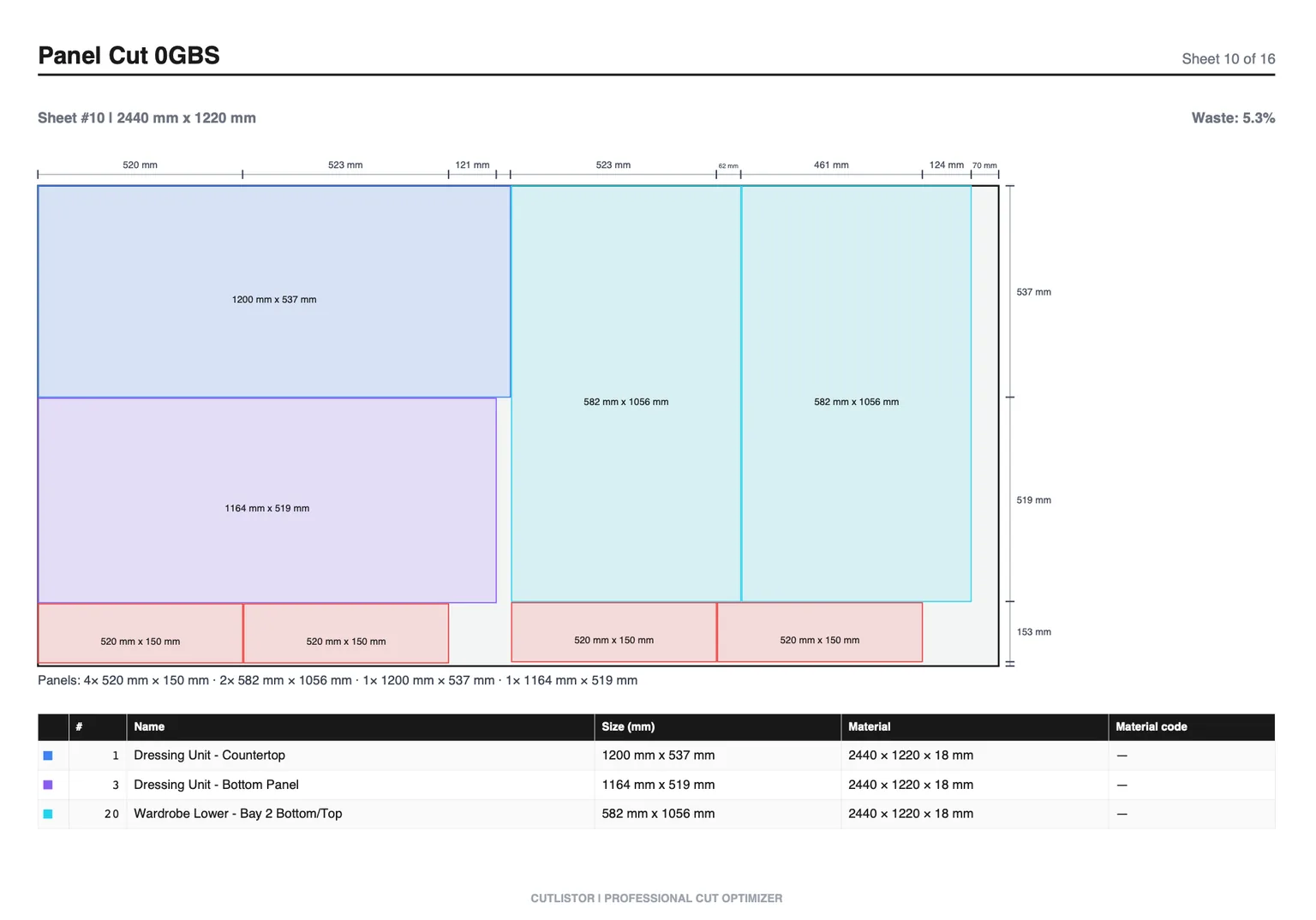
This guide positions optimizers for production volume. For lean custom shops, see cut list software for small cabinet shops.
The Production Software Stack
| Layer | Job | Examples |
|---|---|---|
| Design + construction | Rooms, methods, BOM, drawings | Cabinet Vision, Mozaik, SketchList |
| CNC / machining | Toolpaths, boring, labels | Suite modules + machine software |
| Cut list / rectangular nest | Yield, quick nests, PDF/DXF rectangles | Cutlistor, CutList Plus, OptiCutter, MaxCut |
| Business data | Quotes, purchasing, scheduling | ERP / spreadsheets / CRM |
Where Optimizers Still Win in Production
- Sales engineering what-if nests before a job enters the design queue
- Rectangular sheet counts for purchased stock on rush add-ons
- Linear optimization for face-frame or trim batches outside the CNC cell
- Shops with mixed cells: beam saw + CNC boring, nest upstream in an optimizer
- Multi-seat estimating without consuming design licenses
Cutlistor's Role (and Limits) in Production
Cutlistor is a browser rectangular sheet and linear optimizer. Production teams use it for planning speed, Excel/CSV BOM nests, PDF shop plans, and paid DXF for rectangular handoff.
Cutlistor's free tier meters something different: editing parts and re-optimizing the layout are unlimited, and only PDF export and starting a new project count against a daily allowance of 3. Cut lists are capped at 20 rows, CSV and XLSX import is limited to 5 rows per file, and nothing is saved between sessions.
Free tier is not a production system of record. Use Pro ($12/mo), Business ($25/mo), or Team ($99/mo, 5 seats) for saved projects, DXF, and collaboration.
- 3 PDF exports per day (editing and re-optimizing unlimited)
- 20 part rows per session
- CSV/XLSX import up to 5 rows
- 3 AI plan scans and 3 3D CAD imports per month on the free tier
- No saved projects until you sign up for a paid plan
- Strengths: browser access, sheet + linear, import, price clarity, PDF plans
- Limits: not full cabinet design, not true-shape CAM, not a machine post-processor
Production-Relevant Alternatives
| Tool | Production role | Pair with |
|---|---|---|
| Cabinet Vision / Mozaik | System of record for design/CNC | Optimizer for overflow estimating |
| CutList Plus fx | Desktop nest near the saw office | ERP / Excel BOMs |
| MaxCut | Desktop cutting / labels | CNC suite for machining |
| OptiCutter | Online nest reports | Purchasing |
| CutList Optimizer | Light browser nest | Not usually primary in production |
| Cutlistor | Browser nest + linear + team SaaS | Design suite for machining |
Governance Tips for Production Teams
- Decide which system owns finished sizes (usually the design suite)
- Export BOMs to the optimizer; do not maintain two conflicting size lists
- Standardize kerf and stock libraries across estimators
- Use Team seats when multiple people nest quotes in parallel
- Keep CNC machining inside the suite that owns construction methods
Buying Reality Check for Shops
When you evaluate tools around “Cut List Software for Production Cabinet Shops”, score them against last month’s real jobs—not a vendor feature matrix. Count how many sheet sizes you buy, whether grain lock matters on your doors, and whether your office lives in Excel or a design suite.
At production volume the calculus inverts. Repeated cabinet types justify the setup cost of a parametric library, and the design suite stops being overhead. A standalone optimizer still has a role for one-off millwork and for jobs that arrive as somebody else's spreadsheet.
Pilot on a single production run and measure two things: sheets consumed versus estimated, and how long the office spent preparing the list. In a production shop the second number is often the one that justifies the purchase.
Publish the decision as a production SOP so every shift nests the same way rather than each lead having a preference.
- Can you re-nest after a mid-job revision without rebuilding the BOM?
- Do PDF plans match how your sawyers actually stage sheets?
- Are free-tier caps honest enough for a real pilot week?
- Does the tool do sheet and linear, or only one of them?
Conclusion
Production cabinet shops should not replace Cabinet Vision or Mozaik with a browser optimizer. They should use cut list software where it is strongest: fast rectangular yield, linear packs, estimating seats, and clear PDFs. Cutlistor fills that lane with honest limits on design and CAM.
Evaluate with a real production BOM on the cabinet making hub, then place Cutlistor beside (not instead of) your CNC suite.