Free Sheet Cut List Optimizer
Nest cabinet sides, shelves, backs, doors, and other panels on plywood, melamine, MDF, or other sheet materials. See your required sheet count and material yield before you place an order.
Open Free Sheet OptimizerPlan Every Cabinet Part. Order the Right Sheets.
Create accurate cabinet cut lists and optimize the materials needed for your next cabinet project. Cutlistor helps cabinet makers plan plywood, melamine, MDF, and other sheet goods while also optimizing lumber for face frames, cleats, nailers, trim, and other linear parts.
Nest cabinet panels on the sheet sizes you actually buy, account for saw kerf and grain direction, calculate material requirements, and export clear cutting diagrams for your workshop.
Free sheet and linear cut list optimizers — no signup required.
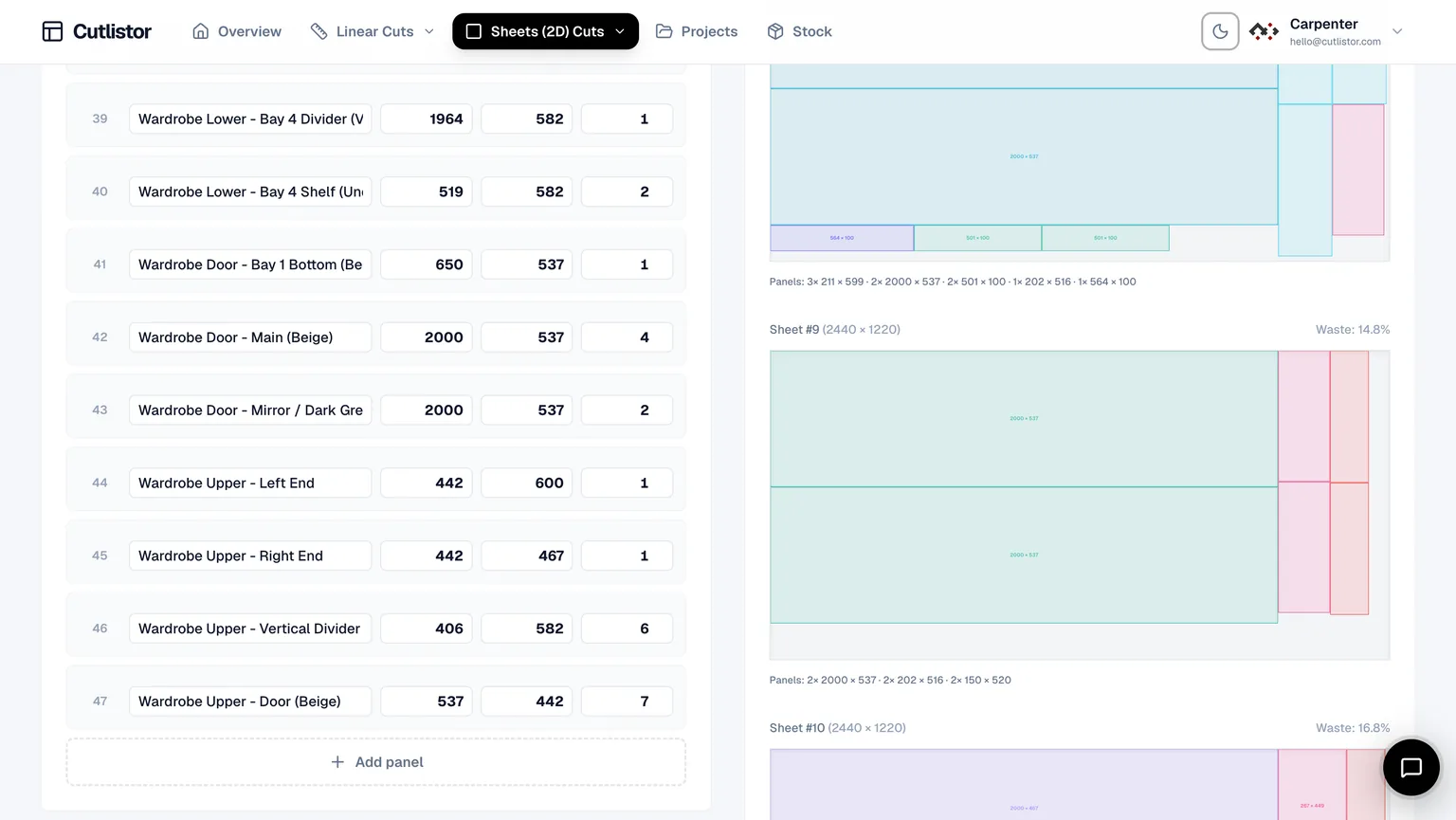
A cabinet project can involve dozens or hundreds of individual parts. Sides, shelves, doors, backs, toe kicks, drawer components, and fillers are usually cut from sheet materials, while face frames, cleats, nailers, and trim come from linear stock.
Cutlistor handles both workflows in one place.
Nest cabinet sides, shelves, backs, doors, and other panels on plywood, melamine, MDF, or other sheet materials. See your required sheet count and material yield before you place an order.
Open Free Sheet OptimizerPlan face-frame stock, cleats, nailers, toe kicks, hardwood edging, trim, and other parts from the stick lengths you purchase.
Open Free Linear OptimizerCreating a cabinet cut list is the first step toward knowing exactly what material a project requires. Cutlistor takes that list one step further by optimizing how those parts are cut.
Start by entering the sheet sizes and stock lengths you actually purchase.
For example:
Then add each part with its finished dimensions, quantity, and material. Typical cabinet parts include:
Run the sheet optimizer to arrange your cabinet panels on the sheets you purchase.
Cutlistor accounts for factors such as:
For linear materials, use the linear optimizer to plan lumber, face frames, cleats, nailers, and trim.
If you're building multiple cabinets or an entire kitchen, increase the quantity to optimize the complete production run rather than planning one cabinet at a time.
Once your layouts are ready, export PDF cutting diagrams for the workshop or DXF files for compatible CNC workflows.
Your team can work from the optimized layouts instead of manually interpreting a spreadsheet or drawing every cutting pattern.
Material waste can have a significant impact on the profitability of a cabinet project.
Ordering one extra sheet of melamine or plywood may not seem significant on a single job. Across dozens of kitchens or a large commercial casework project, however, unnecessary sheets quickly become a substantial cost.
Waste is especially important when working with:
A cabinet cut list tells you what parts you need.
A cabinet cut list optimizer determines how those parts can be arranged on your available material to reduce waste.
That's why optimizing the cutting layout is more useful than estimating material requirements from total square footage alone.
Cutlistor can optimize cabinet panels on materials including:
Enter the sheet dimensions supplied by your material vendor and optimize your cabinet parts around those actual dimensions.
Grain direction matters for doors, drawer fronts, end panels, and other visible components. Lock the grain direction where required while allowing parts that don't have directional requirements to rotate when appropriate. This can improve material yield without compromising the appearance of the finished cabinet.
See how many sheets each material group requires and compare different cutting layouts. For example, you can prioritize layouts based on:
Not every cabinet component comes from a sheet. Use the linear optimizer for:
Enter the stock lengths you purchase and set the appropriate kerf for your saw or cutting equipment. Cutlistor generates optimized cutting sequences so you can see how many lengths are required and how much material remains.
Already have a cabinet BOM or cutting list in a spreadsheet?
Import your existing CSV or Excel file into Cutlistor instead of manually entering every part.
This is useful for cabinet shops that already generate material lists through:
Import the parts, review the material information, and run the optimizer.
If you design cabinets in 3D, you don't necessarily need to recreate your parts manually.
Cutlistor supports 3D model imports including:
This can be useful for workflows involving SketchUp, Fusion, Blender, and other modeling software.
Not every project starts with a spreadsheet or structured 3D model.
You can also use AI-assisted scanning to extract part information from:
Review the extracted dimensions before generating your final cutting plan.
Upload a drawing and create a cabinet cut listOptimize the panels required for an entire kitchen, including base cabinets, wall cabinets, tall units, doors, fillers, and end panels.
Plan sides, shelves, decks, backs, stretchers, and other casework components with accurate material requirements.
Batch identical cabinet boxes and optimize them by material, thickness, and finish.
Combine sheet optimization for cabinet boxes with linear optimization for hardwood face-frame components.
Optimize repeated cabinet modules across hotel, office, retail, and other commercial projects.
Learn more about cabinet cutting lists, material optimization, and production planning:
Explore more resources for cabinet makers and woodworking businesses:
Build your cut list. Optimize your sheets. Cut with less waste.
Whether you're building a single kitchen or producing cabinets for a commercial project, Cutlistor helps you move from cabinet design to cutting plan without manually calculating every sheet and stick.
Create your cabinet cut list, optimize the materials you actually buy, and generate a cutting plan your workshop can use.