
Article
Best Cut List Optimizer Software in 2026
Cutlistor Team10 min read
Introduction
If you work with plywood, MDF, lumber, aluminum, or any other material that needs to be cut efficiently, a good cut list optimizer can save you hours of work and significantly reduce material waste.
Whether you are a cabinet maker, woodworker, carpenter, CNC operator, or DIY enthusiast, the right software helps you generate optimized cutting layouts in seconds.
In this guide, we compare the best cut list optimizer tools in 2026, including both desktop and cloud-based solutions. For hands-on steps with our own app, see How to use a cut list optimizer.
What Is a Cut List Optimizer?
A cut list optimizer is software that calculates the most efficient way to cut parts from stock materials such as plywood and MDF sheets, solid wood boards, aluminum extrusions, pipes and tubing, and melamine panels.
The goal is simple: reduce waste, lower material costs, and speed up production.
Many modern tools also include advanced features such as:
- AI-powered plan scanning
- 3D CAD import
- Multi-material support
- Cost estimation
- Real-time optimization
- Grain direction and kerf settings
Best Cut List Optimizer Software in 2026
Below we review five strong options. When you are ready to try Cutlistor in the browser, start from our free optimizers.
1. OptiCutter
OptiCutter is one of the most popular online cut list optimizers available today. It supports both sheet and linear optimization and offers a clean, easy-to-use interface.
Key features
- 1D and 2D optimization
- Cost calculations
- Labels and reports
- Mobile-friendly interface
- CSV import and export
- DXF export
Pros: very polished user experience, fast optimization, good reporting tools, suitable for professionals.
Cons: limited advanced automation, fewer import options than newer tools.
Best for: cabinet makers, furniture manufacturers, and professional woodworking shops.
2. CutList Optimizer
CutList Optimizer is one of the longest-running web-based optimization tools. It is widely used by hobbyists and professionals alike.
Pricing (checked 23 July 2026): free allows 5 calculations per day and 5 saved items. Silver is $15/month ($13.50/month billed yearly). Gold is $25/month ($22.50/month billed yearly) and adds high-speed calculation. A $4.90 three-day pass unlocks Silver features for one-off jobs.
Key features
- Sheet and linear optimization
- Grain direction support
- PDF reports
- Cost calculations
Pros: well-established and reliable, simple to use, free tier available.
Cons: requires manually clicking "Calculate", less interactive than newer tools, limited CAD integration.
Best for: users looking for a trusted, no-frills optimizer.
3. Cutlistor
Cutlistor is an advanced cloud-based cut list optimizer. It combines traditional optimization with AI and 3D model processing.
Unlike many competitors, Cutlistor delivers instant real-time results as you edit your cut list - there is no separate Calculate button or waiting for batch processing.
No account is needed to try it, and the free tier does not count the optimizing itself — parts can be edited and re-nested indefinitely. It counts finished PDFs and new projects, at 3 a day. Lists are limited to 20 rows, CSV and XLSX uploads to 5 rows per file, and work does not survive the session.
Key features
- Linear optimization for lumber, trim, and pipes
- 2D panel optimization for plywood, MDF, and melamine
- AI plan scanning from sketches and PDF drawings
- 3D CAD import (GLTF, GLB, Collada)
- Multiple optimization methods
- Real-time optimization
- Multi-material support
- Material grouping
- Mitered end support
- CSV and XLSX import
- Project saving
- Inventory management
- Multi-currency pricing
- Metric and imperial units
- Fully responsive on desktop, tablet, and mobile
- DXF export for sheet and linear cut layouts (paid plans)
- 3 PDF exports per day (editing and re-optimizing unlimited)
- 20 part rows per session
- CSV/XLSX import up to 5 rows
- 3 AI plan scans and 3 3D CAD imports per month on the free tier
- No saved projects until you sign up for a paid plan
Why Cutlistor stands out
AI plan scanning: upload a hand-drawn sketch or PDF, and Cutlistor automatically extracts parts using AI.
3D CAD import: import models from SketchUp,
Blender, and other tools that export common 3D formats.
Multiple optimization methods: choose layouts based on lowest waste, fewest sheets, rips and rows, neat grid layout, or CNC- and router-friendly nesting.
Real-time optimization: adjust dimensions, stock, or constraints and see the layout update instantly.
Best for: professionals who want an all-in-one cloud platform with modern automation and advanced import capabilities.
4. OpenCutList
OpenCutList is a free and open-source extension for
SketchUp, the 3D modeling software. It generates cut lists directly from your 3D models and is extremely popular in the woodworking community.
Key features
- Automatic cut list generation from SketchUp models
- Material tracking
- Label printing
- Cost estimation
- Export to spreadsheets
Pros: free and open source, tight SketchUp integration, highly customizable.
Cons: requires SketchUp, learning curve for new users.
Best for: woodworkers already using SketchUp for design.
5. CutListEvo
CutListEvo is a modern cloud-based cut optimizer with a strong focus on cabinetry and furniture production.
Key features
- 2D sheet optimization
- Labels and reports
- Cost calculations
- Cloud-based workflow
Pros: easy to use, good visual layouts, suitable for small shops.
Cons: fewer advanced import options, less flexible than Cutlistor for some workflows.
Best for: small to medium woodworking businesses.
Feature comparison
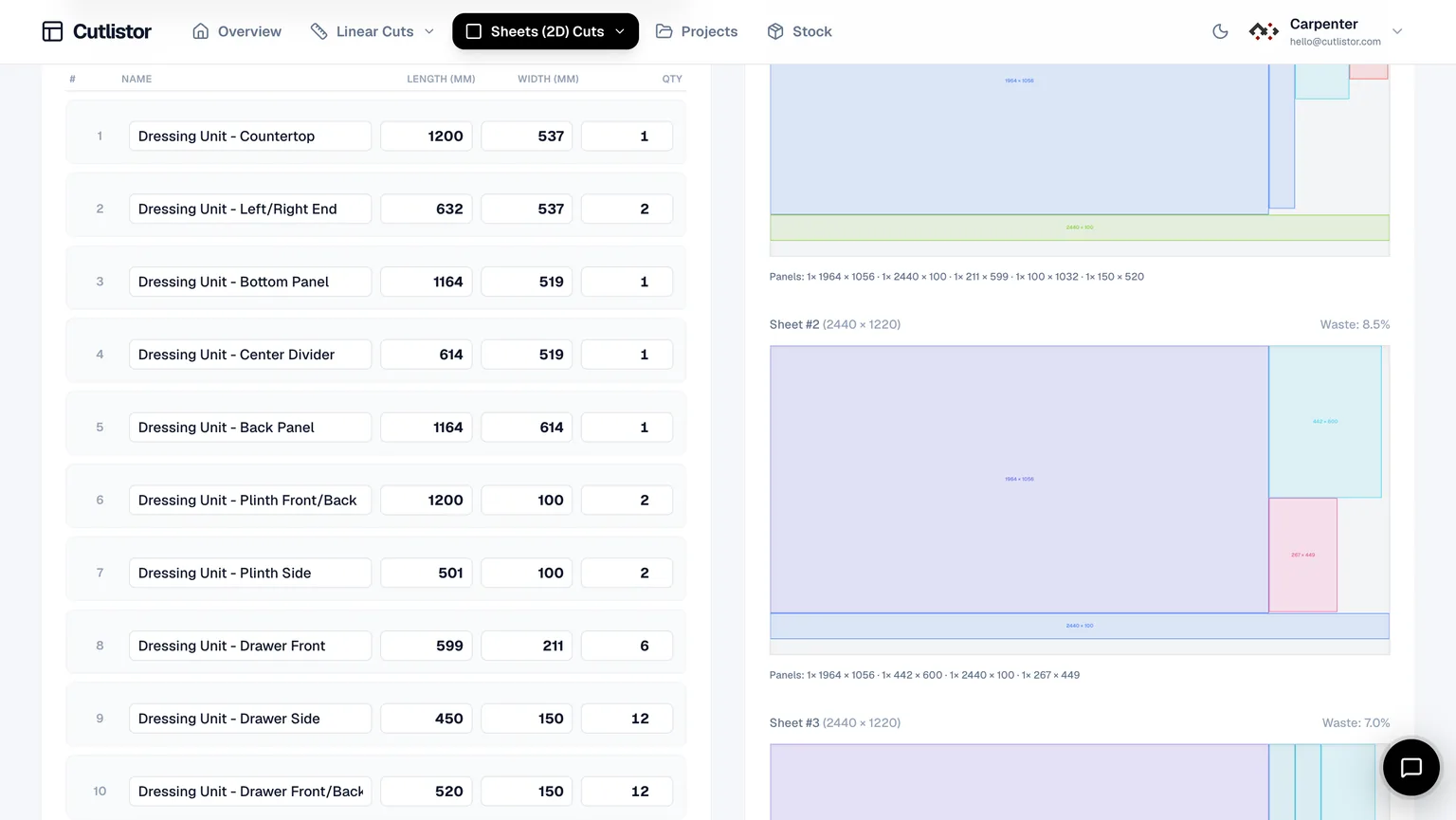
Quick reference across the tools compared in this article (including OpenCutList as a SketchUp extension rather than a cloud app).
| Feature | OptiCutter | CutList Optimizer | Cutlistor | OpenCutList | CutListEvo |
|---|---|---|---|---|---|
| Linear optimization | Yes | Yes | Yes | Yes | Limited |
| Sheet optimization | Yes | Yes | Yes | Yes | Yes |
| AI plan scanning | No | No | Yes | No | No |
| 3D CAD import | Limited | No | Yes | Yes (SketchUp only) | No |
| Real-time optimization | No | No | Yes | No | Limited |
| Multiple optimization methods | Limited | Limited | Yes | Limited | Limited |
| Multi-material support | Limited | Limited | Yes | Yes | Yes |
| Cloud-based | Yes | Yes | Yes | No | Yes |
| Mobile friendly | Yes | Yes | Yes | No | Yes |
Which cut list optimizer is best?
Choose OptiCutter if:
You want a polished, reliable optimizer with strong reporting features.
Choose CutList Optimizer if:
You need a proven, simple online tool.
Choose Cutlistor if:
You want the most advanced cloud-based platform with AI, CAD import, and instant real-time optimization.
Choose OpenCutList if:
You already use SketchUp and prefer a free solution.
Choose CutListEvo if:
You want a straightforward cloud solution for cabinet production.
Why real-time optimization matters
Traditional cut optimizers require you to enter all data and then click a Calculate button to generate results.
Modern tools like Cutlistor optimize layouts instantly as you edit: change a part size, add stock, adjust kerf, or toggle grain direction, and the layout and yield update immediately. That makes it much faster to experiment and compare options.
Final verdict
All five tools are excellent choices, but the best one depends on your workflow.
- Best overall for many users: OptiCutter
- Best established online tool: CutList Optimizer
- Best modern all-in-one platform: Cutlistor
- Best free SketchUp plugin: OpenCutList
- Best simple cloud alternative: CutListEvo
If you want a next-generation optimizer with AI plan scanning, 3D CAD import, and real-time optimization, Cutlistor is worth trying.
For more Cutlistor guides, compare optimizers to spreadsheets or dive into plywood sheet planning.
Frequently asked questions about cut list optimizer software
What is the best cut list optimizer software in 2026?
The best cut list optimizer software in 2026 depends on your workflow and requirements.
OptiCutter is a strong all-around choice for professionals.
CutList Optimizer is a popular and established web-based tool.
Cutlistor stands out with AI plan scanning, 3D CAD import, and real-time optimization.
OpenCutList is ideal for users of
CutListEvo is a simple cloud-based solution for woodworking businesses.
If you want modern automation and instant results, Cutlistor is one of the most feature-rich options available.
What does a cut list optimizer do?
A cut list optimizer calculates the most efficient way to cut parts from stock materials such as plywood sheets, MDF panels, lumber, pipes, and aluminum profiles.
The software helps you:
- Reduce material waste
- Lower project costs
- Save time
- Generate printable cutting diagrams
- Estimate material requirements
This is especially useful for cabinet makers, furniture builders, carpenters, and CNC operators.
What is the best free cut list optimizer?
The best free cut list optimizer options include:
CutList Optimizer (free tier)
OpenCutList (free and open source, for
SketchUp users)
Cutlistor (free cut list optimizer with advanced features)
Cutlistor offers free access to both linear and sheet optimization directly in your browser.
Which cut list optimizer supports plywood and MDF sheet optimization?
Most leading tools support 2D sheet optimization for plywood, MDF, melamine, and particle board, including:
These tools consider blade kerf, grain direction, and stock dimensions.
Which software is best for lumber and board cutting optimization?
For 1D linear optimization of lumber, trim, aluminum extrusions, and pipes, top choices include:
Cutlistor also supports mitered ends for more accurate trim and framing calculations.
Can I import a SketchUp model into a cut list optimizer?
Yes. Several tools support importing 3D models.
OpenCutList works directly inside
Cutlistor imports GLTF, GLB, and Collada files exported from
Fusion 360, and
This allows you to generate cut lists directly from 3D models instead of entering dimensions manually.
What is AI plan scanning in cut list software?
AI plan scanning lets you upload a hand-drawn sketch, PDF, or image of your design, and the software automatically extracts the parts and dimensions into a cut list.
Cutlistor includes AI plan scanning to speed up project setup and eliminate manual data entry.
Which cut list optimizer updates results in real time?
Most traditional tools require you to click a "Calculate" button after making changes.
Cutlistor updates cutting layouts and yield instantly as you edit dimensions, stock sizes, or optimization settings.
This real-time optimization makes it much faster to compare layouts and experiment with different stock options.
What is the difference between 1D and 2D cut optimization?
1D (linear) optimization is used for materials cut only by length, such as lumber, trim, pipes, and aluminum profiles.
2D (sheet) optimization is used for panel materials, such as plywood, MDF, melamine, and acrylic sheets.
Many tools, including Cutlistor, support both types.
Which cut list optimizer supports multiple materials?
Cutlistor supports multiple materials within a single project, including different sheet sizes, thicknesses, and linear stock.
This is particularly useful for cabinetry and furniture projects that combine plywood, solid wood, and hardware components.
Can cut list optimization software estimate project costs?
Yes. Many tools include material cost estimation.
By entering stock prices, the software can calculate total material cost, waste cost, yield percentage, and cost per part. This helps you price jobs more accurately.
Is there a cloud-based cut list optimizer?
Yes. Cloud-based options include:
These tools work directly in your browser with no installation required.
What is the best cut list optimizer for cabinet makers?
Cabinet makers typically need sheet optimization, grain direction support, multiple materials, label printing, cost estimation, and project management.
Cutlistor is particularly well suited because it combines AI plan scanning, 3D import, and real-time optimization.
Does Cutlistor have a free plan?
Yes. Cutlistor offers a free cut list optimizer that supports both panel and linear optimization.
You can upload spreadsheets, import 3D models, and generate optimized cutting layouts directly in your browser.
What file formats can Cutlistor import?
Cutlistor supports CSV, XLSX, PDF plans, images of sketches, GLTF, GLB, and Collada (.dae). This makes it easy to import data from spreadsheets and CAD software.
Does Cutlistor work on mobile devices?
Yes. Cutlistor is fully responsive and works on desktop, tablet, and mobile devices, allowing you to access your projects from the workshop, office, or job site.