Article
How to Prepare a Cabinet Cut List for CNC
Cutlistor Team4 min read
Introduction
A CNC-ready cabinet cut list is more than finished sizes. The nest must match sheet dimensions, cutter kerf, labeling, grain locks, and the boring or machining operations your post processor expects.
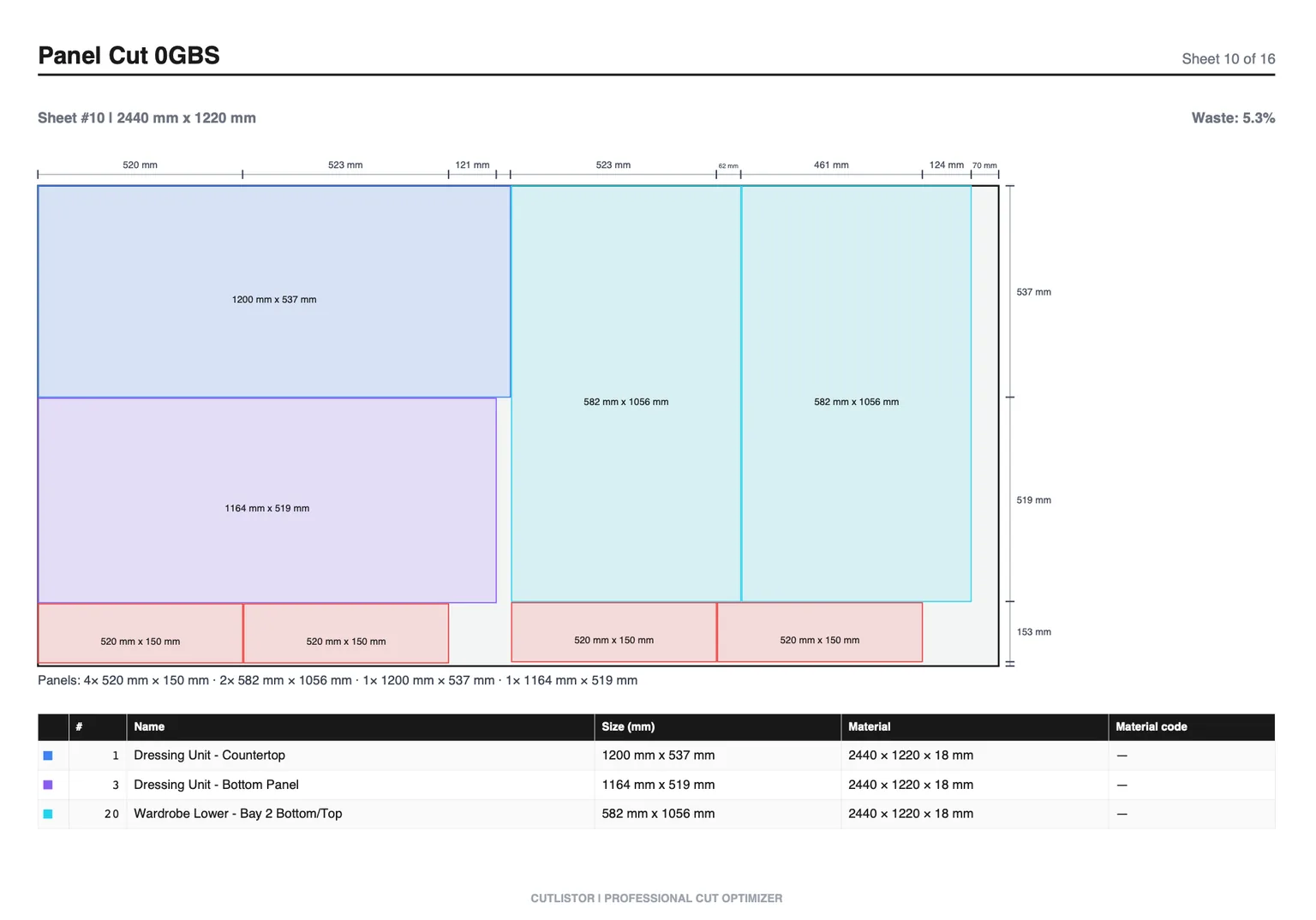
Cutlistor sits upstream of full CAM: rectangular nesting, PDF plans, and DXF export on paid plans for rectangle handoff. True-shape toolpaths, vacuum pods, and machine macros still live in your CNC software.
Step 1: Clean the BOM Before Nesting
One row per unique part size and material. Merge identical gables across cabinets with quantity and distinct labels. Split SKUs that cannot share a sheet (white vs woodgrain, 18 mm vs 12 mm).
- Finished size in machine units (mm or inches, not mixed)
- Quantity
- Material code matching sheet inventory
- Grain lock on show faces and doors
- Cabinet and part ID for labels
- Machining notes (dado, hinge, pocket) if your CAM reads them
Step 2: Set Real Sheet Size and Kerf
Use the usable sheet size after factory tolerance, not the nominal catalog size if your CNC oversizes spoilboards or you trim factory edges. Set kerf (cutter diameter / effective kerf) to the tool that will cut the nest. Wrong kerf makes every part undersized or wastes a sheet.
Step 3: Label for the Table and the Assembler
| Label field | Example | Why |
|---|---|---|
| Cabinet ID | B14 | Install map |
| Part | GABLE-L | Assembly |
| Material | MEL18-WHT | Sheet sorting |
| Show face | FACE-UP | Grain / finish |
Step 4: Nest, Then Hand Off to CAM
Run rectangular nesting in Cutlistor to prove sheet count for purchasing and to generate a PDF reference. For CNC cutting, export DXF on a paid plan when you need rectangles in your CAM or nesting station, or re-enter / import sizes into the machine software your shop standardizes on.
Cutlistor's free tier meters something different: editing parts and re-optimizing the layout are unlimited, and only PDF export and starting a new project count against a daily allowance of 3. Cut lists are capped at 20 rows, CSV and XLSX import is limited to 5 rows per file, and nothing is saved between sessions.
Pro is $12/mo and includes DXF export among paid features. Cutlistor is not a replacement for Cabinet Vision, a full CNC suite, or true-shape CAM.
Step 5: Align Boring and Joinery Data
If the CNC drills hinge cups, shelf pins, or dados in the same program as the outer cut, those operations must reference the same part origin as the cut list size. A part that is 560×720 in the nest must be 560×720 in the boring map. Revision control matters: one change to gable depth updates cut list, nest, and boring.
Pre-Flight Checklist Before the Spindle Starts
- Sheet SKU and thickness loaded match the nest
- Vacuum zones cover small parts or tabs are planned
- Grain direction on doors locked
- Labels unique across the batch
- Kerf / tool diameter matches the program
- Offcuts large enough to save are marked for inventory
- PDF nest printed or on the tablet at the machine
Panel Saw Hybrid Shops
Many shops break down sheets on a beam saw and only CNC machine operations. In that case, Cutlistor's PDF nest drives the saw; CNC gets labeled parts afterward. Prepare the cut list the same way; only the cutting station changes.
FAQ
Is DXF enough to run my CNC?
DXF rectangles help transfer geometry. You still need toolpaths, feeds, hold-down strategy, and labels in CAM. Treat DXF as a handoff, not a turnkey program.
Should I nest in SketchUp or Rhino instead?
Extract parts from SketchUp or Rhino, then nest in a dedicated optimizer. See those cut list guides for extraction workflows.
How do I handle small stretchers on CNC?
Use tabs, onionskins, or cut small parts on a saw from strips. Tiny rectangles that break vacuum should be flagged on the cut list before nesting.
Conclusion
CNC preparation is clean BOM, real sheet and kerf data, unique labels, aligned machining info, and a clear handoff from rectangular nesting to CAM. Prove sheet count before you load expensive melamine on the table.
Nest the cabinet job in Cutlistor, export PDF for the floor, and use DXF on Pro when your CNC station needs rectangles.