Article
Linear Optimization Guide: 1D Cut Lists for Tube, Bar, Pipe, and Angle
Cutlistor Team5 min read
Introduction
Linear optimization solves the one-dimensional cutting stock problem: how to cut finished lengths from purchased sticks with as little waste as possible. Tube, pipe, flat bar, angle, channel, and aluminium extrusion all follow the same math. Only length matters.
Shops that run only sheet nesting on bar jobs over-buy sticks and fill the drop rack. This guide explains 1D optimization for metal fabrication, drop vs cut-to-length purchasing, standard stock lengths, kerf, and how Cutlistor's free linear tool fits the workflow. See the metal fabrication hub for the full picture.
What is the 1D cutting stock problem?
You have a set of required cut lengths with quantities and one or more stock lengths you can buy. Each cut consumes kerf. The optimizer chooses which stock length to open and in which order to cut so total waste is minimized.
Unlike sheet nesting, there is no rotation or grain on most metal sticks. The decision space is which bar to open and how to pack lengths along it, including using tail drops from one bar before opening the next.
- Decision: stock length selection and cut sequence
- Constraint: kerf between cuts, optional miter length on angled ends
- Output: stick count, cut diagram per bar, tail waste
Tube, bar, pipe, and angle applications
| Stock type | Typical use | Cutlistor mode |
|---|---|---|
| Round tube / pipe | Handrail, frames, conduit | 1D linear |
| Square / rect tube | Structures, furniture metal | 1D linear |
| Flat bar | Brackets, stiffeners, tabs | 1D linear or 2D if flat nest on plate |
| Angle | Trims, bracing, ladder rails | 1D linear |
| Channel | Supports, tracks | 1D linear |
| Aluminium extrusion | T-slot, mullions, machine frames | 1D linear |
Drop stock vs cut-to-length
Drop stock means you buy standard mill lengths (full bars) and cut in-house. Cut-to-length (CTL) means the service center ships pieces already cut to your lengths, often for a premium.
When full bar (drop) wins
Mixed lengths on one BOM, repeat jobs where you reuse drops, and when your saw time is cheaper than CTL markup. Linear optimization shines here because stick choice and sequence matter.
When cut-to-length wins
Single repeated length in high volume, no saw capacity, or when drops are never reused and freight for long bar is expensive.
Common stock lengths
| Region / market | Common bar lengths | Notes |
|---|---|---|
| North America | 20 ft (6096 mm), 24 ft | Steel tube, angle, pipe common |
| Europe / UK | 6 m, 12 m | Metric bar and structural hollow sections |
| Aluminium extrusion | 3 m, 6 m, 6.5 m | Catalog profiles vary by mill |
| Small job shop | Remnant drops | Enter as stock rows on paid inventory plans |
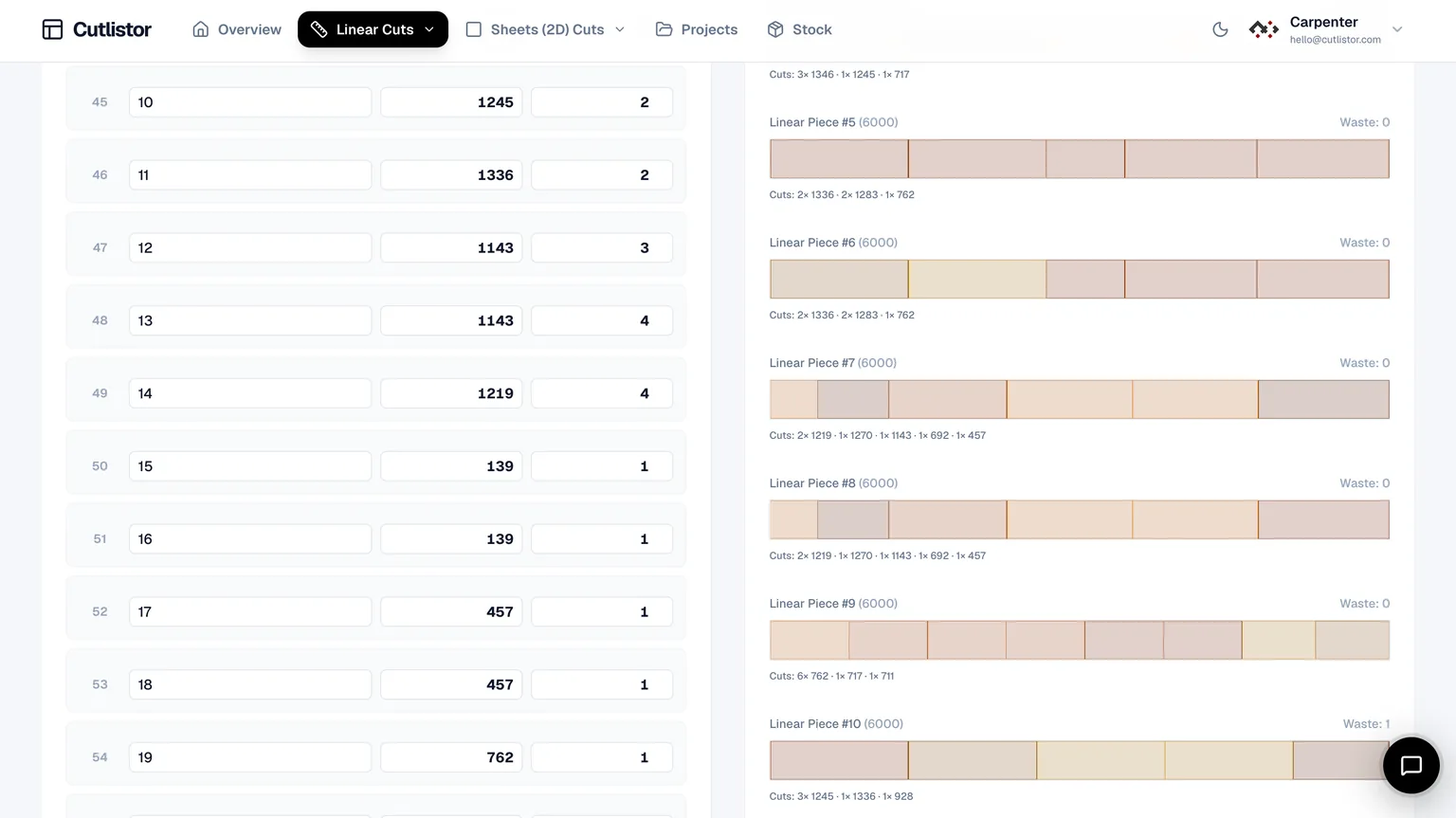
Worked example: ten cuts at 5800 mm, kerf 3 mm. On 6000 mm bar only, each bar yields one part plus ~197 mm drop. Offering 12000 mm may pack two parts per stick with one kerf between them, halving stick count if transport allows.
Kerf on linear cuts
Every saw cut removes width. Cold saws, bandsaws, and chop saws typically run 2-4 mm kerf on steel. Fine-tooth mitre saws on aluminium may run narrower. Enter the kerf you measured, not zero.
Kerf stacks on long BOMs. Twenty cuts at 3 mm kerf loses 60 mm of bar, enough to matter when parts pack tightly near full bar length.
Worked example: angle iron batch
BOM: four at 3200 mm, six at 1800 mm, eight at 950 mm. Stock: 6000 mm and 12000 mm angle, kerf 3 mm, cold saw.
Step 1: Enter both stock lengths with current supplier price if you compare cost, not only stick count.
Step 2: Load all parts in the linear optimizer grouped as one material.
Step 3: Read stick count and tail per bar. Sort drops 950 mm and under into a reuse bin if above your minimum.
Step 4: Export PDF stick diagrams for the cutoff station.
Typical outcome: optimizer pairs two 3200 mm cuts on 12000 mm stock with room for shorter pieces in tails, reducing opens of 6000 mm bar.
Cutlistor linear optimizer
The distinction that matters on the free plan is between reworking a layout and shipping one. Rework is unlimited. Shipping — a PDF export, or opening a new project — comes out of 3 per day. Alongside that sit a 20-row list cap, a 5-row limit per CSV or XLSX import, and no saved state.
- 3 PDF exports per day (editing and re-optimizing unlimited)
- 20 part rows per session
- CSV/XLSX import up to 5 rows
- 3 AI plan scans and 3 3D CAD imports per month on the free tier
- No saved projects until you sign up for a paid plan
When to combine with sheet nesting
Mixed fabrication jobs need both tools. Plate gussets and brackets nest on the sheet optimizer. Tube frames and angle trims nest on the linear optimizer. Do not enter panel rectangles in the linear tool or stick lengths in the sheet tool.
- One PDF from sheet optimizer for plasma or shear cell
- One PDF from linear optimizer for cutoff saw
- Same BOM version in both after engineering changes
- DXF from paid plans when CNC saws or routers need geometry
Linear optimization mistakes
- Single stock length when supplier offers two sizes
- Zero kerf on metal saws
- Ignoring reusable drops in the next nest
- Using linear tool for flat plate rectangles (use sheet tool)
- Not re-nesting after quantity change on the BOM
Conclusion
Linear optimization is the purchasing and cutoff plan for every stick-shaped metal SKU. Pick real stock lengths, measure kerf, and let the algorithm sequence cuts before you PO bar.
Cutlistor's free linear cut list optimizer handles tube, pipe, bar, angle, channel, and extrusion in the browser, alongside rectangular sheet nesting when jobs mix plate and stick work.