Article
Best Free Cabinet Cut List Software in 2026 (Honest Limits)
Cutlistor Team4 min read
Introduction
Free cabinet cut list software is real, but every free tier meters something: rows, exports, saves, or recalculations. The commercial question is whether the free path covers a one-off kitchen or a weekly shop load before you hit a wall.
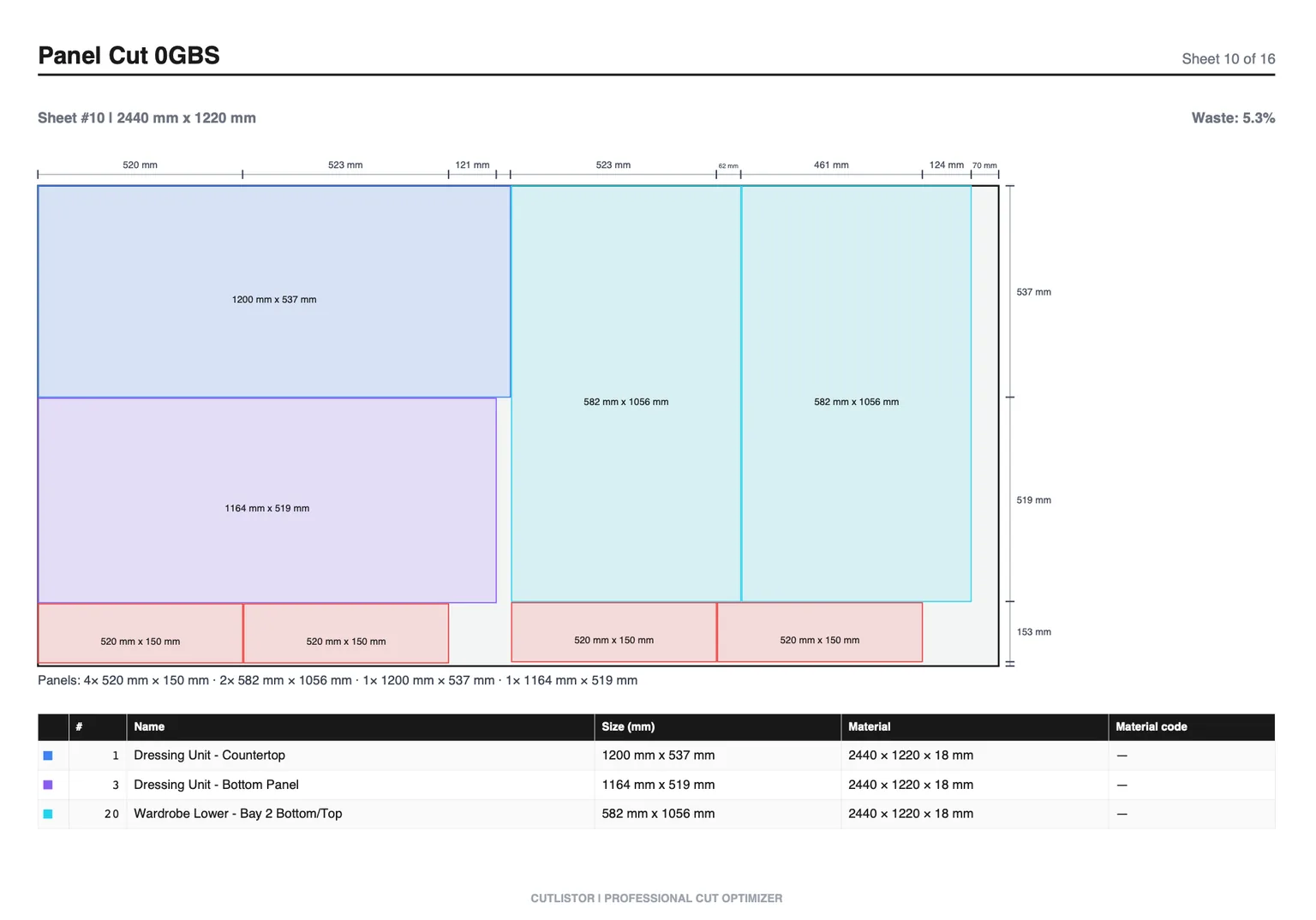
This guide ranks free and freemium options for cabinet makers with honest Cutlistor free-tier facts, competitor free limits where known, and a clear upgrade path when BOMs grow.
What "Free" Means for Cabinet Cut Lists
| Free model | Typical limit | Works for |
|---|---|---|
| Browser freemium | Daily exports, row caps, no save | Quotes, DIY kitchens, trials |
| Open-source plugin | Tied to SketchUp workflow | Design-in-model shops |
| Spreadsheet only | No real nesting algorithm | Tallies and quotes, not layouts |
| Desktop trial | Days or feature locks | Evaluating CutList Plus / MaxCut |
1. Cutlistor Free Tier
Cutlistor free is built for in-session optimizing. You can edit parts and re-nest without burning the daily meter; PDF export and new projects are what count.
Free use is genuinely unmetered where it matters for cutting: change a dimension, re-nest, change it again, at no cost. The 3-per-day allowance covers PDF exports and new projects. Cut lists stop at 20 rows, imported CSV or XLSX files at 5 rows, and there is no persistence between visits.
- 3 PDF exports per day (editing and re-optimizing unlimited)
- 20 part rows per session
- CSV/XLSX import up to 5 rows
- 3 AI plan scans and 3 3D CAD imports per month on the free tier
- No saved projects until you sign up for a paid plan
Upgrade when you need saved projects, DXF for CNC, larger CSV imports, or unlimited rows. Pro starts at $12/mo or $99/yr.
| Free capability | Status |
|---|---|
| Sheet nesting | Yes (row caps) |
| Linear nesting | Yes (row caps) |
| Edit / re-optimize | Unlimited |
| PDF export | 3 per day |
| CSV/XLSX import | Up to 5 rows |
| Saved projects | No |
| DXF export | No (paid) |
2. CutList Optimizer Free
CutList Optimizer (cutlistoptimizer.com) remains a common free browser nest for rectangular cabinet panels. It is a fair starting point for small lists when you do not need deep Excel import or real-time revision loops.
Cabinet shops often outgrow it when revision speed and spreadsheet BOM size matter more than a one-click nest.
3. OptiCutter and MaxCut Free Access
OptiCutter typically gates serious use behind trial or subscription. MaxCut is desktop-oriented with trial evaluation rather than an unlimited free shop tool. Treat both as evaluation paths, not permanent free production systems.
4. OpenCutList for SketchUp (Free Plugin)
OpenCutList is free if you already live in SketchUp. It generates cut lists and layouts from the model, which is excellent for design-build cabinet makers and weak for Excel-first shops that never open SketchUp.
5. Excel as "Free" Cut List Software
Excel is free only if you already pay for Office or use Sheets. It is excellent for BOMs and terrible as a nesting engine. Use it as the source of truth, then import into a free optimizer for layouts.
Free Tier Comparison Table
| Tool | Truly free production? | Cabinet fit | Main free limit |
|---|---|---|---|
| Cutlistor | Yes for light jobs | Sheet + linear browser | 3 PDF exports/day (optimizing unlimited), 20 rows, nothing saved |
| CutList Optimizer | Yes for small lists | Sheet-first browser | Features / recalculate / import depth |
| OptiCutter | Mostly trial/paid | Online reports | Free access limited |
| MaxCut | Trial | Desktop shop | Trial window |
| OpenCutList | Yes (plugin) | SketchUp-native | Requires SketchUp workflow |
| Excel alone | If licensed | BOM only | No nesting algorithm |
When Free Stops Working for Cabinet Shops
Upgrade triggers are predictable: BOMs over free row caps, need to save multi-day kitchen projects, CNC DXF handoff, CSV imports larger than five rows, or multiple estimators sharing work.
Cutlistor Pro at $12/mo (or $99/yr) is usually the commercial step after a successful free trial nest. Business ($25/mo) and Team ($99/mo, 5 seats) cover heavier import and collaboration needs.
Conclusion
The best free cabinet cut list software depends on your starting point: Cutlistor for browser sheet and linear nesting with clear free meters, CutList Optimizer for simple free panel nests, OpenCutList if SketchUp is already home, and Excel only as a BOM, not a nest engine.
Run a real cabinet BOM on the free sheet optimizer before you pay. Upgrade when saves, DXF, or import size become the bottleneck, not before.