Article
How to Batch Cabinet Cut Lists for Multiple Cabinets
Cutlistor Team4 min read
Introduction
Batching cabinet cut lists means combining parts from several cabinets into one material nest instead of optimizing each box alone. Professional shops do this to cut fewer sheets, fewer setups, and cleaner purchasing for kitchen runs and multi-unit casework.
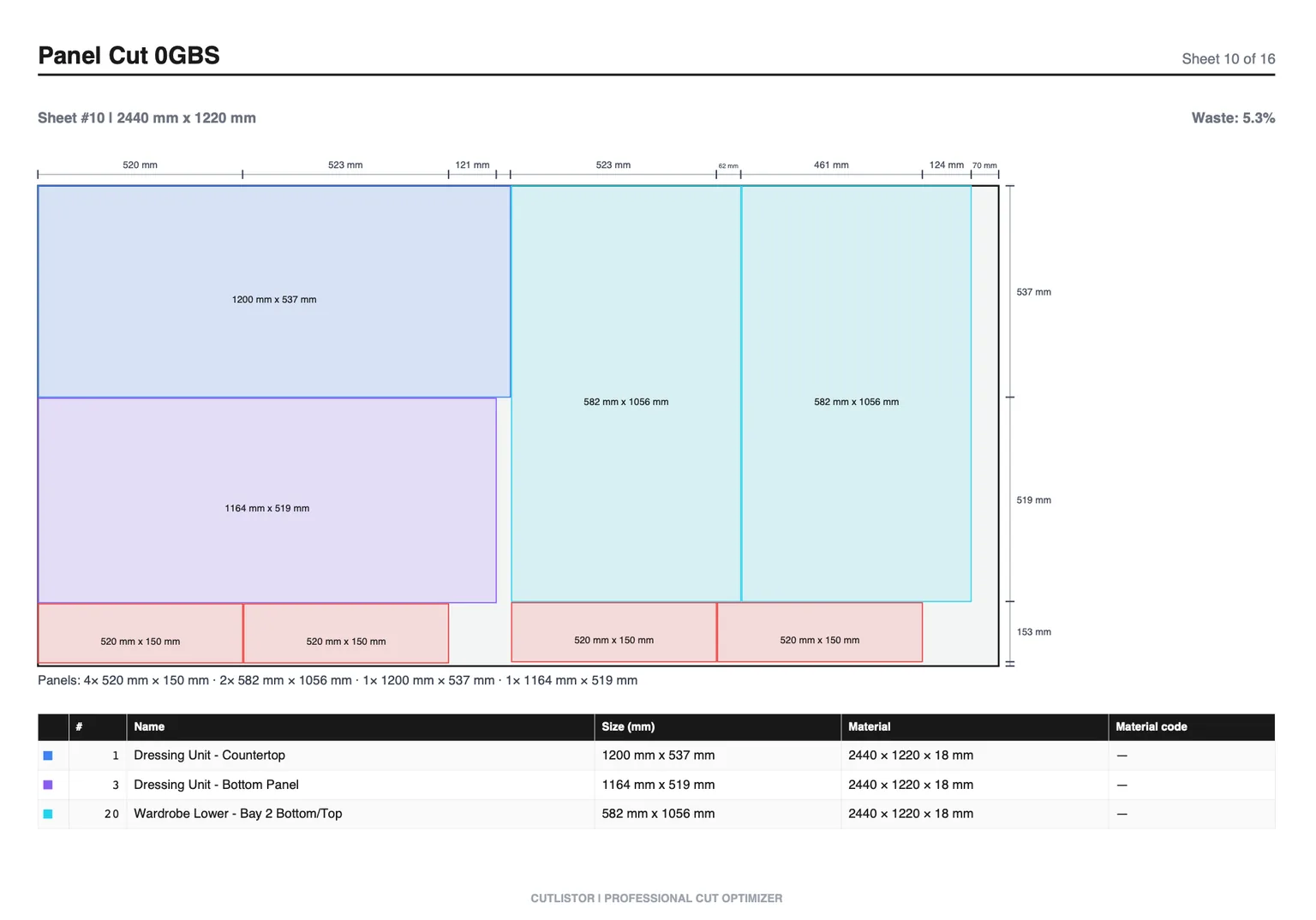
The risk is mix-ups: two identical gables from different cabinets look the same until install. Strong labeling and staging make batching profitable. Weak labeling makes it expensive.
When Batching Pays Off
| Situation | Batch? | Why |
|---|---|---|
| Eight identical 600 mm bases, same melamine | Yes | Max yield, simple labels |
| Kitchen run, mixed widths, same SKU | Yes | Nest once across the run |
| Paint-grade boxes + walnut doors | Partial | Separate nests per material |
| Rush vanity + next-month pantry | No / careful | Staging and cash tied up |
| Face-frame maple + melamine boxes | Partial | Sheet nest + linear nest |
Step 1: Group by Material SKU, Not by Cabinet Alone
Build one master list per SKU: 18 mm white melamine, 18 mm woodgrain, 6 mm birch back, door slab stock. Cabinets become a column (CAB-01, CAB-02), not separate optimizer files that ignore shared remnants.
- Part name
- Width × height (or length for linear)
- Quantity
- Material / thickness
- Cabinet ID
- Grain lock
- Edge-band note
Step 2: Prefix Labels With Cabinet IDs
Rename SIDE to B12-GABLE-L and SHELF to B12-SHELF-1. The same prefix must appear on the nest PDF, the edgebander ticket, and the assembly cart. For kitchens, map IDs to the elevation labels the installer uses.
Worked Example: Three Bases, One Melamine Nest
| Part | 600 mm qty/size | 800 mm | 900 mm | Batch total |
|---|---|---|---|---|
| Gables | 2 @ 560×720 | 2 @ 560×720 | 2 @ 560×720 | 6 @ 560×720 |
| Bottoms | 1 @ 564×560 | 1 @ 764×560 | 1 @ 864×560 | 3 unique |
| Stretchers | 2 @ 564×100 | 2 @ 764×100 | 2 @ 864×100 | 6 parts |
| Shelves | 1 @ 564×540 | 1 @ 764×540 | 1 @ 864×540 | 3 unique |
Identical gables batch as quantity 6. Bottoms stay unique widths but share the same nest and SKU. Run backs on 6 mm stock in a second nest. Nest doors only after overlay sizes are locked.
Step 3: Nest Once Per SKU With Kerf and Grain
Load the batched rows into the sheet optimizer. Set kerf to the panel saw or CNC. Lock grain on woodgrain ends and door blanks. Compare sheet count to three separate single-cabinet nests to prove the savings for the quote.
No account is needed to try it, and the free tier does not count the optimizing itself — parts can be edited and re-nested indefinitely. It counts finished PDFs and new projects, at 3 a day. Lists are limited to 20 rows, CSV and XLSX uploads to 5 rows per file, and work does not survive the session.
Pro ($12/mo) helps when you save the kitchen project and export DXF for CNC. The browser tool nests rectangles; it is not full cabinet design software.
Step 4: Batch Face Frames and Cleats Separately
Rails, stiles, nailers, and scribe stock use linear optimization. Batch all maple face-frame sticks for the run in one linear job with the same cabinet ID prefixes.
Step 5: Stage and Assemble Without Mixing
As parts leave the saw, sort into labeled carts or shelves by cabinet ID. Assemble one ID at a time or by station, but never leave unlabeled white panels in a shared pile overnight.
FAQ
Can I batch wall and base cabinets together?
Yes on the same SKU if finishes match. Heights differ, so labeling matters more. Keep door blanks separate if grain matching across a run requires elevation order.
Should fillers wait for field measure?
Often yes. Batch the known casework first. Cut fillers after final site measure, or leave oversized blanks in the nest if your process trims on site.
Is this different from batching furniture projects?
The material logic is the same. Cabinets add stricter ID discipline because many parts are near-identical rectangles.
Conclusion
Batching cabinet cut lists raises yield when you group by SKU, prefix every label, nest once, and stage by cabinet ID. That is how kitchens and multi-box jobs stay profitable.
Combine your next three boxes in Cutlistor and compare sheet count to nesting them alone.