Article
Cut List Software for Kitchen Cabinets: Nesting Full Runs Without Waste
Cutlistor Team4 min read
Introduction
Kitchen cabinet jobs stress cut list software harder than a single vanity. You get dozens of panel SKUs, mixed thicknesses, grain-locked doors and gables, leftover sticks for toe kicks, and last-minute field changes on island depth.
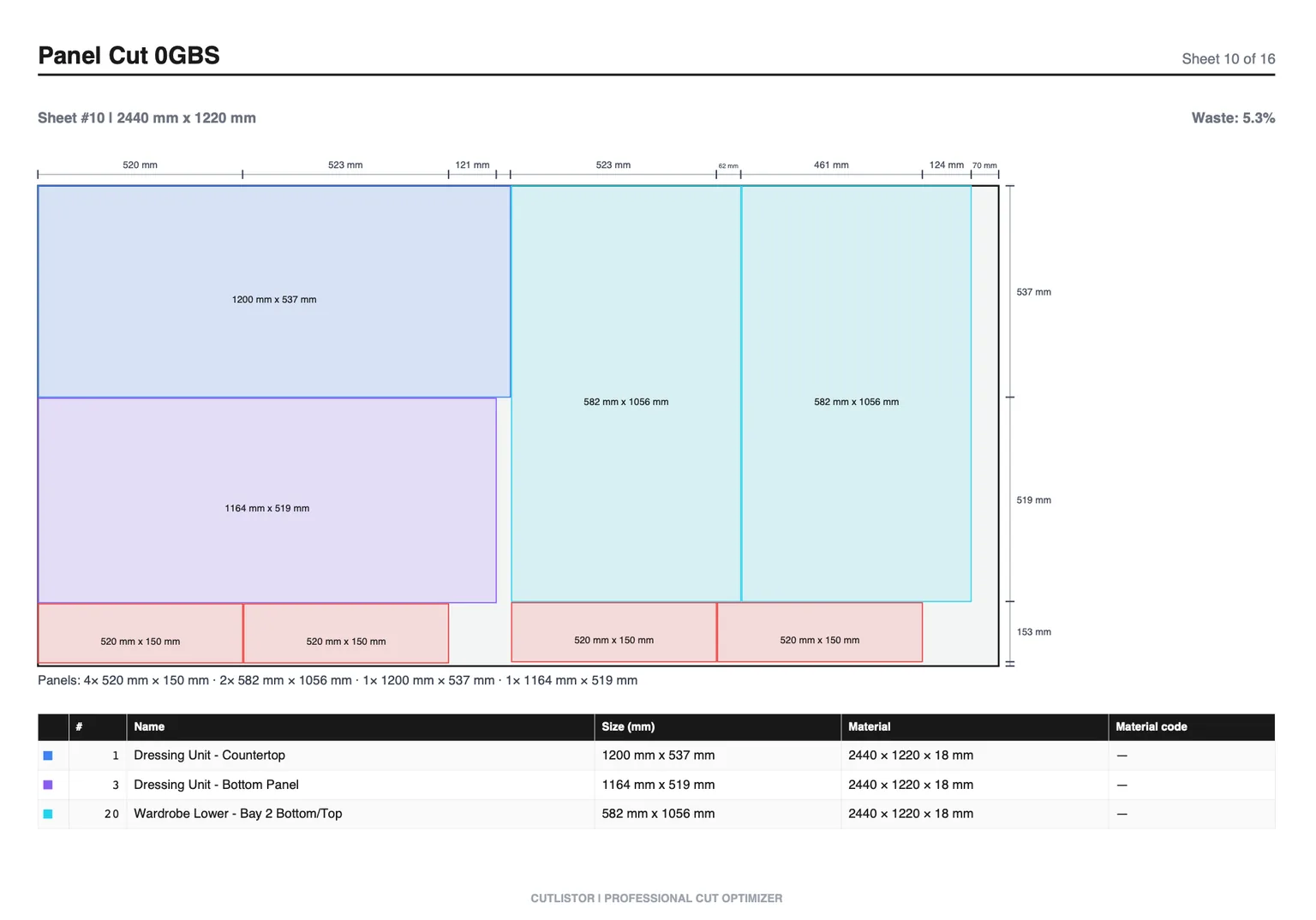
This guide maps what kitchen shops need from cut list software, how Cutlistor for cabinet making fits a kitchen workflow, and when you still need Cabinet Vision or Mozaik for design and machining.
Kitchen-Specific Software Requirements
| Kitchen element | Stock type | Software need |
|---|---|---|
| Gables, bottoms, shelves | Melamine / plywood sheet | 2D nest + kerf + grain |
| Backs | Thinner sheet or hardboard | Separate material group |
| Doors / drawer fronts | Sheet or slab | Grain lock, label clarity |
| Toe kicks, cleats, scribe | Linear sticks | 1D optimizer |
| Face frames | Hardwood / plywood strips | 1D + waste tracking |
| Appliance fillers | Sheet offcuts | Remnant-aware planning |
Kitchen Workflow: Design → BOM → Nest → Cut
Most profitable kitchens already have a design path. Cut list software should plug in after sizes exist, not force a second design tool.
- Design in Cabinet Vision, Mozaik, SketchList, SketchUp, or even elevations + Excel
- Export or build a BOM with length, width, qty, material, grain
- Import into Cutlistor (or nest inside the design suite if that nest is good enough)
- Set kerf for the panel saw, track saw, or CNC bit
- Print PDF layouts; optionally export DXF on paid Cutlistor for rectangular CNC
- Keep Excel/design file as the revision source of truth
Using Cutlistor on Kitchen Jobs
Cutlistor shines when the kitchen BOM already exists and you need yield plus floor plans quickly. Use the sheet optimizer for case parts and the linear optimizer for frames, cleats, and trim.
Worth knowing before you test it: the free tier never charges you for iterating. Editing part sizes and re-nesting are unlimited. Only PDF exports and new projects count, 3 of them a day. Lists are capped at 20 rows, CSV and XLSX imports at 5 rows per file, and no work carries over between sessions.
Full kitchens usually exceed free CSV and row caps. Plan on Pro ($12/mo or $99/yr) for saved projects and larger imports. Cutlistor does not replace hinge boring, room rendering, or true-shape CAM.
- 3 PDF exports per day (editing and re-optimizing unlimited)
- 20 part rows per session
- CSV/XLSX import up to 5 rows
- 3 AI plan scans and 3 3D CAD imports per month on the free tier
- No saved projects until you sign up for a paid plan
Other Tools Kitchen Shops Shortlist
| Tool | Kitchen role | Watch-out |
|---|---|---|
| CutList Plus fx | Desktop nest for full runs | Install / license model |
| CutList Optimizer | Quick browser panel nest | Import and revision depth |
| OptiCutter | Online reports for buying sheets | Free access limited |
| MaxCut | Desktop labels and cutting | Browser collaboration |
| Cabinet Vision / Mozaik | Design + machining + lists | Cost; overkill for nest-only |
| Excel alone | Quote + BOM | No real nesting |
Frameless vs Face-Frame Kitchens
Frameless kitchens lean harder on sheet nesting and edge banding lists. Face-frame kitchens add a serious linear stick problem. Your software should cover both if you build both methods.
Buying Reality Check for Shops
When you evaluate tools around “Cut List Software for Kitchen Cabinets: Nesting Full Runs Without Waste”, score them against last month’s real jobs—not a vendor feature matrix. Count how many sheet sizes you buy, whether grain lock matters on your doors, and whether your office lives in Excel or a design suite.
For kitchen work the deciding question is how often the layout changes. If openings move during the job, a browser optimizer you can re-run in seconds beats a design seat you have to reopen and re-post. If the same twelve cabinet types repeat every week, a library-driven design suite starts to earn its licence.
Test it on one real kitchen, start to finish, and record the sheet count you predicted against the sheet count you consumed. The gap between those two numbers tells you more than any feature list.
Record the choice in your kitchen job template so the next order starts from a settled workflow instead of a fresh opinion.
- Can you re-nest after a mid-job revision without rebuilding the BOM?
- Do PDF plans match how your sawyers actually stage sheets?
- Are free-tier caps honest enough for a real pilot week?
- Does the tool do sheet and linear, or only one of them?
Conclusion
Cut list software for kitchen cabinets must nest high part counts across materials, respect grain, pack sticks, and survive field revisions. Cutlistor is a strong browser layer for that planning job. Keep design suites when you need rooms and machining; keep Excel for quotes.
Start with the kitchen cabinet cut list calculator or drop a BOM into the free sheet optimizer and measure sheet count before you buy materials.