Article · 6 min read
OptiCutter alternative built for everyday build workflows
Most furniture, cabinetry, and trim crews need fast iterations from SketchUp/Fusion meshes, emailed PDF elevations, spreadsheets of parts, grain-safe plywood packs, readable PDF diagrams, molding runs tied to kerf-aware linear cuts — and, when CNC is in the loop, DXF handoff without retyping nests. Cutlistor covers that daily loop, including DXF export for sheet and linear layouts. OptiCutter is another browser-hosted optimizer families have used for years; it still excels when multilingual UI mandates, a marketed planner API, or specific spreadsheet egress outweigh design-to-cut automation. Tables below spell out exactly where Cutlistor wins for typical bench work — and where OptiCutter remains worth a look.
Looking for the OptiCutter login?
You are on Cutlistor, not OptiCutter. If you already have an OptiCutter account, sign in at opticutter.com - we cannot access, reset, or migrate accounts on their service, and nothing on this page changes anything about yours.
If you landed here because you were signing in to run one quick layout, it is worth knowing that Cutlistor's sheet and linear optimizers need no account at all. Enter stock and parts, run the layout, export a PDF - the free tier works anonymously in the browser, and an account only becomes necessary once you want projects saved between sessions, stock inventory, or DXF export.
- OptiCutter account help, password resets, and billing: opticutter.com
- Cutlistor free sheet and linear optimizers: no sign-in, no email required
- Cutlistor account: needed for saved projects, stock inventory, team seats, and DXF export
- Nothing carries over automatically between the two - part lists move via CSV or XLSX export and import
Feature comparison - daily workshop workflows
These capabilities map to how builders actually bounce between office work and blade time. Rows rely on opticutter.com public marketing versus Cutlistor’s shipped product as of authoring time.
| What shops ask for | Cutlistor | OptiCutter (homepage claims) |
|---|---|---|
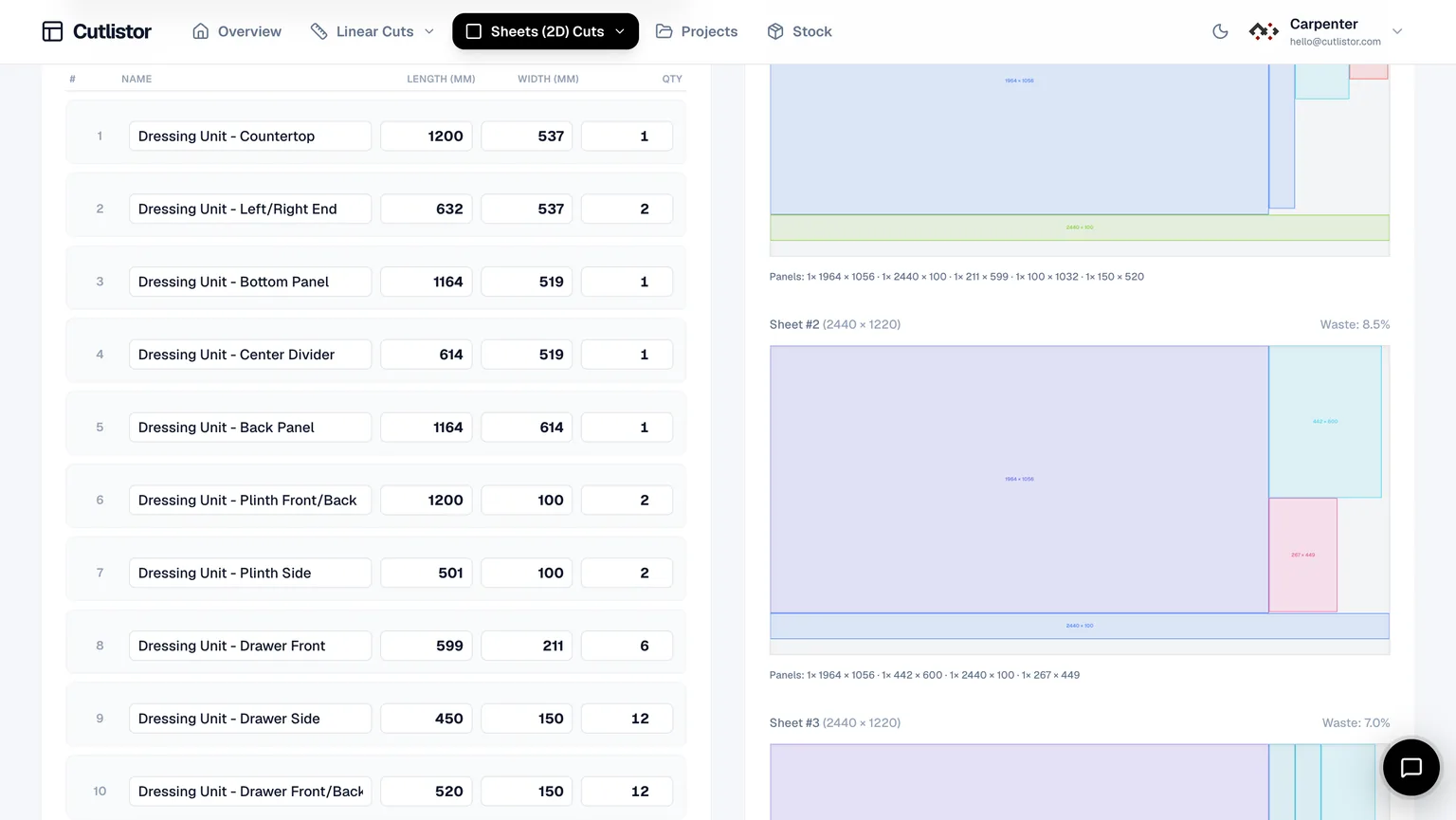
| See layouts change instantly while editing stock/parts | Yes - free sheet + linear calculators redraw nesting diagrams and yield as you edit rows | Cloud-hosted solves; workflows advertise an explicit Calculate step rather than co-editing live diagrams |
| Multiple sheet optimization styles (rips, yield grids, CNC-style routing, tidy packs) | Yes - selectable methods baked into the sheet optimizer UX | Advertises multiple optimization algorithms behind the solver; UI differs - verify in-product |
| Bring 3D models (SketchUp, Fusion, Blender, etc.) straight into BOM rectangles | Yes - glTF / GLB / Collada import with mesh-to-panel pipelines (persisted uploads scale with billing tier) | Not surfaced on homepage as a marquee feature |
| Import PDF elevations, sketches, or photos via AI-assisted parsing | Yes - documented AI intake on paid quotas (helps skip manual typing) | Not surfaced on homepage as a marquee feature |
| Import spreadsheet BOM rows (CSV / XLSX) into calculators | Yes - paired sample templates ship with both calculators | Spreadsheet tooling is part of broader cut list tooling (paths such as spreadsheet import/export exist) |
| Kerf-aware linear + rectangular nesting with annotated shop PDFs | Yes - grain callouts supported on sheets where enabled; arrows + BOM context on exported PDF packs | Yes - emphasizes printable/PDF reports for cutting plans |
| DXF export from nesting for CAM post-processors | Yes - exports sheet and linear layouts as DXF with CUT, STOCK, and LABEL layers | Paid tiers advertise DXF alongside spreadsheets |
| Saved projects, inventory, multi-material pricing, edge banding, team seats | Yes - dashboard experience after sign-in | Paid tiers advertise plan history, material groups, cost/priority objectives, roll stock, etc. |
Cutlistor's free tier meters something different: editing parts and re-optimizing the layout are unlimited, and only PDF export and starting a new project count against a daily allowance of 3. Cut lists are capped at 20 rows, CSV and XLSX import is limited to 5 rows per file, and nothing is saved between sessions. Quote OptiCutter limits from their pricing table before enterprise migrations.
Feature comparison - automation & factory edge cases
These rows matter for CNC vendors, multilingual plants, or software teams - not for every weekend warrior choosing between two browser nesting tabs.
| Specialist requirement | Cutlistor | OptiCutter (homepage claims) |
|---|---|---|
| Server-to-server optimization via REST quotas | Primarily interactive software - not marketed like OptiCutter’s billed API SKU | Offers enterprise API plan with billed request buckets |
| Localized UI languages for floor tablets | English-led experience today - multilingual storefront not emphasized like OptiCutter | Lists nine selectable languages for non-English shops |
If your procurement packet demands a planner REST API or nine-language UI, vet OptiCutter’s SKU directly. Bench-first and CNC shops that need DXF from nesting can compare Cutlistor and OptiCutter on a real BOM.
Why Cutlistor feels faster for prototype-to-install jobs
Cutlistor assumes you revise dimensions obsessively - a client changes fridge panels, toe kicks widen, MDF sheets swap mid-quote. Separate sheet and linear tools keep jargon honest (grain rotates on plywood, kerf ladders on bundled linear cuts) while previews stay synchronized with BOM edits.
Pair that with ingest paths from actual design artifacts (CAD meshes, PDF/sketch AI, spreadsheets) instead of forcing another manual transpose step every time Autodesk or SketchUp updates.
Neither tool replaces verifying critical dims at the blade; Cutlist simply removes busywork upstream so crews spend minutes sawing - not retyping rectangles.
Try both fairly (15-minute bake-off)
Import the same BOM, match kerf, lock grain wherever relevant, toggle Cutlistor’s sheet methods versus OptiCutter’s solver presets, compare PDF readability under shop lighting, export DXF from both if CNC is in your loop, repeat after nudging widths ±2 mm - the tool that survives edits wins your subscription dollars.
Benchmark API/export needs against vendor docs, not blog speculation.
Trademark independence
OptiCutter remains a trademark of its owner (Devtica s.r.o. per their site contact block). Cutlistor is unrelated; we summarize optics from public positioning so you pick software deliberately.
FAQ
- For an everyday woodworking shop is Cutlistor better than OptiCutter?
- If your week mixes plywood packs, MDF casework, laminated panels, spreadsheets from vendors, SketchUp meshes, emailed PDF elevations, constant dimension tweaks — and you want selectable sheet layout styles plus CAD or AI ingestion — Cutlistor is purpose-built for that loop with instant previews, annotated PDF packs, and DXF export when CNC needs solver-native geometry. Choose OptiCutter when multilingual UI breadth, marketed planner APIs, or specific spreadsheet egress dominate procurement over Cutlistor’s real-time editing and design ingest.
- What does Cutlistor give me OptiCutter does not loudly promote?
- First-class hooks from design files: glTF/GLB/Collada mesh import into panels, AI-assisted PDF/sketch intake, real-time layout refresh while editing free calculator rows, explicit multi-method sheet strategies you can flip without waiting on cloud batch runs, and DXF export for sheet and linear cut layouts.
- When is OptiCutter still the rational pick?
- When IT requires thousands of unattended optimizations via their REST API SKU, your plant mandates the nine-language UI optics OptiCutter advertises, or you need cost/priority objective tooling beyond Cutlistor’s current scope — all valid reasons to favour their stack despite losing Cutlistor’s CAD/AI immediacy and live layout refresh.
- Does Cutlistor export DXF for CNC?
- Yes. Export sheet and linear cut layouts as DXF files with closed polylines — ready for laser cutters, routers, and CAM software.
- Is Cutlistor free?
- Free calculators ship without signup; expect rows caps plus a modest daily throttle on PDF exports and starting brand-new calculator sessions - see the dialogs inside each optimizer. Signing in unlocks saved projects, higher limits, AI/CAD ingestion, dashboards, and paid upgrades billed through Stripe - see Pricing on cutlistor.com.
- Is Cutlistor the same company as OptiCutter?
- No - different vendors, unrelated codebases. Use the comparison tables above instead of relying on hearsay threads.
Related alternatives
- CutList Optimizer style workflow in CutlistorEvaluate an alternative to classic online panel cut list optimizers: Cutlistor’s free browser nesting, kerf-aware PDFs, and linear stock tool for mixed jobs.
- Cutlist Evolution style optimization in the browserCompare part limits, pricing models, linear cutting and CNC export across the main browser optimizers, plus where Cutlist Evolution still wins.
- Real Cut 1D alternative for linear stockCompare Cutlistor with Real Cut 1D-style linear optimization: browser access, kerf-aware PDFs, and sheet plus linear tools in one product.
- OTR Cutlist alternativeOTR Cutlist alternatives compared for 2026: free browser sheet and linear optimizers with real-time layouts, kerf control, DXF export for CNC and PDF cut plans.