Article
Best Cabinet Cut List Software in 2026: Nesting, Imports, and Shop Plans Compared
Cutlistor Team5 min read
Introduction
Cabinet cut list software turns a BOM of gables, shelves, backs, doors, and face-frame sticks into nestable parts, sheet counts, and floor-ready cut plans. The buy decision is commercial: which tool reduces sheet waste, survives mid-job revisions, and fits your design stack without forcing a full Cabinet Vision migration.
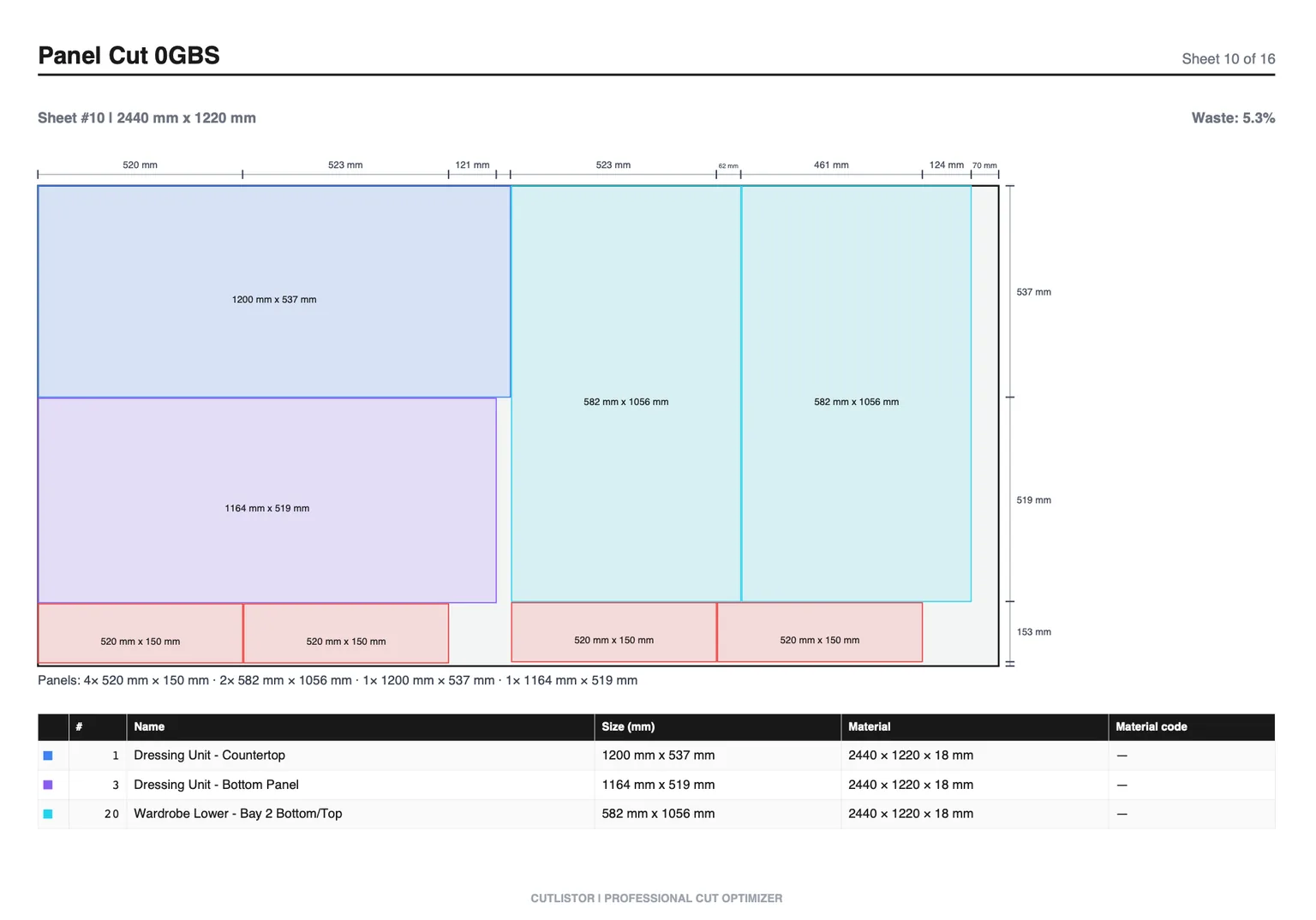
This roundup compares dedicated cut list and nesting tools for cabinet making, with clear limits: Cutlistor is not a room planner or true-shape CAM package. We cover browser optimizers, desktop classics, and when design suites own the workflow instead.
What Counts as Cabinet Cut List Software
| Category | Primary job | Cabinet examples |
|---|---|---|
| Cut list / nesting | Pack panels and sticks, yield, PDF/DXF plans | Cutlistor, CutList Plus fx, CutList Optimizer, OptiCutter, MaxCut |
| Cabinet design | 3D rooms, construction methods, CNC machining | Cabinet Vision, Mozaik, SketchList 3D, SketchUp + OpenCutList |
| Spreadsheet BOM | Quotes, formulas, client line items | Excel, Google Sheets |
Buying Criteria for Cabinet Shops
| Shop need | Must-have | Nice-to-have |
|---|---|---|
| Kitchen casework | 2D nest + grain + PDF | AI plan scan, saved projects |
| Face-frame shops | Sheet + 1D linear in one workflow | Stock inventory |
| CNC panel shops | DXF export, router-friendly layouts | True-shape CAM (usually separate) |
| Excel-first offices | XLSX import, column mapping | 3D model takeoff |
Best Cabinet Cut List Software Compared
Below are the tools cabinet shops actually shortlist when the search intent is buy, not hobby DIY.
1. Cutlistor
Cutlistor is browser-based sheet and linear cut list software aimed at material planning: nest cabinet panels, pack sticks, import spreadsheets, and export PDF cut plans without installing desktop nesting software.
Worth knowing before you test it: the free tier never charges you for iterating. Editing part sizes and re-nesting are unlimited. Only PDF exports and new projects count, 3 of them a day. Lists are capped at 20 rows, CSV and XLSX imports at 5 rows per file, and no work carries over between sessions.
- 3 PDF exports per day (editing and re-optimizing unlimited)
- 20 part rows per session
- CSV/XLSX import up to 5 rows
- 3 AI plan scans and 3 3D CAD imports per month on the free tier
- No saved projects until you sign up for a paid plan
- Paid plans from $12/mo ($99/yr yearly); Business $25/mo; Team $99/mo (5 seats)
- DXF export on paid plans; AI plan scans and 3D CAD import with plan quotas
- Not a full cabinet design suite and not true-shape CAM for irregular parts
Best for: shops that design in CAD or spreadsheets and need fast nesting, yield, and floor PDFs at transparent SaaS pricing.
2. CutList Plus fx
CutList Plus fx is a long-running desktop cut list and nesting product many cabinet shops already know. It is strong for shops that want offline Windows software and established report styles.
Compared with Cutlistor, expect install/licensing tradeoffs versus browser access, and evaluate import and linear workflows against your current BOM process. See our dedicated comparison for a feature-level split.
3. CutList Optimizer (cutlistoptimizer.com)
CutList Optimizer is a familiar browser nesting tool for rectangular sheet parts with kerf, grain, and PDF reports. Many small cabinet shops start here because the free tier covers light jobs.
Limits show up on revision loops (manual recalculate), spreadsheet import depth, and mixed sheet-plus-linear workflows compared with Cutlistor.
4. OptiCutter
OptiCutter is an online optimizer with polished reports and CSV-friendly workflows. It suits shops evaluating subscription nesting with clean presentation for clients or purchasing.
Weigh free-tier access, real-time edit speed, and CAD/sketch import against Cutlistor if your office lives in Excel BOMs and mid-quote revisions.
5. MaxCut
MaxCut targets shops that want desktop cutting software with labeling and shop-floor oriented outputs. It can be a fit when operators prefer installed Windows tools tied to saw workflows.
Compare browser collaboration, pricing transparency, and linear nesting needs before standardizing.
6. Cabinet Vision, Mozaik, SketchList (design layer)
These are cabinet design platforms. They can generate cut lists and, in some configurations, machining output. They are not drop-in substitutes for a lightweight browser optimizer when you only need yield from an Excel BOM.
Buy them when design, construction methods, and CNC machining are the product. Pair them with a dedicated optimizer only if your design export path still needs a better nest for shear breakdown or estimating.
Feature Comparison Matrix
| Capability | Cutlistor | CutList Plus fx | CutList Optimizer | OptiCutter | MaxCut |
|---|---|---|---|---|---|
| Deployment | Browser | Desktop | Browser | Browser | Desktop |
| Sheet nesting | Yes | Yes | Yes | Yes | Yes |
| Linear nesting | Yes | Yes | Basic | Varies | Varies |
| CSV/XLSX import | Yes | Yes | Limited | Yes | Yes |
| PDF cut plans | Yes | Yes | Yes | Yes | Yes |
| DXF for CNC | Paid | Varies | Varies | Varies | Varies |
| Free tier | 3 PDF exports/day (optimizing unlimited), 20 rows, nothing saved | Trial/legacy | Yes (limits) | Limited | Trial |
| Full cabinet design | No | No | No | No | No |
Cutlistor Pricing Snapshot
Published Cutlistor tiers: Free (limits above), Pro $12/mo or $99/yr, Business $25/mo, Team $99/mo with 5 seats. DXF, saved projects, and higher AI/3D quotas sit on paid plans.
Who Should Buy What
| You should choose... | When... |
|---|---|
| Cutlistor | You need browser sheet + linear nesting, Excel import, PDF plans, and transparent SaaS pricing |
| CutList Plus fx | You prefer established desktop nesting and existing shop reports |
| CutList Optimizer | You want a simple free browser nest for smaller panel lists |
| OptiCutter / MaxCut | You shortlist on reporting style or desktop saw workflows |
| Cabinet Vision / Mozaik / SketchList | You need design, construction methods, and machining, not just nesting |
Conclusion
The best cabinet cut list software is the one that nests your real BOMs with kerf and grain, prints plans the floor trusts, and fits next to the design tools you already use. Cutlistor wins for browser sheet-plus-linear planning, spreadsheet import, and clear pricing. It loses when you need full cabinet design or true-shape CAM.
Start on the cabinet making hub, run a sample kitchen BOM through the free optimizer, then upgrade only if you need saved projects, DXF, or higher import limits.