
Article
How to Optimize a Cabinet Cut List
Cutlistor Team4 min read
Introduction
A cabinet cut list that only totals part sizes leaves money on the table. Optimization turns that list into a sheet PO you can defend: fewer full sheets purchased, less scrap trucked out, and quotes that match what the floor actually cuts.
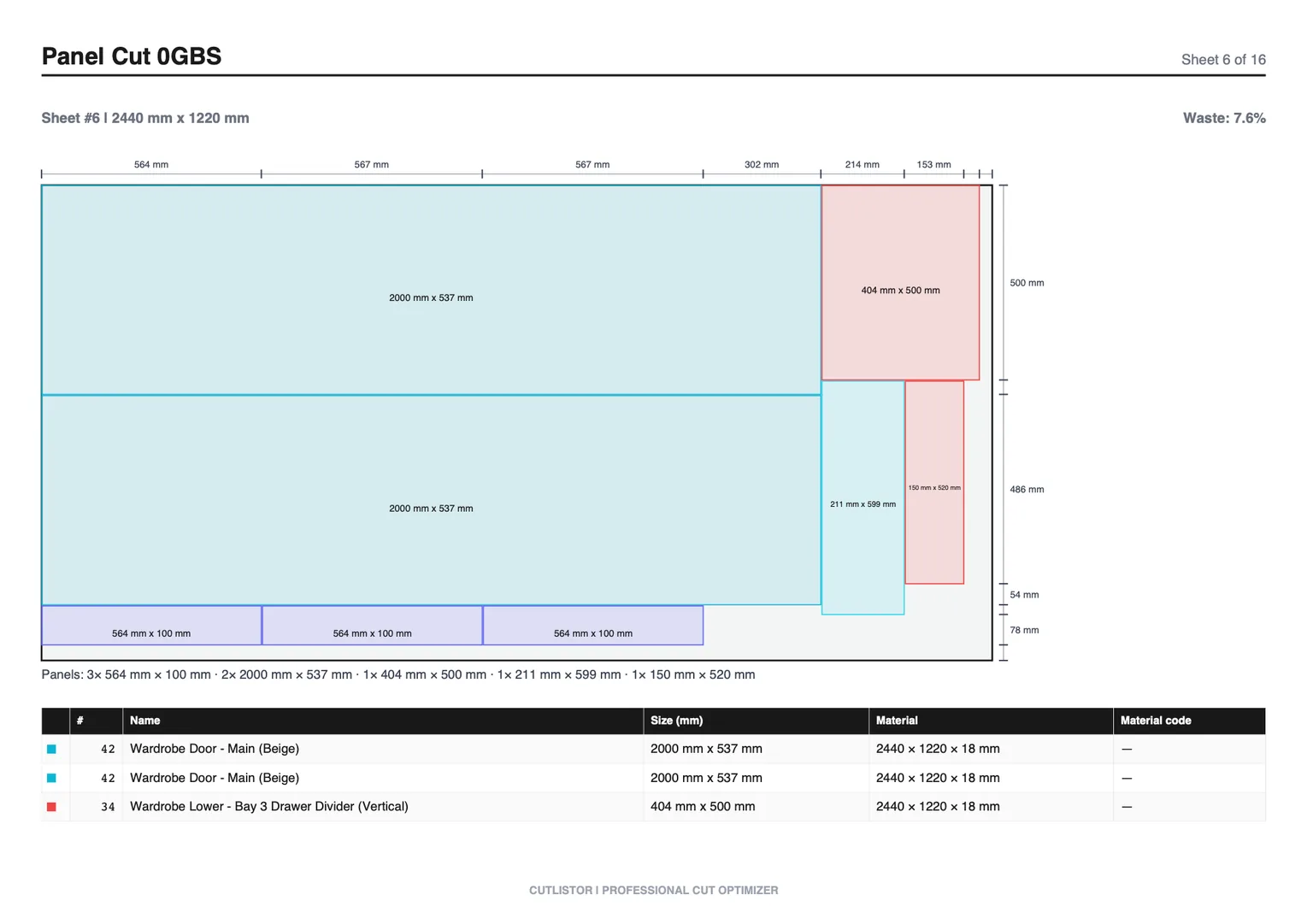
This guide walks through a shop-ready process: clean the BOM, set stock and kerf, lock grain on show faces, nest before you buy, and compare manual sheet counts to an optimized layout. The same habits improve margin on kitchens, vanities, and commercial casework.
Start from the cabinet making hub if you need the full Cutlistor workflow for panels and linear trim on one job.
Why cabinet cut list optimization pays
Sheet goods dominate material cost on painted or laminated casework. A layout that wastes one extra 4×8 sheet on a mid-size kitchen can erase the profit on several boxes. Gains come from three places: accurate sheet count for purchasing, honest yield for quoting, and fewer emergency pickups mid-install.
- Purchasing: buy the sheets the nest proves you need, not a round-up guess
- Quoting: price waste you cannot reuse instead of hoping remnants cover it
- Throughput: one PDF cut plan per material reduces layout time on the saw
- Margin: 5 to 12% sheet savings on typical shops compounds across weekly jobs
Step 1: Clean the cabinet BOM
Optimization cannot fix a messy list. Merge identical panels, separate materials, and flag grain-critical parts before you open the nest.
- One row per unique width × height × material × thickness
- Split white melamine, woodgrain melamine, plywood, and MDF into different material groups
- Mark show faces (doors, exposed gables, finished backs) for grain lock
- Include quantity multipliers for batch runs instead of duplicating rows by hand
Step 2: Enter real stock sizes and kerf
| Input | Common mistake | Shop fix |
|---|---|---|
| Stock size | Using nominal 4×8 for every SKU | Enter supplier SKU: 4×8, 5×5 Baltic, 2750×1830, etc. |
| Kerf | Leaving 0 mm for speed | Measure saw or bit kerf on scrap; typically 2.5 to 3.5 mm |
| Trim margin | Nesting into damaged mill edges | Shrink usable nest window by trim allowance |
| Material mix | Plywood and MDF on one nest | Separate nests per material code |
Step 3: Lock grain, then free rotation on hidden parts
Visible faces need grain direction locked so doors and exposed ends look intentional. Hidden shelves, cleats, and paint-grade interiors can usually rotate, which often saves a full sheet. Decide per part, not for the whole job.
Worked example: base cabinet run
| Method | Sheets purchased | Approx. yield | PO impact (example $85/sheet) |
|---|---|---|---|
| Manual rip-and-crosscut guess | 11 | 68% | $935 |
| Optimized nest, grain locked on sides | 9 | 81% | $765 |
| Difference | −2 sheets | +13 pts | $170 material saved |
Two sheets saved on one kitchen run is not unusual when the manual list padded for fear of shorting the job. Put that savings next to labor: the nest also produced one PDF the sawyer could follow without redrawing the layout on a whiteboard.
Step 4: Nest before you send the sheet PO
Most free optimizers meter the optimizing. Cutlistor does not — you can tweak parts and re-run the layout as often as a job needs. The daily ceiling of 3 applies to PDF exports and new projects only. Expect a 20-row cut list limit, a 5-row ceiling on each CSV or XLSX import, and no saved projects.
Cabinet cut list optimization checklist
Use this before every material PO:
- BOM cleaned and split by material
- Supplier stock sizes entered (not only nominal 4×8)
- Kerf measured for the saw or CNC on this job
- Grain locked on show faces; rotation allowed on hidden parts
- Sheet nest complete; sheet count written on the quote
- Usable offcuts from prior jobs entered as stock when available
- PDF cut plan ready for the floor
FAQ
Does a cut list optimizer replace cabinet design software?
No. Design software draws boxes and hardware. An optimizer answers purchasing and layout questions from the finished sizes. Most shops export a BOM from design software, then nest in Cutlistor or a similar tool.
How much sheet savings is realistic?
Many cabinet shops see one to three sheets saved per mid-size kitchen versus padded manual lists, depending on door grain rules and stock SKUs. Track yield percent over a month rather than judging one odd job.
Can I try optimization without buying software?
Yes. Cutlistor's free sheet optimizer runs in the browser. Re-optimize while you edit the list as much as you need; PDF export and new projects are what count against the daily free allowance.
Conclusion
Optimizing a cabinet cut list is a discipline: clean BOM, real stock, measured kerf, smart grain rules, and nest-before-buy. Do that and sheet POs stop being guesses that either short the install or bury margin in scrap.
Run your next kitchen or vanity pack through Cutlistor, compare sheet count to your usual pad factor, and put the difference on the quote where it belongs.