Article
Cabinet Cut List Software for CNC: Nesting, DXF, and Honest Limits
Cutlistor Team4 min read
Introduction
CNC cabinet shops often search for cut list software when they really need two layers: a nest that places rectangles efficiently, and a CAM/post path that drills, dados, and labels on the machine. Mixing those layers causes bad buys.
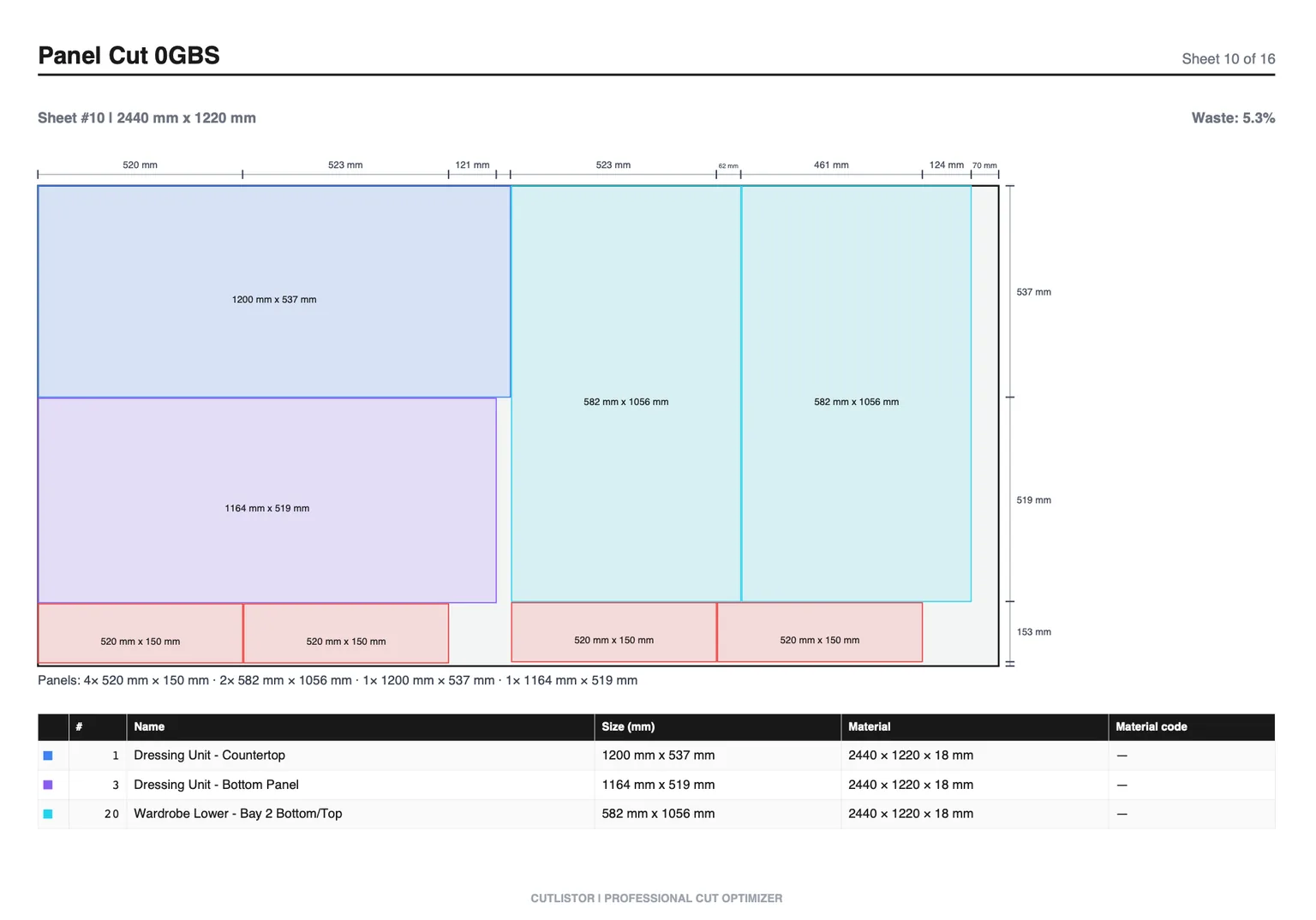
This guide explains where browser cut list tools like Cutlistor help CNC cabinet makers, what DXF export actually gives you, and when design-suite machining or industrial CAM is mandatory.
Two Layers: Rectangular Nest vs CNC Machining
| Layer | Job | Typical tools |
|---|---|---|
| Cut list / rectangular nest | Pack panels on sheets, yield, PDF/DXF rectangles | Cutlistor, CutList Plus, OptiCutter, MaxCut |
| Cabinet CNC / CAM | Toolpaths, boring, dados, labels, vacuum pods | Cabinet Vision, Mozaik, proprietary CNC software |
| True-shape nest | Irregular outlines, advanced common-line | Industrial nesting (usually not cabinet boxes) |
When Cutlistor Helps CNC Cabinet Shops
Use Cutlistor when you need sheet count and rectangular layouts fast: estimating, shear/beam-saw breakdown before the CNC, or rectangular DXF handoff on paid plans.
The free tier draws its line at output, not at effort. Rearranging parts and re-running the nest as many times as you like costs nothing; the daily allowance of 3 is spent only when you export a PDF or open a new project. Sessions hold up to 20 part rows, CSV and XLSX files import up to 5 rows each, and closing the tab clears the work.
DXF export is a paid feature. Free tier has no DXF and no saved projects. Pro starts at $12/mo or $99/yr.
- 3 PDF exports per day (editing and re-optimizing unlimited)
- 20 part rows per session
- CSV/XLSX import up to 5 rows
- 3 AI plan scans and 3 3D CAD imports per month on the free tier
- No saved projects until you sign up for a paid plan
- Router/CNC-friendly layout methods for rectangular nests
- Not a substitute for hinge boring, dados, or label printers on the CNC
- Not true-shape CAM for irregular parts
DXF Reality Check
| Output | Cutlistor | Cabinet design CNC suite |
|---|---|---|
| PDF cut plan | Yes | Often |
| Rectangular DXF nest | Paid | Often via nest module |
| Hinge / shelf pin boring | No | Yes |
| Dados / grooves | No | Yes |
| Part labels / barcodes | PDF labels | Machine-integrated often |
| True-shape irregular nest | No | Sometimes / separate CAM |
Hybrid Shop Workflows That Work
- Estimate sheet count in Cutlistor during quoting; machine in the design suite after the job wins
- Nest rectangles in Cutlistor for a beam saw; send labeled stacks to the CNC for boring only
- Import Excel BOM → Cutlistor nest → paid DXF → your CAM accepts rectangles
- Keep Mozaik/Cabinet Vision as system of record for construction; use Cutlistor when that nest is slow for quick what-ifs
Other CNC-Adjacent Cut List Tools
CutList Plus fx and MaxCut are common in shops that want desktop cutting software near the saw. CutList Optimizer and OptiCutter cover browser rectangular nests. None of them replace a full cabinet CNC suite by themselves; compare DXF and labeling features against your controller.
Buying Reality Check for Shops
When you evaluate tools around “Cabinet Cut List Software for CNC: Nesting, DXF, and Honest Limits”, score them against last month’s real jobs—not a vendor feature matrix. Count how many sheet sizes you buy, whether grain lock matters on your doors, and whether your office lives in Excel or a design suite.
The split for CNC shops is between nesting and machining. A browser optimizer gets you accurate sheet counts and DXF geometry quickly; it will not generate boring patterns or toolpaths. If the bottleneck is at the router rather than at the panel saw, buy CAM, not a nester.
Run one job all the way to the router before committing: import, nest, export DXF, machine it. Most CNC integration problems surface at the post, not at the nest, and a demo file will not reveal them.
Document the nesting-to-toolpath handoff in your CNC setup notes so the next program is not rebuilt from memory.
- Can you re-nest after a mid-job revision without rebuilding the BOM?
- Do PDF plans match how your sawyers actually stage sheets?
- Are free-tier caps honest enough for a real pilot week?
- Does the tool do sheet and linear, or only one of them?
Conclusion
Cabinet cut list software for CNC is valuable when rectangular nesting, yield, and DXF handoff are the gap. It is the wrong sole purchase when you need construction-aware machining. Cutlistor covers browser nesting and paid DXF with clear free-tier limits; design suites cover the machine cell.
If you are still estimating by hand, start on the free sheet optimizer, then upgrade for DXF only when your CAM path is ready to accept rectangles.