Article
Metal Cut List Optimizer: Sheet Nesting and Linear Bar Planning for Fabricators
Cutlistor Team5 min read
Introduction
A metal cut list optimizer turns a bill of materials into a purchase plan and a cut sequence. For plate it nests rectangles on sheets. For tube, pipe, bar, and extrusion it sequences lengths on sticks with kerf between cuts.
Fabricators without an optimizer guess sheet and stick counts, pad POs, and still run short. With one, estimating ties to yield before material is ordered. This guide explains what a metal cut list optimizer is, sheet vs linear modes, a Cutlistor walkthrough, and when browser nesting is enough versus full CAM.
For context on the full metal workflow, see our metal fabrication hub.
What is a metal cut list optimizer?
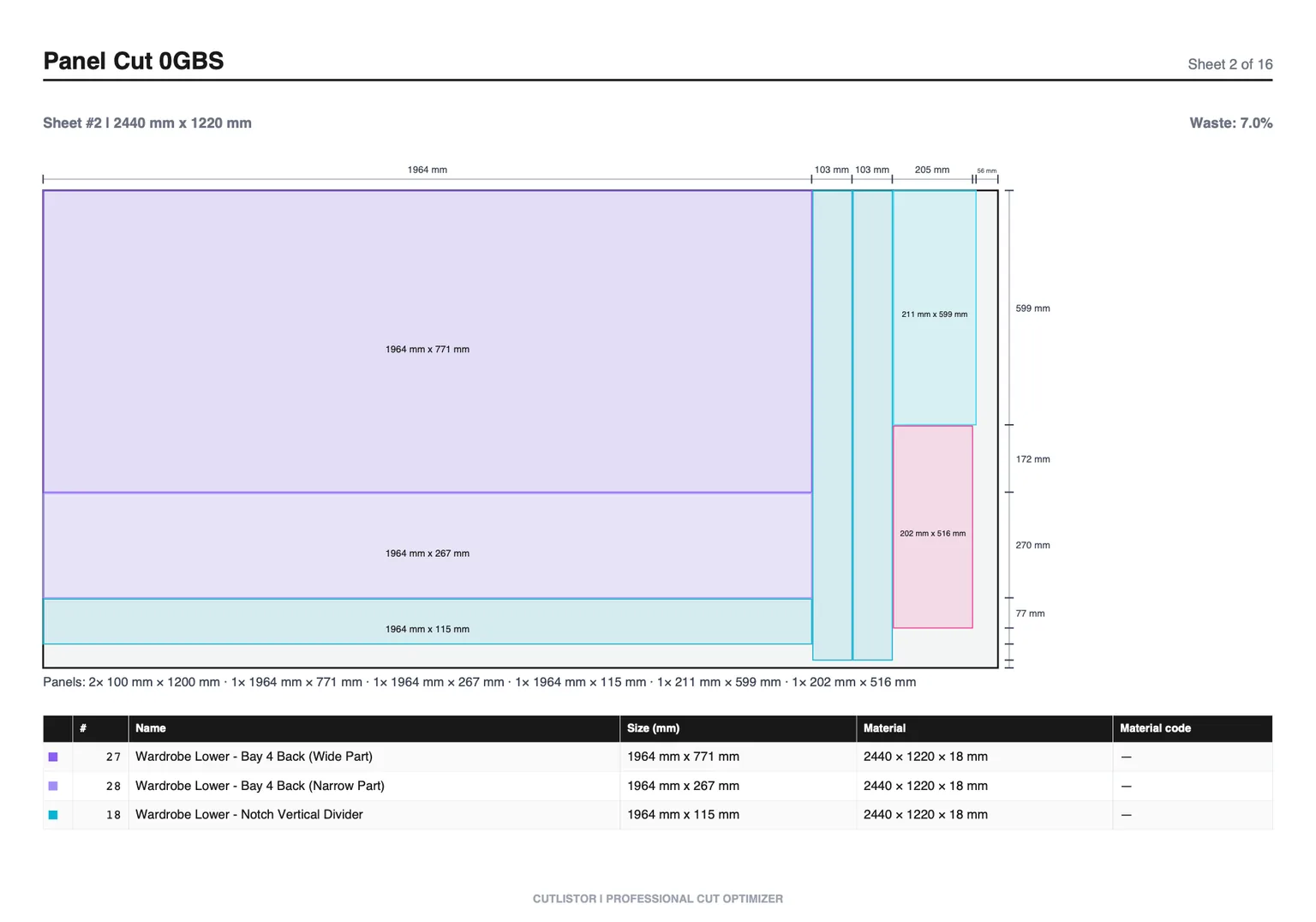
At minimum it accepts finished part dimensions and stock sizes, accounts for kerf, and outputs how many sheets or sticks you need plus a diagram. Better tools refresh layouts as you edit parts, import spreadsheets, and export PDF cut plans for the floor.
Cutlistor adds rectangular 2D nesting (guillotine, shelf, maxrects-style packing) and 1D linear nesting in one brand, running entirely in the browser with nothing to install.
- Inputs: parts, quantities, stock SKUs, kerf, optional grain or miter angles
- Outputs: sheet or stick count, yield, nested PDF diagrams, DXF on paid plans
- Goal: buy the right amount of metal before cutting starts
Sheet vs linear for metal jobs
| Material form | Optimizer | Example parts |
|---|---|---|
| Plate / sheet | 2D sheet | Base plates, gussets, panel blanks |
| Tube / pipe | 1D linear | Handrail, frame rails, conduit |
| Bar / flat | 1D linear | Stiffeners, keys, small brackets |
| Angle / channel | 1D linear | Trims, supports, ladder rails |
| Aluminium extrusion | 1D linear | T-slot frames, window mullions |
Who needs a metal cut list optimizer?
Any shop that buys stock by the sheet or stick and cuts to finished sizes benefits. The return is fastest where material cost is high and jobs repeat with small BOM changes.
- Job shops quoting plate nests and stick counts daily
- Structural and architectural metal contractors
- Machine builders cutting aluminium extrusion frames
- Maintenance teams planning pipe and angle batches
- Estimators replacing spreadsheet guesswork with yield numbers
Cutlistor sheet optimizer walkthrough
Open the free sheet cut list optimizer in your browser. Add each plate SKU with measured length and width. Enter rectangular parts with quantities. Set kerf to your plasma, laser, shear, or router value. Lock grain on brushed aluminium or tread plate if rotation is not allowed.
Compare layout methods and read sheet count and yield. Edit any part size and the nest refreshes immediately. Export a PDF cut plan for the nest review. On paid plans, export DXF for CAM or CNC and save the project for repeat jobs.
Sheet tips for metal
- Group by thickness and grade so unlike materials never nest together
- Enter usable nest area if the plate has mill edge you will trim
- Re-use tagged remnants as stock rows before buying full sheets
- Read yield from the tool, not from naive area multiplication
Cutlistor linear optimizer walkthrough
Open the free linear cut list optimizer. Add stock lengths your supplier actually ships (for example 6000 mm and 12000 mm bar, or 20 ft tube). Enter each cut length and quantity. Set kerf for your cold saw, bandsaw, or chop saw.
Review stick count and tail waste per bar. Short parts should fill drops from longer cuts before new sticks open. Export PDF stick diagrams for the cutoff station. On paid plans, add miter start and end angles on linear parts when frames need angled ends, and export DXF for CNC saws.
Cutlistor vs CAM nesting software
| Task | Cutlistor | CAM nesting |
|---|---|---|
| Rectangular plate nest | Yes, browser | Yes, heavier setup |
| True-shape laser nest | No | Yes |
| Linear bar / tube | Yes, 1D tool | Sometimes add-on |
| PDF cut plans | Yes | Varies |
| DXF export | Paid plans | Core feature |
| Install required | No | Usually desktop |
Cutlistor free tier for metal jobs
Cutlistor's free tier meters something different: editing parts and re-optimizing the layout are unlimited, and only PDF export and starting a new project count against a daily allowance of 3. Cut lists are capped at 20 rows, CSV and XLSX import is limited to 5 rows per file, and nothing is saved between sessions.
- 3 PDF exports per day (editing and re-optimizing unlimited)
- 20 part rows per session
- CSV/XLSX import up to 5 rows
- 3 AI plan scans and 3 3D CAD imports per month on the free tier
- No saved projects until you sign up for a paid plan
Kerf and yield in metal optimizers
Metal processes consume measurable kerf. Plasma and laser kerf is narrow but non-zero. Shear and saw kerf is wider. The optimizer must subtract kerf on every cut line or yield lies.
Yield percentage tells you how much of the purchased stock becomes paid parts. Track it on quotes so margin reflects reality. See the dedicated yield guide for worked numeric examples on sheet and bar.
Try the free metal cut list tools
Run your next BOM through both tools before you buy stock. Mixed jobs need two PDFs: one from the sheet optimizer for plate, one from the linear optimizer for tube and extrusion.
- Sheet: rectangular nesting with kerf, grain, and multi-method layouts
- Linear: multiple stick lengths, kerf, tail waste visibility
- Import CSV or XLSX when data already lives in a spreadsheet
- Upgrade for saved projects, stock inventory, miter angles on linear parts, and DXF export
Conclusion
A metal cut list optimizer is the bridge between engineering BOM and the purchase order. Cutlistor covers rectangular sheet nesting and linear bar planning in the browser, with accurate kerf and yield, PDF cut plans on every tier, and DXF when you need CNC handoff.
Use it for quoting and planning rectangular work and stick cutting. Keep CAM nesting for true-shape laser programs. Build the habit of nesting before you buy, and material waste stops being a guess.