Article
Best Metal Fabrication Software in 2026: CAD, Nesting, ERP, and Cut List Tools Compared
Cutlistor Team7 min read
Introduction
Metal fabrication shops rarely buy one piece of software. A typical workflow spans design, flat-pattern development, nesting for the laser or plasma table, quoting, purchasing, and shop-floor cut plans. The "best" tool depends on which layer you are solving: geometry, machine motion, business data, or material yield on rectangular stock.
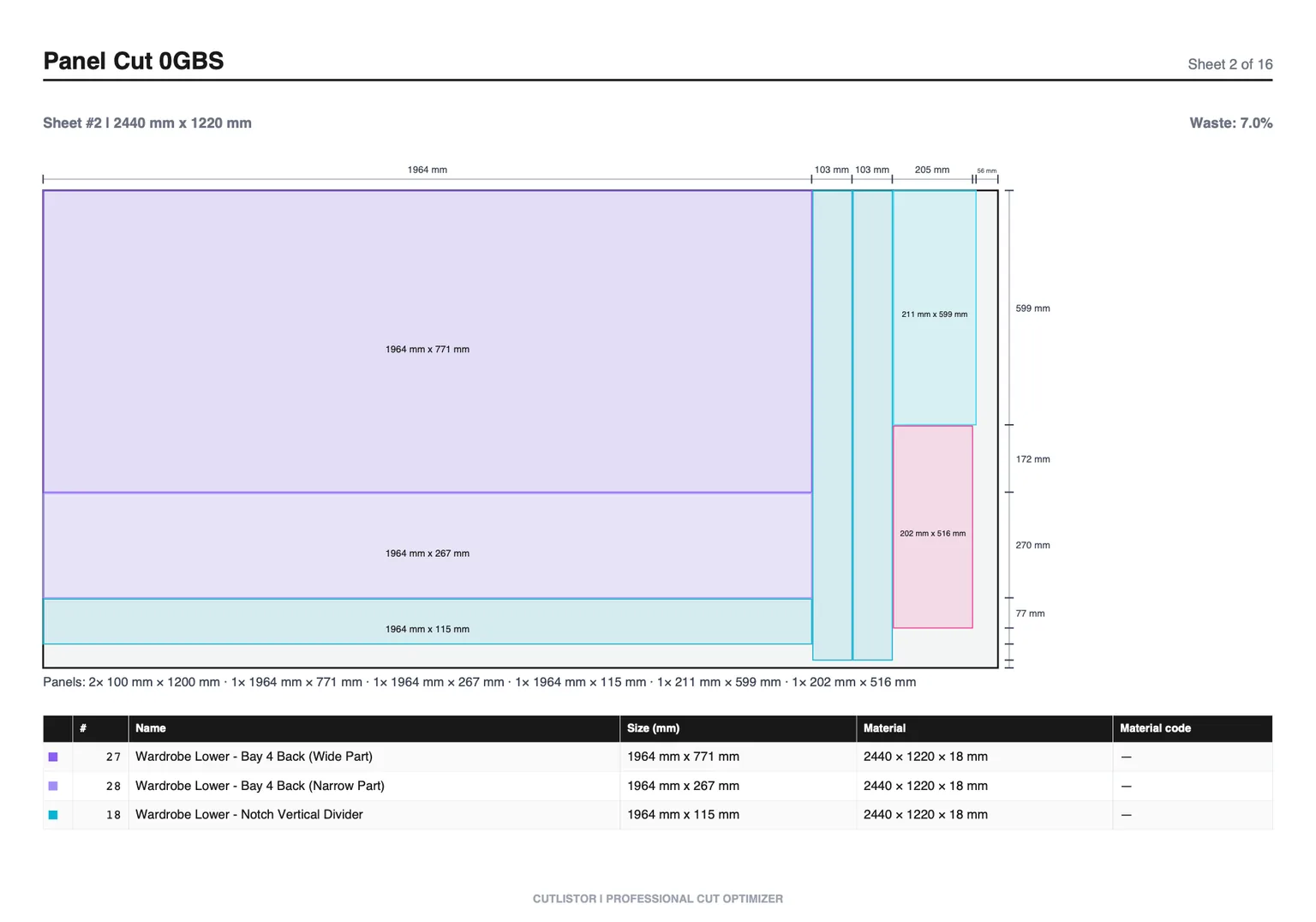
This guide maps the metal fabrication software landscape in 2026 without pretending one app replaces every step. We cover CAD, industrial CAM nesting, ERP/estimating platforms, and browser cut list optimizers, with clear guidance on where Cutlistor fits and where you need SigmaNEST-class tooling instead.
Four Categories of Metal Fabrication Software
| Category | Primary job | Typical users | Examples (categories, not exhaustive) |
|---|---|---|---|
| CAD / 3D design | Model parts, produce drawings and flat patterns | Designers, engineers, detailers | SolidWorks, Fusion 360, Inventor, Onshape, Solid Edge |
| CAM / true-shape nesting | Nest irregular outlines, apply lead-ins, post to machines | Laser/plasma programmers, production fabs | SigmaNEST, Lantek, TruTops, Radan, Hypertherm ProNest |
| ERP / estimating / MRP | Quotes, BOMs, purchasing, job costing, scheduling | Owners, estimators, office staff | JobBOSS, E2, Global Shop, FabSuite, custom ERP modules |
| Cut list / rectangular nesting | Pack rectangles on sheets and sticks, PDF shop plans, quick yield | Estimators, small shops, maintenance fab, project teams | Cutlistor, OptiCutter, CutList Optimizer, spreadsheet macros |
CAD and Flat Pattern Software
CAD is where geometry lives: brackets, enclosures, duct transitions, and weldments. For sheet metal, parametric CAD (SolidWorks Sheet Metal, Fusion Sheet Metal, Inventor) unfolds parts to flat patterns with bend allowances and relief cuts.
CAD exports DXF/DWG flat patterns to nesting or CAM. It does not, by itself, answer "how many 5×10 sheets do we buy?" or "what is the yield on this mix of rectangles?" That planning layer is separate unless you buy an integrated suite.
- Best for: accurate flat sizes, assemblies, revision control, customer drawings
- Not a substitute for: machine post-processors, kerf-aware nest on a specific laser, or quick rectangular yield on a BOM pasted from Excel
- Common handoff: DXF flat patterns to CAM nesting, or rectangular dimensions to a cut list optimizer
CAM and Industrial Nesting
Industrial CAM nesting software (SigmaNEST is the best-known name in many laser shops) takes true-shape geometry, nests parts with rotation and common-line cutting where supported, and outputs machine-ready programs through post-processors tuned to your controller.
These tools target production: high part counts, mixed jobs on one sheet, remnant tracking, and integration with laser, plasma, punch, and waterjet equipment. Pricing is typically enterprise or quote-based; vendors bundle modules by machine type and seat count.
If your shop runs a fiber laser eight hours a day with nested DXFs from many customers, you are in this category. A browser rectangular optimizer is not a drop-in replacement.
ERP, Estimating, and Shop Management
ERP and estimating packages track customers, quotes, work orders, inventory, and labor. Some include basic nesting or integrate with CAM. Others expect you to import material usage from nesting output or manual takeoffs.
For metal fab, the value is tying sheet weight, processing time, and outside services to margin. Nesting yield feeds material cost, but ERP rarely replaces a dedicated nest engine for complex true-shape jobs.
- Best for: quote history, purchasing, scheduling, job costing, audit trail
- Often weak at: interactive nest preview, kerf tuning at the machine, quick what-if layouts during a phone quote
- Pair with: CAM nesting for production lasers, or cut list tools for rectangular estimating
Cut List and Rectangular Nesting Tools
Cut list optimizers solve a narrower problem: given rectangular parts (and often linear bar lengths), how do you pack them on standard sheet sizes or sticks with minimal waste, and print a plan the shop can follow?
They excel during estimating, prototyping, and shops that shear or break down sheet without a full CAM department. Most treat each part as a rectangle with length, width, quantity, grain, and kerf. They do not replace true-shape nesting for irregular plasma contours or machine post-processors.
Where Cutlistor Fits in Metal Fabrication
Cutlistor is a browser-based cut list optimizer for rectangular sheet nesting and 1D linear nesting (bar, tube, angle, channel). It targets material planning: yield on standard sheets, labeled PDF cut plans, spreadsheet import, and fast revision while quoting.
Cutlistor is not SigmaNEST. It does not post to your laser controller, nest true-shape DXF contours with arbitrary rotation, or manage shop-floor machine queues. DXF export for CNC handoff is available on paid plans; the free tier focuses on PDF export and in-session optimization.
The free tier draws its line at output, not at effort. Rearranging parts and re-running the nest as many times as you like costs nothing; the daily allowance of 3 is spent only when you export a PDF or open a new project. Sessions hold up to 20 part rows, CSV and XLSX files import up to 5 rows each, and closing the tab clears the work.
- 3 PDF exports per day (editing and re-optimizing unlimited)
- 20 part rows per session
- CSV/XLSX import up to 5 rows
- 3 AI plan scans and 3 3D CAD imports per month on the free tier
- No saved projects until you sign up for a paid plan
- Rectangular 2D nesting with kerf, grain, and multiple layout methods
- 1D linear optimizer for bar, tube, and extrusion cut lists
- Real-time layout refresh as you edit parts (no manual recalculate step)
- DXF export on paid plans; PDF cut plans on free and paid tiers
Software Comparison by Shop Type
| Shop profile | CAD | CAM / true-shape nest | ERP | Cut list / rectangular nest |
|---|---|---|---|---|
| Production laser job shop | Required | Required (SigmaNEST-class) | Recommended | Optional for quick quotes |
| Mixed fab (shear, brake, occasional laser) | Recommended | As needed for laser jobs | Recommended | High value for sheet and bar planning |
| In-house maintenance / facilities fab | Light (2D CAD or sketches) | Rare | Optional | High value (Cutlistor, spreadsheets) |
| Estimator / project engineer | Reads customer DXF | Outsources nest to vendor | Quote tools | High value before PO |
| Hobby / prototype metal | Fusion / FreeCAD | Deepnest or vendor nest | None | Cutlistor or open tools for rectangles |
SigmaNEST, SolidWorks, and Fusion in Context
SigmaNEST (SigmaTEK) is often paired with laser and plasma tables for automated nesting and posting. Shops mention it alongside Lantek, TruTops, and Radan in the same conversation: industrial CAM, not spreadsheet utilities. Licensing is quote-based and varies by modules and machines.
SolidWorks and Fusion 360 cover design and, with add-ins or built-in CAM, some 2.5D machining and sheet workflows. They are not automatic substitutes for a dedicated nest post-processor on a high-volume laser line, but many small shops design in Fusion and either nest in CAM or use rectangular optimizers for simpler panel jobs.
A common split workflow: estimate rectangular yield and sheet count in Cutlistor during quoting, then nest true-shape customer DXFs in SigmaNEST-class CAM for production. The tools complement each other when roles are clear.
Recommendation Matrix
| You need to... | Start here | Cutlistor role |
|---|---|---|
| Post nested programs to a fiber laser daily | Industrial CAM (SigmaNEST-class) | Not the primary tool; optional for rough sheet count |
| Quote rectangular panels and bar on standard stock | Cut list optimizer | Strong fit: sheet + linear in one browser tool |
| Nest irregular SVG/DXF outlines on a budget | Deepnest or vendor CAM | Wrong tool for true-shape; use for rectangles only |
| Track jobs, purchasing, and margin | ERP / estimating | Import yield from nest or Cutlistor PDF/CSV |
| Design sheet metal with bends | Parametric CAD | Export flat sizes to Cutlistor or CAM |
Conclusion
The best metal fabrication software stack is usually a stack, not one license. CAD for geometry, CAM for production nesting and machine posts, ERP for business control, and a cut list optimizer for fast rectangular yield and shop plans on standard stock.
Cutlistor earns its place in that stack on material planning: rectangular sheet nesting, linear bar optimization, and PDF cut plans in the browser. It does not replace SigmaNEST for true-shape laser CAM. Choose it when you need accurate sheet counts and cut lists without installing industrial nesting software. For a full workflow map, see our metal fabrication hub.