Guide · 6 min read
CNC nesting optimizer explained
A nesting optimizer decides where parts sit on raw material so that you buy fewer sheets or bars. On a CNC, that decision carries extra constraints a hand-cut layout never has: the cutter has a diameter, the part needs holding down until the last pass, and the toolpath has to reach the geometry without the machine driving through a clamp. This page explains what CNC nesting optimization actually computes, the difference between rectangular and true-shape nesting, and how to tell which one your job needs - including the cases where a cut list optimizer is the wrong tool and you want a CAM nester.
What a CNC optimizer computes
Strip away the interface and a nesting optimizer solves a packing problem: given a set of parts and a set of stock, place every part on some piece of stock without overlap, obeying whatever constraints you set, using as little material as possible.
That is computationally hard in the general case, so every optimizer trades exhaustive search for heuristics. Different heuristics win on different jobs, which is why a good tool offers several layout strategies rather than one "optimize" button. A layout tuned for fewest sheets can be miserable to actually cut; a layout tuned for straight rips is easy to cut and uses one more sheet.
- Part placement and rotation, subject to grain or fibre locks
- Kerf or cutter-diameter spacing between neighbouring parts
- Edge margin, so the cutter never runs off the clamped perimeter
- Which stock sizes to consume, when several are available
- Offcut geometry worth keeping versus scrap
Rectangular nesting vs true-shape nesting
This is the distinction that decides which software you need, and it is worth being blunt about it.
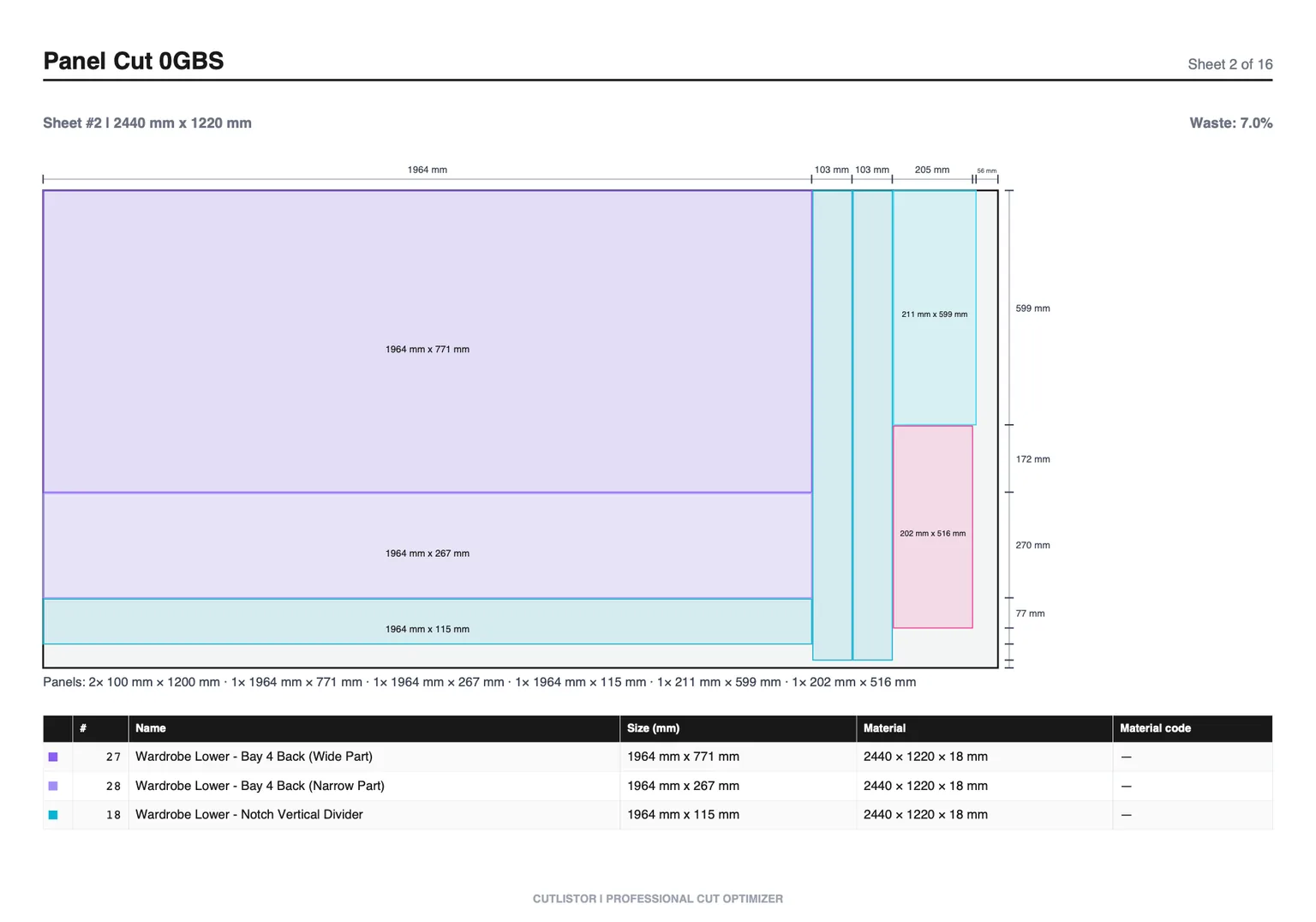
Rectangular nesting treats every part as its bounding box. It suits panel goods, plate, glass, and anything cut on a panel saw or routed as a rectangle - which is the overwhelming majority of cabinet, furniture, casework, and plate work. True-shape nesting fits irregular outlines into each other's concavities, which matters when your parts are brackets, gussets, or profiled panels and the wasted area inside a bounding box is the whole point.
Cutlistor does rectangular nesting for sheets and length nesting for linear stock, and exports DXF for CAM. If your parts are irregular profiles and you need them interlocked, you want a true-shape nester in your CAM package instead - the two tools are not substitutes, and a rectangular optimizer will quietly waste material on profiled work.
| Rectangular nesting | True-shape nesting | |
|---|---|---|
| Part model | Bounding box | Actual outline |
| Best for | Panels, plate, glass, casework | Brackets, gussets, profiled parts |
| Typical machines | Panel saw, router, beam saw | Plasma, laser, waterjet, router |
| Cut order | Often guillotine-able | Rarely guillotine-able |
| Where you find it | Cut list optimizers | CAM and dedicated nesting packages |
On a CNC, the bit diameter is the kerf
The single most common CNC nesting error is carrying over a table-saw kerf value. A full-kerf table saw blade removes about 3.2 mm. A 6 mm compression bit removes 6 mm, and a 9.5 mm bit removes 9.5 mm - two to three times as much per cut.
Set kerf to the cutter diameter you will actually run, and if you cut parts with a common-line strategy where two parts share one pass, say so explicitly rather than halving the kerf value and hoping. Underestimating here does not produce a slightly tight layout; it produces parts that are undersized by the difference on every shared edge.
Add edge margin separately. Most beds need 10-20 mm of untouched material around the perimeter for hold-down, and a nest packed to the sheet edge will lose parts to movement on the last cuts.
1D nesting: the same problem on bar stock
Nesting is usually discussed as a 2D sheet problem, but tube lasers, saw cells, and bar feeders solve the 1D version: pack cut lengths onto stock bars so the drops are as short as possible. The literature calls it the cutting stock problem; shops call it length nesting.
1D is easier to solve well and the gains are often larger, because a bad linear plan leaves a metre of drop on every bar. The constraints that matter are stock lengths available, kerf per cut, minimum usable drop, and whether remnants from previous jobs are in play.
Machine constraints the optimizer cannot see
A nest that looks efficient on screen can be unrunnable, and the reasons are almost always physical rather than mathematical.
- Hold-down: vacuum zones, pods, or clamps that dictate where parts may not sit
- Onion skin or tabbing: small parts that will move unless left partly attached
- Cut sequence: inside geometry before outside profile, or the part shifts
- Spoilboard condition: a worn zone that cannot hold a small part reliably
- Sheet squareness: a nest with zero edge margin assumes stock nobody actually receives
- Material handling: a layout that requires flipping a 2440 mm sheet mid-run costs more than the sheet it saved
The practical answer is to treat the optimizer's output as a proposal. Run it, look at the diagram as a machinist rather than as an accountant, and adjust margins or strategy until the plan is one you would happily hand to the night shift.
A workable CNC nesting routine
Most of the value comes from doing the boring parts consistently rather than from a cleverer algorithm.
- Group parts by material and thickness before nesting anything
- Enter true stock size, including any oversize on delivered sheets
- Set kerf to cutter diameter and edge margin to your hold-down reality
- Lock rotation only on parts with grain or a directional finish
- Compare two layout strategies on the same job and read both yield numbers
- Export DXF for CAM and PDF for the floor, from the same approved layout
DXF export is available on paid plans; the free browser optimizers cover the layout and PDF side so you can test the workflow before committing.
FAQ
- What is a CNC nesting optimizer?
- Software that decides where each part sits on raw material so the job consumes fewer sheets or bars, accounting for cutter diameter, rotation limits, and edge margin.
- Does Cutlistor do true-shape nesting of irregular parts?
- No. It nests rectangles on sheets and lengths on bars, and exports DXF for CAM. Irregular profiled parts that need interlocking belong in a true-shape nester.
- What kerf should I use for a CNC router?
- The cutter diameter - 6 mm for a 6 mm bit. A table-saw value of around 3 mm will undersize the spacing on every part.
- Is 1D nesting the same problem as sheet nesting?
- Same family, simpler case. Packing lengths onto bars is the one-dimensional cutting stock problem and is generally solved closer to optimal than 2D nesting.
- How much material does nesting optimization actually save?
- It depends entirely on how the part sizes relate to the stock size. Jobs with awkward part sizes routinely gain a sheet or two; jobs where parts already tile the sheet gain nothing, and that is worth knowing before you buy software.
Related guides
- Cut list examplesThree complete cut list examples - a bookcase, a run of base cabinets, and a deck frame - with the exact columns, real dimensions, and what each one turns into.
- What is a cutting plan?A cutting plan is the full set of layouts for a job plus the order you cut them in. What it contains, how to draw one, and how to judge whether it is any good.
- Standard cabinet widths and the 3-inch increment ruleWhy cabinet lines step in 3-inch increments, the full width table for base, wall and tall cabinets, and the part sizes each width produces.
- Cut list optimizer: free online sheet & linear calculatorWhat a cut list optimizer actually does: kerf, nesting, grain, offcuts and yield explained for sheet goods and linear stock, in plain shop language.