Guide · 7 min read
What is a cut sheet?
"Cut sheet" is one of those terms that means two unrelated things depending on who says it. In a woodworking shop, a metal fab shop, or a glass shop, a cut sheet is the drawing that shows how parts are laid out on a piece of stock and in what order to cut them. On a construction or MEP job, a cut sheet is the manufacturer's product data sheet - the one-page spec you attach to a submittal so the engineer can approve the fixture you intend to install. Same two words, completely different documents. This page covers both, then goes deep on the shop version, because that is the one you can generate from a parts list.
The two meanings, side by side
Before you go looking for a template, work out which document someone is asking you for. Handing a submittal reviewer a nesting diagram, or a saw operator a pump datasheet, wastes everyone's afternoon.
If the request came with part dimensions and quantities, they want the shop version. If it came with a model number and a spec section, they want the manufacturer version.
| Shop cut sheet | Construction / MEP cut sheet | |
|---|---|---|
| Also called | Cut plan, cutting diagram, nest, layout | Product data sheet, spec sheet, submittal sheet |
| Who makes it | You, from your parts list | The manufacturer |
| What it shows | Parts placed on stock, with cut order and offcuts | Model, dimensions, performance, certifications |
| Who reads it | The person at the saw or CNC | Architect, engineer, inspector |
| Changes per job | Every job | Never - it is a catalogue page |
| How you get one | Run a cut list through an optimizer | Download it from the manufacturer's site |
What belongs on a shop cut sheet
A cut sheet is only useful if the person holding it never has to ask a follow-up question. That means it carries the stock it applies to, the parts on that stock, and enough labelling to tell two similar rectangles apart at the saw.
- The stock item, by the size you actually purchase - 2440 × 1220 × 18 mm melamine, not "a sheet"
- One diagram per piece of stock, numbered, so "sheet 3 of 5" means something
- Every part drawn to scale in position, labelled with its part name and finished size
- Kerf allowance, stated - the layout is wrong for anyone using a different blade
- Grain direction where it matters, marked on the parts that are locked
- The offcut, dimensioned, so it can be labelled and put back on the rack
- A parts table that totals quantities, so the operator can count what came off the sheet
Anything else - pricing, edge banding schedules, hardware - is welcome but belongs on its own page. The diagram page should be readable from arm's length in bad light.
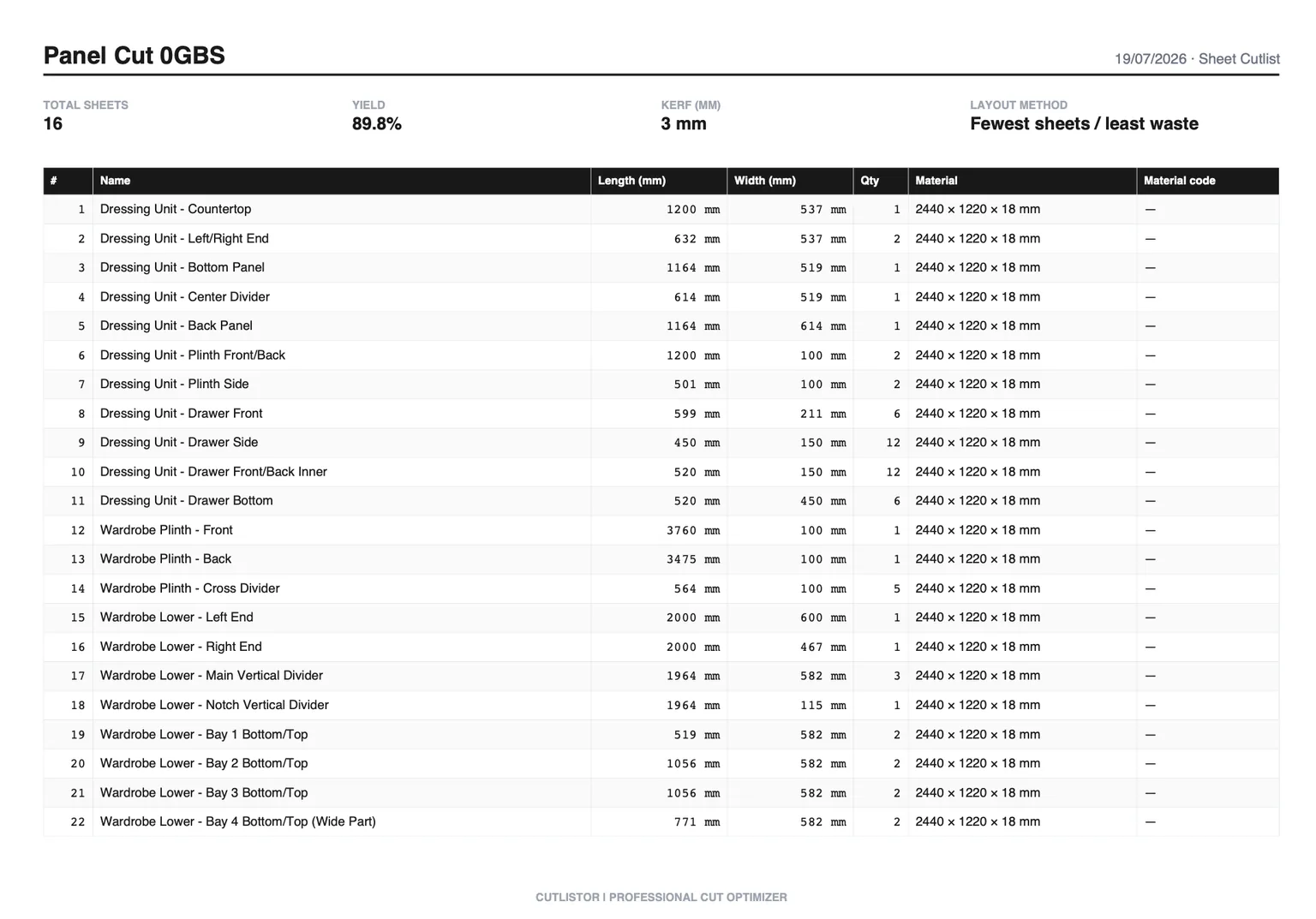
Cut sheet vs cut list vs cut plan
These three get used interchangeably, and mostly that is harmless, but they are stages of the same process rather than synonyms.
A cut list is the input: a table of parts with sizes and quantities, in no particular arrangement. A cut sheet is the output for one piece of stock: those parts placed on that stock. A cut plan is the whole set - every cut sheet for the job, in the order you intend to work through them, plus the material totals.
The practical consequence is that you cannot download a "cut sheet template" and fill it in the way you can with a cut list template. The layout depends on arithmetic that has to happen after the parts are known. That is what an optimizer does.
Cut sheet example: five shelves and two sides
Take a bookcase in 18 mm plywood on a 2440 × 1220 sheet: two sides at 1800 × 300, five shelves at 764 × 300, one top at 800 × 300, and a 1800 × 800 back in 6 mm ply.
The 6 mm back is a different material, so it does not belong on the same cut sheet at all - it needs its own stock row and its own diagram. That leaves eight parts, all 300 mm deep, on one 18 mm sheet. Ripped 300 mm strips down the length with a 3.2 mm kerf, the sheet yields four strips across the 1220 mm width (4 × 300 + 3 × 3.2 = 1209.6 mm, which fits) and the parts cross-cut out of those strips with room to spare.
Cross-cutting those strips, each 2440 mm long: a 1800 mm side leaves 637 mm on its strip, which is too short for a 764 mm shelf, so two strips carry one side each. The third takes three shelves (3 × 764 + two kerfs = 2298 mm) and the fourth takes the last two shelves plus the 800 mm top. All eight parts fit on one sheet.
The finished cut sheet therefore shows one sheet, four rips, the cross-cut positions along each, and two 637 mm offcut strips worth labelling and racking rather than binning.
How to generate a cut sheet from a parts list
The work is mechanical once the parts list is right, so the sensible order is: get the list correct, then let software place the rectangles.
- Write the parts list first, with finished sizes - length, width, quantity, material
- Split it by material and thickness; each group gets its own cut sheets
- Enter the stock size you buy, not a nominal one
- Set kerf to match the tool that will do the cutting
- Lock grain on the parts where it shows, and only those
- Run the layout, then read the stock count before you order material
- Export to PDF and print one copy per station
Cutlistor's free sheet optimizer does this in the browser: up to 20 part rows per session, CSV or XLSX import up to 5 rows, and 3 PDF exports a day with unlimited editing and re-running in between.
Cut sheets for linear stock
Everything above assumes sheet goods, but pipe, tube, bar, extrusion, trim, and dimensional lumber get cut sheets too - they just look different. Instead of a rectangle with parts nested inside it, a linear cut sheet is a bar drawn end to end with the cut positions marked along it and the drop shown at the right.
The information that matters is the same: which stock length this applies to, which pieces come off it in what order, what kerf was assumed, and how much is left. Shops that run a stop system usually want cumulative positions rather than individual lengths, because that is what gets dialled in.
Common cut sheet mistakes
- Nesting two thicknesses on one diagram because both are "plywood"
- Using nominal stock sizes when the delivered sheet is 2440 × 1220 rather than 8' × 4'
- Leaving kerf at zero, which produces layouts that are one part short in reality
- Printing diagrams without part labels, so two similar panels get swapped
- Locking grain on every part, which quietly costs a sheet for no visible benefit
- Not dimensioning the offcut, which is how usable material ends up in the skip
FAQ
- What is a cut sheet in construction?
- The manufacturer's product data sheet for a specified item - dimensions, performance, and certifications on one page - submitted for approval before installation. It is not a cutting diagram, and you download it rather than generate it.
- Is a cut sheet the same as a cut list?
- No. The cut list is the table of parts you start with. The cut sheet is the diagram showing where those parts land on one piece of stock.
- Is there a cut sheet template I can fill in?
- Not really, because the layout has to be calculated from your specific parts and stock. Templates exist for the cut list that feeds it; the sheet itself comes out of an optimizer.
- What does a cut sheet optimizer do?
- It takes your parts and stock sizes, subtracts kerf, packs the parts onto as few pieces of stock as it can, and draws the result as one diagram per piece with a parts table.
- Can I make a cut sheet for free?
- Yes. The free sheet and linear optimizers produce printable PDF cut sheets in the browser with no account, within daily export limits.
Related guides
- CNC nesting optimizer explainedWhat a CNC optimizer does, how rectangular nesting differs from true-shape, why bit diameter is your kerf, and where a cut list optimizer stops and CAM begins.
- Cut list examplesThree complete cut list examples - a bookcase, a run of base cabinets, and a deck frame - with the exact columns, real dimensions, and what each one turns into.
- What is a cutting plan?A cutting plan is the full set of layouts for a job plus the order you cut them in. What it contains, how to draw one, and how to judge whether it is any good.
- Standard cabinet widths and the 3-inch increment ruleWhy cabinet lines step in 3-inch increments, the full width table for base, wall and tall cabinets, and the part sizes each width produces.