Calculator page · 3 min read
Plywood layout calculator
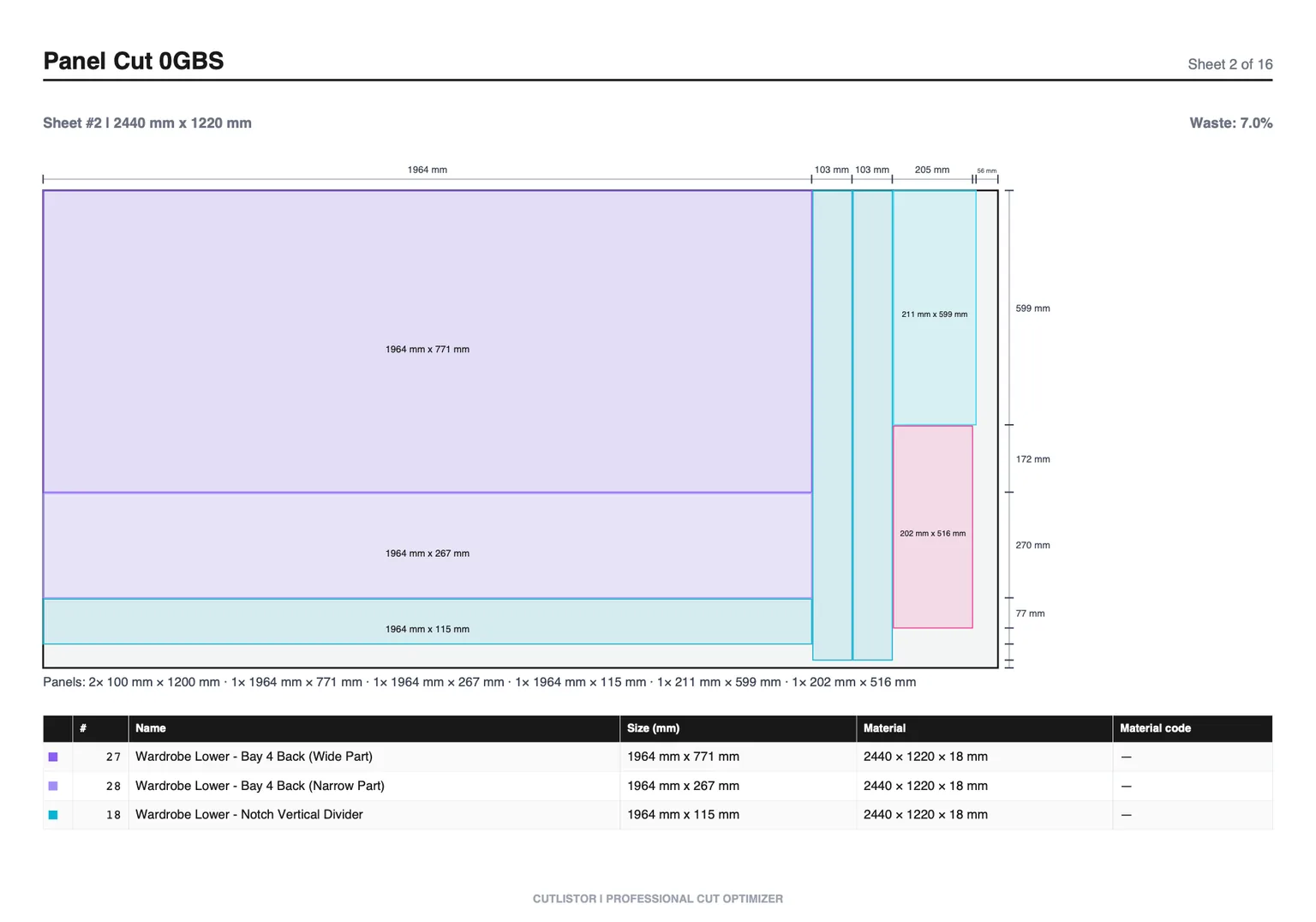
A plywood layout calculator (or plywood planner) arranges parts on purchased sheets so you see the cut diagram before blade time. Cutlistor offers multiple sheet layout methods - rips and rows, least waste, neat grid, and router/CNC-style packing.
How Cutlistor nests plywood layout
Use the free sheet cut list optimizer to enter plywood layout stock sizes, parts, kerf, and optional grain or edge-banding notes. You will see nested layouts and can export a PDF for the shop.
Plywood layout vs cut list
The cut list is the data; the layout is the visual plan. Cutlistor generates both from the same inputs and exports PDF documentation.
Layout vs cut list
The cut list is dimensions; the layout is where each part sits. Cutlistor generates both from one part table.
Step-by-step plywood layout sheet workflow
Start with the plywood layout sheet SKU you actually purchase — 4×8, 5×5, or metric full sheets. Add every finished part as width × height × quantity. Set kerf to 3.2 mm rip or CNC bit so the optimizer subtracts realistic blade loss for plywood layout.
Run the layout and read sheet count plus yield before buying. If yield looks low on plywood layout, check grain locks, mixed thicknesses, or whether switch methods to match table saw vs CNC habits fits your crew better.
Export the PDF when the diagram matches shop habits. If a dimension changes, edit the row and recalculate — the plywood layout nest refreshes immediately.
Layout methods for plywood layout
Cutlistor offers multiple sheet strategies because no single algorithm wins every plywood layout job. Rips and rows suits table-saw-first shops. Fewest sheets pushes yield when plywood layout cost dominates. Router / CNC layout helps dense packs when spoilboard spacing is set.
A plywood layout calculator arranges parts visually — Cutlistor offers four methods you can toggle without retyping parts.
| Layout method | Best for plywood layout |
|---|---|
| Rips & rows | Panel saw straight bands |
| Fewest sheets / least waste | Tightest 2D nest |
| Router / CNC layout | Dense CNC plywood packs |
Worked example: compare rips vs least waste
Same twelve cabinet parts: rips and rows may use two sheets with faster cuts; least waste may fit on one sheet with busier handling — compare both before buying.
Import, export, and verification
Import CSV or XLSX from /samples/cutlist-import/ when your plywood layout cut list already lives in a spreadsheet. Group rows with material codes when you buy multiple plywood layout SKUs.
Export kerf-aware PDF cut plans for the floor. Paid plans add saved projects, stock inventory, AI plan scanning, and 3D CAD import (glTF, GLB, Collada).
Free anonymous use includes 3 calculations per day, up to 20 part rows per session, and CSV/XLSX imports of up to 5 rows.
Before you cut plywood layout: checklist
Confirm plywood layout stock size matches inventory. Confirm kerf matches today's blade or bit.
Split mixed jobs: panels in the sheet optimizer, sticks in the linear optimizer.
FAQ
- Is this plywood layout calculator free?
- Yes. The sheet cut list optimizer runs in your browser with daily limits. Accounts unlock saved projects and higher caps.
- What sheet sizes work for plywood layout?
- Enter any rectangle you purchase — 4×8, 5×5, or metric full sheets. Match the delivery note, not a generic label.
- Does kerf matter on plywood layout?
- Yes. Set kerf to 3.2 mm rip or CNC bit. Underestimating kerf on dense plywood layout nests can shift sheet count.
Related calculators
- Plywood estimatorPlywood estimator: calculate how many sheets a job requires from your part list, with kerf-aware nesting and yield percentage.
- Sheet yield calculatorSheet yield calculator for plywood and MDF: measure nesting efficiency, compare layout methods, export cut plans.
- Plate nesting calculatorPlate nesting calculator for rectangular steel and metal plate: 2D nesting with kerf, PDF export via Cutlistor’s sheet optimizer.
- Steel cut list generatorCut list generator for steel bar and linear stock: 1D optimization with kerf, multi-length stock, offcut tracking and free PDF export for the shop.